
Python Versions Explained: Which Should You Use?
If you keep seeing numbers like "Python 2.7" and "Python 3.11" and aren't sure which one to install, the decision is simpler than it looks: choose the…

Key topics
If you keep seeing numbers like "Python 2.7" and "Python 3.11" and aren't sure which one to install, the decision is simpler than it looks: choose the latest stable Python 3 and start coding. This guide decodes what those version numbers mean, why Python 2 still shows up in old tutorials, and how to verify what's actually running on your machine before you install anything.
What Do Python Version Numbers Mean?
Every piece of software gets updated over time, and each update gets a version number so you know what you're running. Python version numbers look like this: 3.11.5. Each part has a job:
- Major version: Big changes that may not work with older code. This is the difference between Python 2 and Python 3.
- Minor version: New features that still work within the same major version, like Python 3.10 vs 3.11.
- Patch version: Small fixes and security updates, like Python 3.11.4 vs 3.11.5.
Here's the decision rule that makes this useful instead of trivia:
| Version part | What it means | What you do about it |
|---|---|---|
Major (the 3) | Compatibility. Python 3 code generally won't run on Python 2. | Always pick Python 3. |
Minor (the 11) | Features and runtime choice. Newer minors add features and get longer support. | Pick a recent, stable minor. |
Patch (the 5) | Maintenance. Bug fixes and security updates. | Just keep it reasonably current. |
When people talk about "python versions," they usually mean the major and minor numbers. For a beginner, the one decision that actually matters is Python 2 versus Python 3.
Knowledge check
Check your understanding
Answer this question before you continue.
Why Python 2 Still Confuses People
Python 2 arrived in 2000 and became the version most people learned for years. Python 3 came out in 2008 with cleaner syntax and better handling of text, but it wasn't fully compatible with Python 2. For a long time, both existed side by side, which is why you'll still find old tutorials, forum posts, and even some preinstalled systems that mention Python 2.
That era is over. Python 2 reached end-of-life on January 1, 2020, which means it no longer receives updates or security fixes. It still exists on some older computers, but nothing new should be built with it.
Knowledge check
Check your understanding
Answer this question before you continue.
Python 2 vs Python 3: What Actually Changed
Here are the differences that matter most to a beginner:
- Support: Python 2 is end-of-life. It gets no updates and no security fixes.
- Print: Python 2 let you write
print "Hello". Python 3 requires parentheses:print("Hello"). - Division: In Python 2,
5 / 2returned2(a whole number). In Python 3, it returns2.5as you'd expect. - Text: Python 3 handles Unicode text by default, so international characters work cleanly.
- Ranges: Python 2 had both
range()andxrange(). Python 3 has justrange(), and it works efficiently.
The print difference is the one you'll actually trip over. If you copy old Python 2 code into a Python 3 environment, you'll get a SyntaxError on the very first line:
print "Hello"
SyntaxError: Missing parentheses in call to 'print'. Did you mean print("Hello")?
That error is the whole story in miniature: version choice is a compatibility decision, not a label. Python 3 is easier to read, learn, and use, and almost every tutorial, library, and company now works with it. Starting there means everything you learn applies to what you'll actually use.
Knowledge check
Check your understanding
Answer this question before you continue.
Which Python Version Should You Install?
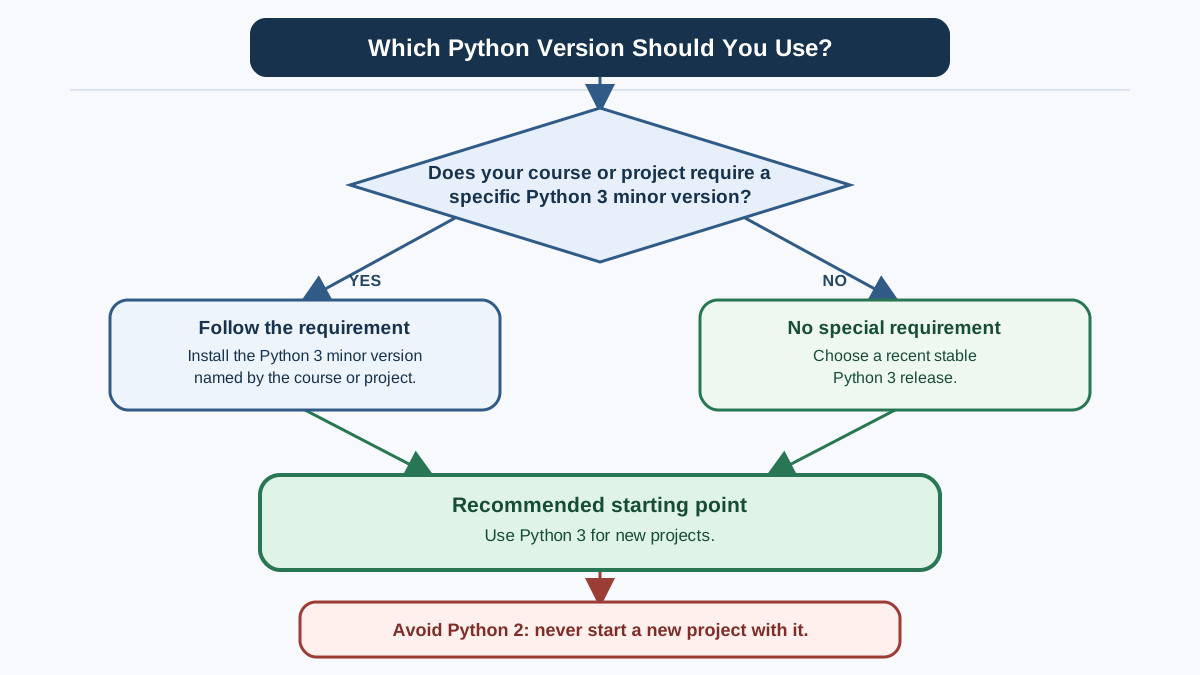
Install the latest stable version of Python 3. That's the whole rule for a new learner, with one boundary condition: if a course, book, or project names a specific minor version, follow that requirement instead. Otherwise, default to the newest stable Python 3 release.
Here's why that default is the right call:
- Courses, books, and online resources assume Python 3.
- Popular libraries and tools are built for Python 3.
- Job postings and real projects expect Python 3 experience.
- Newer versions include the latest features and security fixes.
You don't need the very newest release the day it ships. Just pick a recent, stable Python 3 version and check python.org when you want to confirm what's current.
One clarification so the rule doesn't feel contradictory: if Python 3 is already installed on your machine, you don't need to replace it before you start learning. Use what you have to begin. Upgrade later when a course, project, or library asks for a newer version. The only version you should never start with is Python 2.
Knowledge check
Check your understanding
Answer this question before you continue.
How to Check What You Have
Before installing anything, see what's already on your computer. The command name differs by operating system, so use the one that matches your machine.
On macOS or Linux, open Terminal and run:
python3 --version
On Windows, open Command Prompt and try:
python --version
If you see a version number starting with 3, you're on the right family. But that check answers a broad question: is Python 3 available at all? It doesn't tell you whether a specific project's minor version is satisfied. So keep two rules separate:
- Python 3 is enough to start learning. Any recent stable
3.xgets you going. - A project may name a minor version. If a course or library says "Python 3.11 or newer," that requirement wins over your default.
The second rule matters because the version number describes the interpreter that command just ran, not every Python on your machine. The command is a launcher alias — some systems call it python, others python3 — and each one can point at a different installation. So make a habit of running the exact command that returned your 3 version, and use that same command when you run your code. If copied code behaves differently than you expect, check which interpreter you actually invoked before blaming the code.
Tip: The command you check with is the command you should run with. If
python3 --versionreports3.11, run your scripts withpython3, not with a barepythonthat might point somewhere else.
Common Questions About Python Versions
Can I use Python 2 code in Python 3?
Not always. Some Python 2 code needs changes to run under Python 3, and the print example above shows why. That's exactly why it's better to start with Python 3 from day one.
What if a tutorial uses a different version? Most new tutorials use Python 3. If you find an old one built around Python 2, look for an updated version or a resource that matches your installation.
How often should I update? You don't need to chase every release. Updating when you start a new project, or roughly once a year, keeps you on a recent version with current security fixes and features.
Your Next Step
You don't need to memorize the version history. You need one decision and one habit:
- Choose Python 3 — the latest stable release, unless a course or project names a specific minor version.
- Verify the interpreter you invoke — run the version command, confirm it reports a
3version, and use that same command to run your code.
Once it's installed, run the version command for your operating system and confirm it reports a 3 version. Then move on to writing your first program. If a confusing error ever makes you wonder whether you're running the interpreter you think you are, that's the moment to re-run your version check before anything else.
Knowledge check
Final check
Finish the article by checking the ideas you just learned.
References
Want a more structured Python path?
Use the Python Starter Pack to turn scattered tutorials into a focused practice path.
Python Starter Pack
A compact LearnPyFast PDF pack covering what Python is, installation, your first program, running Python code, and Python versions.
- 5 curated chapters
- Enhanced PDF edition with bundle-only learning guidance
- Offline-friendly format for focused review
- Source article links for future online updates
Coming soon


