
Tuples and Sets in Python
If you already know how to use lists in Python, you have the foundation for two more data structures that solve specific problems. Tuples protect fixed…

Key topics
If you already know how to use lists in Python, you have the foundation for two more data structures that solve specific problems. Tuples protect fixed records. Sets remove duplicates and answer "is this here?" fast. The real skill is not memorizing syntax—it is choosing the structure by the behavior your program needs. That is the whole point of learning about Python tuples and sets: each one exists because a real task needs it.
What Are Tuples and Sets?
Tuples and sets are two more ways to store collections of values, and each one exists to solve a specific problem:
- Tuples keep items in a fixed order that you cannot change after creation.
- Sets store only unique items, with no guaranteed order.
The difference is not cosmetic. It changes what your code is allowed to do and how fast it can do it. Once you see the mechanism behind each one, choosing between them stops being guesswork.
Understanding Tuples
A Python tuple is an ordered collection you cannot modify after you create it. That property is called immutability. You write a tuple with round brackets ( ).
Three facts define a tuple:
- Ordered: Items stay exactly where you put them.
- Immutable: You cannot add, remove, or change items after creation.
- Flexible: A tuple can hold numbers, strings, other tuples, and more.
Creating and using tuples:
## Creating tuples
empty_tuple = ()
tuple_of_numbers = (7, 3, 10)
tuple_of_strings = ("Python", "Test")

## Accessing tuple elements
my_tuple = (89, 33, "Python", "Test", "Programming")
print(my_tuple[2])      # Output: Python
print(my_tuple[2:5])    # Output: ('Python', 'Test', 'Programming')
Python
('Python', 'Test', 'Programming')
Common questions about tuples:
- Why can't I change the items in a tuple? Tuples are designed to stay fixed. That immutability protects data from accidental changes.
- How is a tuple different from a list? Lists are mutable, so you can add, remove, or change items. Tuples are immutable. Use a tuple when the data should stay the same.
- Can a tuple hold another tuple? Yes. A tuple can reference any type of data, including other tuples.
Common mistake: A one-item tuple needs a trailing comma.
("Python")is just the string"Python"in parentheses.("Python",)is a real tuple.
Knowledge check
Check your understanding
Answer this question before you continue.
When to Use Tuples
Reach for a tuple when the data should not change. Practical examples:
- Coordinates: Store an
(x, y)position like(4, 5). - Fixed collections: Days of the week, months, or configuration values that stay constant.
- Multiple assignment:
x, y = (12, 4)unpacks a tuple into two variables in one line.
A tuple is also a signal. When another developer reads your code and sees a tuple, they know the data is meant to stay put. That clarity is worth more than it looks.
Understanding Sets
A Python set is an unordered collection that keeps only unique items. You write a set with curly brackets { }.
Three facts define a set:
- Unique items: Duplicates are removed automatically.
- Unordered: The order of items is not guaranteed and may change.
- Efficient: Sets are built for fast membership checks on suitable values.
Creating and using sets:
## Creating sets
empty_set = set()
set_of_numbers = {4, 1, 6}
set_of_strings = {"Python", "Test", "Programming", "Book", "Table"}

## Adding items
set_of_numbers.add(10)

## Removing duplicates automatically
numbers = [1, 2, 2, 3, 4, 4]
unique_numbers = set(numbers)
print(unique_numbers)  # Output: {1, 2, 3, 4}

## Checking membership
print("Python" in set_of_strings)  # Output: True
{1, 2, 3, 4}
True
Note: The order shown above is just one possible display order. Because sets are unordered, Python may print the same set in a different order on your machine. Do not rely on the printed sequence—rely on the contents.
Common mistake: Converting a list to a set is lossy. The set keeps one copy of each item, but it discards the duplicate counts and does not preserve the original order. If you needed to know how many times each value appeared, or you needed the values in their original sequence, a set would destroy that information.
Common questions about sets:
- Can a set contain duplicates? No. A set automatically keeps only one copy of each item.
- Why doesn't order matter in a set? Sets are optimized for fast lookups and uniqueness, not for remembering order.
- How do I create an empty set? Use
set(). The literal{}creates an empty dictionary, not a set. - Are sets faster than lists for membership checks? Often, yes, for large collections. Sets are built on hash tables, so checking whether an item exists is typically much faster than scanning a list item by item. That speed is a real advantage, but it is not the reason to choose a set. Choose a set when you need uniqueness or unordered membership; treat speed as a supporting benefit, not a promise for every case.
Common mistake:
{}does not create an empty set. It creates an empty dictionary. If you need an empty set, writeset().
Knowledge check
Check your understanding
Answer this question before you continue.
When to Use Sets
Sets shine whenever you care about uniqueness or speed:
- Finding unique words: Convert a list of words to a set to see only the distinct ones.
- Removing duplicates: Turn a list into a set to drop repeated values.
- Fast membership checks: Test whether a value exists in a collection without scanning every item.
For example, if you have a list of email addresses and want to know which ones are unique, converting the list to a set gives you the answer in one line. Just remember that you get the unique values, not the order they appeared in or how many times each one showed up.
Tuples vs Sets vs Lists
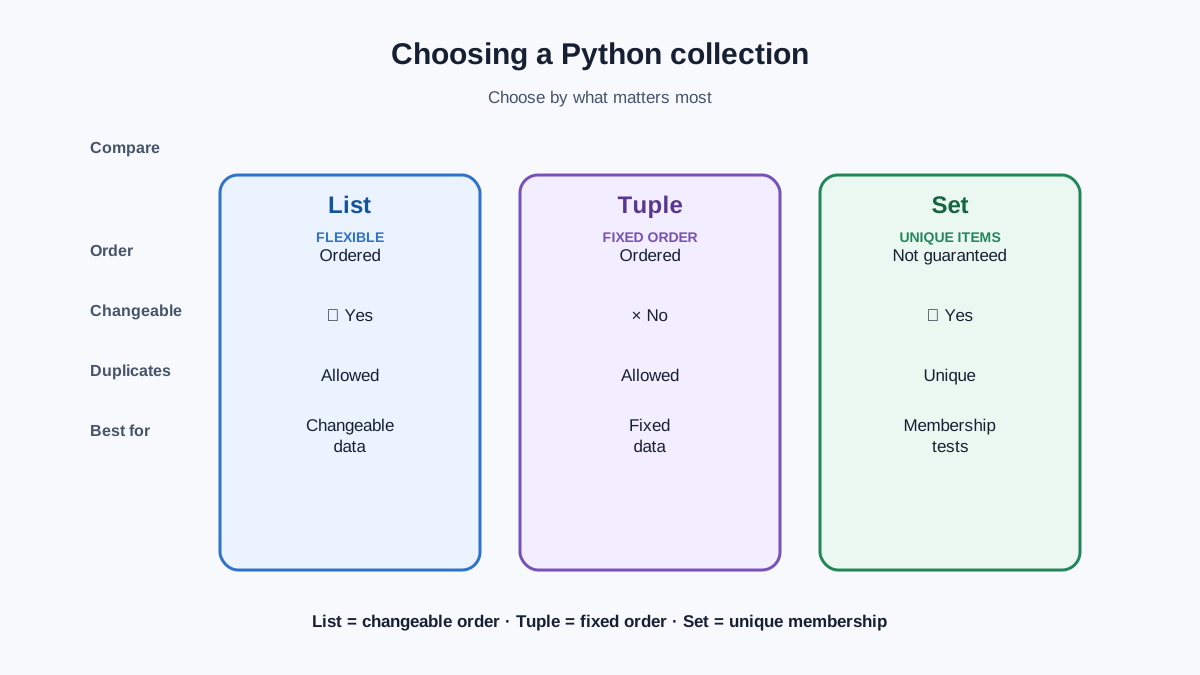
Here is how the three data structures compare:
| Structure | Ordered | Changeable | Duplicates | Use this when |
|---|---|---|---|---|
| List | Yes | Yes | Allowed | You need to add, remove, or change items |
| Tuple | Yes | No | Allowed | The data is fixed and should never change |
| Set | No | Yes | Not allowed | You need uniqueness or unordered membership |
The decision rule is short: keep order and allow changes, use a list. Keep order but never change, use a tuple. Care only about uniqueness, use a set.
Knowledge check
Check your understanding
Answer this question before you continue.
Practical Example: Sets of Tuples
You can combine these structures. A set of tuples stores unique, fixed groupings—handy for coordinates, combinations, or any pair where duplicates should not appear. The set guarantees no pair repeats, and each tuple keeps its two values locked in place:
## Set of tuples: each tuple is a pair (number, its square)
set_of_tuples = {(x, x**2) for x in range(1, 6)}
print(len(set_of_tuples))  # Output: 5
print((3, 9) in set_of_tuples)  # Output: True
5
True
Notice what this example avoids: instead of printing the set and hoping the order looks neat, it checks the two things that actually matter—how many unique pairs exist and whether a specific pair is present. That is the same decision rule from earlier, applied to a combined structure.
There is one boundary worth knowing here. A tuple can be a member of a set only when every value inside it is hashable—which, for a beginner, means the values are not mutable. A tuple of numbers like (3, 9) works as a set member. A tuple that contains a mutable set does not, because the inner set could change and break the uniqueness guarantee. That is why the example above uses fixed pairs of numbers, not nested sets.
Next Steps
You now have the full picture: lists for changeable ordered data, tuples for fixed ordered data, and sets for unique unordered data. To make these stick, try this small task: take a list of names with duplicates, convert it to a set to remove repeats, then sort the result back into a list.
Watch what each step does to the data. The conversion to a set keeps membership but discards the duplicate occurrences and the original order. If you needed to know how many times each name appeared, or you needed the names in their original sequence, a set would destroy that information. Sorting creates a fresh, predictable order—but only because you asked for it. That is the tradeoff in action: a set buys uniqueness and fast membership checks, and it charges you order and duplicate counts in return.
When you are ready, practice combining all four data structures in one exercise set.
Knowledge check
Check your understanding
Answer this question before you continue.
Knowledge check
Final check
Finish the article by checking the ideas you just learned.
References
Want a more structured Python path?
Use the Python Starter Pack to turn scattered tutorials into a focused practice path.
Python Starter Pack
A compact LearnPyFast PDF pack covering what Python is, installation, your first program, running Python code, and Python versions.
- 5 curated chapters
- Enhanced PDF edition with bundle-only learning guidance
- Offline-friendly format for focused review
- Source article links for future online updates
Coming soon


