
Understanding Python Syntax
Python syntax is the grammar that turns what you type into instructions the interpreter can run. Get it right and your code reads almost like plain…

Key topics
Python syntax is the grammar that turns what you type into instructions the interpreter can run. Get it right and your code reads almost like plain English. Get it wrong and Python stops and tells you where. The fastest way to make syntax stick is not to memorize rules—it's to run small experiments: write a script, run it, break it on purpose, and let the output and errors teach you the structure.
What Is Python Syntax?
Syntax is the set of rules for writing code so the computer can understand it. Think of it as grammar for a programming language. Break the grammar and your message stops making sense.
Python's syntax is deliberately simple and consistent. Where many languages use punctuation to mark structure, Python leans on indentation and a few English words like if and for. That design choice is why Python code tends to look clean and readable—and why it's a friendly place for beginners to start.
If you haven't written a program yet, write and run one tiny Python script first. This article is about the structure underneath that first script.
Knowledge check
Check your understanding
Answer this question before you continue.
How Python Code Is Structured
Most Python code is a sequence of lines read top to bottom. As a beginner, treat it as one statement per line. (Python can also let an expression span several lines in specific cases, but that's an advanced detail—start with the simple default.)
The real structure lives in a small set of moves you can learn to spot at a glance. Let's read one compact script and name each part as it appears:
## Ask for a score
score = 85
if score >= 80:
    print("You passed!")
print("Done checking.")
You passed!
Done checking.
Walk through it line by line:
- The first line is a comment. It starts with
#, so Python ignores it. It's a note for humans. score = 85is a statement. It assigns a value to a name. Statements are the lines that do something.if score >= 80:is the start of a block. The condition is tested, and the colon at the end announces that indented lines are coming.- The indented
print("You passed!")belongs to that block. It runs only when the condition is true. - The final line is dedented, so it sits outside the block and runs no matter what.
That's the whole mental model: a line either does something on its own, or it opens a block with a colon and gathers indented lines beneath it. Once you can tell those apart, you can read almost any beginner script.
To run these examples yourself, save the code in a file with a .py extension and execute it with Python. If that workflow is unfamiliar, practice it once with a tiny script before continuing.
Knowledge check
Check your understanding
Answer this question before you continue.
Why Indentation Matters
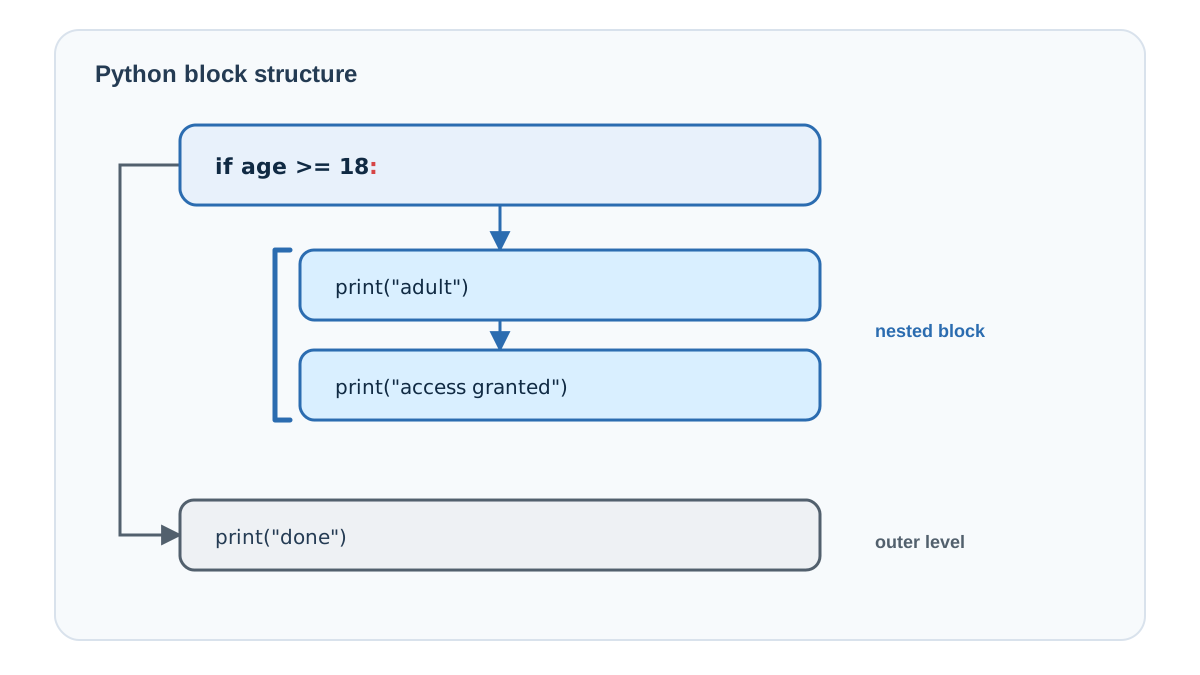
Indentation means adding spaces at the start of a line to show that certain lines belong together. In Python, indentation isn't just for looks—it's part of the syntax. Python uses whitespace to delimit blocks, a design it borrowed from its predecessor language ABC.
Here's what that looks like in practice:
age = 18
if age >= 18:
    print("You are an adult.")
    print("Welcome!")
print("This line is outside the if block.")
Read it in plain causal order. The condition age >= 18 is tested. The colon at the end of the if line announces that a block is coming. The two indented lines belong to that block. The final line is dedented, so it sits outside the block and runs no matter what.
You are an adult.
Welcome!
This line is outside the if block.
Now run the experiment that makes block membership visible. Move the last line inside the block by indenting it:
age = 18
if age >= 18:
    print("You are an adult.")
    print("Welcome!")
    print("This line is now inside the if block.")
You are an adult.
Welcome!
This line is now inside the if block.
The output changed because the line's membership changed. That's the whole point: indentation decides which lines run together, and the output is your evidence.
A few rules to keep in mind:
- Indent consistently. The common convention is 4 spaces per level. Pick a width and stick with it.
- Don't mix tabs and spaces. Mixing them in the same block is a classic source of confusing errors. Most editors convert tabs to spaces automatically—turn that setting on.
- Wrong indentation is an error. If a line's indentation doesn't match any other level, Python raises an
IndentationErrorand tells you where to look.
Common mistake: Beginners often think indentation is cosmetic, like formatting in a word processor. It isn't. In Python, indentation is the structure. One misplaced space can change which lines run together.
Knowledge check
Check your understanding
Answer this question before you continue.
The Rules That Keep Code Parseable
The block model above is the backbone of Python syntax. A few smaller rules keep the rest of your code parseable, and each one answers the same question: can Python parse this line?
- Case sensitivity. Python is case-sensitive.
printis not the same asPrintorPRINT. Use the exact case the language expects. - Comments. Anything after a
#on a line is ignored by Python. Use comments to explain what your code does.
## This line is a comment and does nothing.
print("Hello")  # This part after the # is also ignored.
- Variable names. Names can use letters, numbers, and underscores (
_), but they can't start with a number, can't contain spaces, and can't be a reserved keyword likeif,for, orwhile. Choose clear, descriptive names. - Spaces inside a line. Ordinary spaces between words and symbols are ignored. Only the leading indentation at the start of a line carries structural meaning.
A wrong keyword, a stray space in a name, or a missing # all change what the interpreter understands. Keep the can Python parse this line? question in mind and the rules stop feeling like a random list.
Knowledge check
Check your understanding
Answer this question before you continue.
Reading Simple Python Code
Reading code is a skill, and it improves fast with practice. When you look at a script, run the same routine you used above: read the line, identify the action or value, then use the colon and indentation to predict the block.
Ask yourself two questions about every block: What does each line do? and Which lines are grouped together? Answer those and you've understood the structure.
This routine pays off the moment you edit a real script. When you change a condition or add a line, block membership tells you what will run and what won't. If you want to make a line conditional, indent it into the block. If you want it to always run, dedent it out. You can predict the behavior before you ever press run—and when you do run it, the output confirms your prediction.
Avoiding Common Syntax Mistakes
Syntax errors are normal when you're learning. They're also the most honest feedback a language gives you: Python is telling you it can't parse what you wrote. The fix is usually small.
Before you debug, it helps to know what kind of problem you're facing. A syntax error means Python can't understand the code at all—a missing colon, an unclosed parenthesis, or broken indentation. A logic error means the code runs fine but produces the wrong result, like a condition that's backwards. The first stops the program; the second lets it run and mislead you.
When Python reports a syntax error, treat the line number as a starting clue, not a verdict. The real problem is often on that line or just above it. Then check the usual suspects:
- Check your indentation. Make sure indented lines line up, and don't mix tabs and spaces.
- Watch for missing characters. A forgotten closing parenthesis or a missing colon after
iforforis a classic beginner slip. - Read the error message. Python points to the line and often suggests the fix. Read it before you guess.
- Use clear names. Descriptive variable names make your own code easier to debug later.
Tip: When you hit a syntax error, reduce the code to the smallest example that still fails. That tiny version usually reveals the mistake faster than staring at the full script.
Your Next Step
Syntax becomes real when you use it to predict behavior. Write a short script with an if statement, two indented lines, and one unindented line. Before you run it, say out loud which lines will print. Run it and check. Then move the unindented line inside the block and predict again—watch the output change. Finally, deliberately misalign one line and run it once more. This time you'll get an error, and the message will tell you exactly which line broke.
That loop—write, run, predict, break, fix—is how syntax stops being a list of rules and becomes something you feel. The rules are simple. The practice is what makes them stick.
Knowledge check
Final check
Finish the article by checking the ideas you just learned.
References
Want a more structured Python path?
Use the Python Starter Pack to turn scattered tutorials into a focused practice path.
Python Starter Pack
A compact LearnPyFast PDF pack covering what Python is, installation, your first program, running Python code, and Python versions.
- 5 curated chapters
- Enhanced PDF edition with bundle-only learning guidance
- Offline-friendly format for focused review
- Source article links for future online updates
Coming soon


