
Copying and Referencing in Python: Avoiding Common Pitfalls
You copy a list in Python, change the "copy," and the original changes too. If you have hit this, you are not alone. It is one of the most common beginner…

You copy a list in Python, change the "copy," and the original changes too. If you have hit this, you are not alone. It is one of the most common beginner surprises in the language, and it happens because of a hidden assumption about how variables work.
Most beginners picture a variable as a box that holds a value. Assign b = a, and you imagine Python duplicating the contents of box a into box b. That mental model works for numbers and strings, but it falls apart the moment you use a list or dictionary.
Here is the stronger model: a Python variable is a name tag attached to an object. When you write b = a, you are not copying anything. You are sticking a second name tag on the same object. Both names now point at one thing, and any change you make through either name is visible through the other.
This is what programmers call a reference. In plain English: b does not hold a copy of a's data. It points to the same underlying object that a points to.
Why Your "Copy" Changed the Original
Let us make the problem concrete. Run this small script:
original = [1, 2, 3]
copy = original
copy.append(4)

print("original:", original)
print("copy:    ", copy)
Expected output:
original: [1, 2, 3, 4]
copy:     [1, 2, 3, 4]
You changed copy, but original changed too. That feels like a bug, but Python is doing exactly what you asked. The line copy = original did not create a new list. It attached the name copy to the same list object that original already pointed to. One list, two name tags.
Common mistake: Treating
=as a copy command. In Python,=only creates a new reference to the same object. If you want an actual copy, you have to ask for one explicitly.
Knowledge check
Check your understanding
Answer this question before you continue.
Mutable vs Immutable: Why Some Types Behave Differently
You might wonder why this never seemed to matter with numbers or strings. Try this:
a = 5
b = a
b = 10

print("a:", a)
print("b:", b)
Expected output:
a: 5
b: 10
Here, a stays 5. Why the difference?
The answer comes down to whether the object can change in place. Python types split into two camps:
- Mutable types can be modified after creation. Lists, dictionaries, and sets are mutable.
- Immutable types cannot be modified after creation. Integers, strings, and tuples are immutable.
When you wrote b = 10, Python did not modify the object that a points to. It created a brand new integer object and attached the name b to it. The original object holding 5 was never touched, so a kept pointing at it.
Lists do not work that way. When you call copy.append(4), Python modifies the list object in place. Since both original and copy point to that same list object, the change is visible through both names.
The rule to remember: reassigning a name creates a new binding, but modifying a mutable object changes the object itself. If two names point at the same mutable object, both names see every in-place change.
Knowledge check
Check your understanding
Answer this question before you continue.
Making a Real Copy with .copy()
When you actually want a separate list or dictionary, Python gives you a method for it. Both lists and dictionaries have a .copy() method that creates a new outer container:
original = [1, 2, 3]
copy = original.copy()
copy.append(4)

print("original:", original)
print("copy:    ", copy)
Expected output:
original: [1, 2, 3]
copy:     [1, 2, 3, 4]
Now the two lists are independent. You can modify copy without touching original.
This works the same way for dictionaries:
settings = {"theme": "dark", "volume": 70}
backup = settings.copy()
backup["volume"] = 30

print("settings:", settings)
print("backup:  ", backup)
Expected output:
settings: {'theme': 'dark', 'volume': 70}
backup:   {'theme': 'dark', 'volume': 30}
What .copy() gives you is called a shallow copy. That term matters, because shallow copies have a limit you need to understand.
When Shallow Copy Is Not Enough
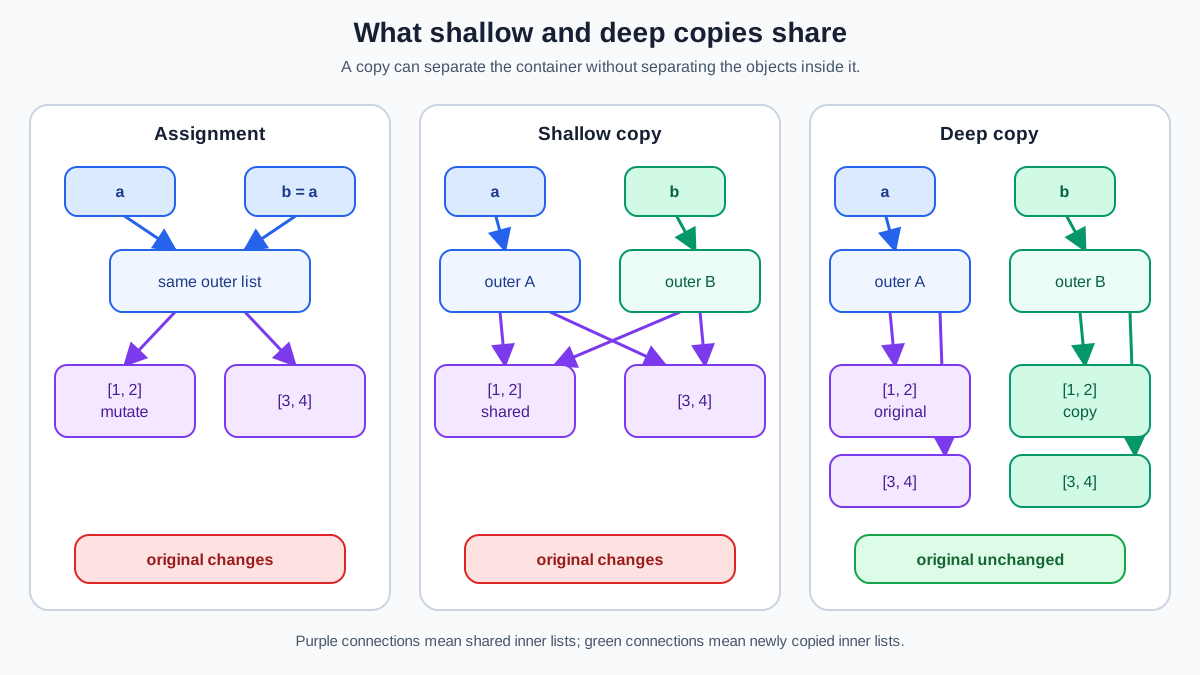
A shallow copy creates a new outer container, but the items inside that container are still references to the same objects as the original. For a flat list of numbers, that is fine, because numbers are immutable. But what happens when the list contains other lists?
original = [[1, 2], [3, 4]]
shallow = original.copy()

shallow[0][0] = "X"

print("original:", original)
print("shallow: ", shallow)
Expected output:
original: [['X', 2], [3, 4]]
shallow:  [['X', 2], [3, 4]]
The outer list was copied, but the inner lists were not. Both original and shallow share the same two inner list objects. Change an inner list through one name, and the change shows up through the other.
This is the classic shallow copy trap. It bites whenever your data is nested: a list of lists, a list of dictionaries, or a dictionary whose values are themselves lists or dictionaries.
To copy the inner objects too, you need a deep copy. Python provides one in the copy module:
import copy

original = [[1, 2], [3, 4]]
deep = copy.deepcopy(original)

deep[0][0] = "X"

print("original:", original)
print("deep:    ", deep)
Expected output:
original: [[1, 2], [3, 4]]
deep:    [['X', 2], [3, 4]]
copy.deepcopy() recursively copies the outer container and every object inside it, down through however many levels of nesting exist. In this example, the result is fully independent: each inner list is a new object, so changing one through deep leaves original untouched.
Knowledge check
Check your understanding
Answer this question before you continue.
Choosing the Right Copy for the Job
You now have three ways to create a second name or a second object. The table below shows when each one is the right tool.
| Approach | What it does | Use this when | Avoid when |
|---|---|---|---|
b = a | Adds a new name tag to the same object | You actually want two names pointing at one object, such as passing data to a function | You need an independent copy |
b = a.copy() | Creates a new outer container, but inner items are still shared | You need a new outer container and will not modify nested mutable items independently | You need to change nested lists or dictionaries without affecting the original |
copy.deepcopy(a) | Recursively copies the container and the objects inside it | You need to modify nested mutable items independently and the objects support deep copying | Your data is flat and .copy() is enough, or you want to keep sharing some inner objects on purpose |
My rule of thumb for beginners: if your data is flat, use .copy(). If your data is nested and you need to modify the inner objects independently, use copy.deepcopy(). Nesting alone is not the real test. The real question is whether you need changes at the inner level to stay isolated. If you only need a new outer container, a shallow copy is enough.
And if you are not sure whether you need a copy at all, ask yourself whether you are okay with changes appearing in both places. If you are not, copy first.
Knowledge check
Check your understanding
Answer this question before you continue.
Where This Bites in Real Code
This is not abstract theory. Real scripts hit this constantly.
Imagine you load a list of student records and want to build a cleaned-up version for a report. If you write cleaned = records and then start removing or modifying entries, you are mutating your original data. Later, when you need the raw records again, they are gone.
The same pattern appears with configuration dictionaries. You might load default settings and want to experiment with different values for one run. If you copy with =, your experiment overwrites the defaults. A shallow copy protects the outer dictionary. But if you need to change a nested value, like a list of allowed servers or a dictionary of feature flags, ask yourself one question first: should that change affect the original defaults?
If the answer is no, use copy.deepcopy() before editing. If sharing the nested values is fine, a shallow copy is enough. The copy depth follows from which level you plan to mutate, not from the shape of the data alone.
Data cleanup, report building, and file workflows all share this shape: load data, transform it, and keep the original intact for later steps. Choosing the right copy operation is what keeps those steps from interfering with each other.
Your Next Step
Run the nested-list example yourself. Try all three approaches: plain =, .copy(), and copy.deepcopy(). Modify an inner item with each one and observe which changes leak through to the original.
That small experiment will cement the mental model faster than any explanation. Once you can predict which copy method isolates your changes, you have mastered one of the most common sources of confusing Python bugs.
From here, the natural next step is putting these data structures to work: reading data from files, transforming it, and building something useful with it.
Knowledge check
Final check
Finish the article by checking the ideas you just learned.
References
Want a more structured Python path?
Use the Python Starter Pack to turn scattered tutorials into a focused practice path.
Python for Artificial Intelligence Starter Pack
Build a Python foundation you can actually use. The Python for AI Starter Pack brings together a guided path through setup, core programming concepts, data structures, files, JSON, APIs, debugging, and practical projects—so you can move quickly from running your first program to understanding and building useful software.
- 264-page illustrated PDF
- 12 guided Python chapters
- Visual concept diagrams
- Self-assessment quizzes
- Bonus deep-dive sections
- Files, JSON, APIs, debugging & projects
- Foundation for data, automation & AI
Coming soon


