
How to Count Words in Python
Counting words in Python sounds trivial until you try it on real text. The moment your sentence contains a comma, a capital letter, or an ellipsis, the…

Counting words in Python sounds trivial until you try it on real text. The moment your sentence contains a comma, a capital letter, or an ellipsis, the naive approach quietly hands you wrong numbers. The fix isn't complicated—but it requires understanding what your text actually looks like before you start counting.
What We're Building and Why
Here's the task: you have a block of text, and you want to know how often each word appears. Maybe you're analyzing customer feedback to spot recurring complaints. Maybe you're checking your own writing to see which words you overuse. Or maybe you have a document and you want to know which terms show up most frequently.
Whatever the reason, the goal is the same: turn raw text into a clear count of word frequencies.
The recipe has three steps:
- Split the text into individual words.
- Count each word using a dictionary.
- Display the results in a useful order.
Before we write any code, one warning: the straightforward version works on clean text, but real text is messy. Punctuation attaches itself to words. Capital letters make identical words look different. We'll start with the simple version, watch it fail on realistic input, and then fix it properly.
The Naive Version: Split and Count
Python's .split() method breaks a string into a list of words. By default, it splits on whitespace—spaces, tabs, and newlines.
text = "the cat and the dog and the bird"
words = text.split()
print(words)
['the', 'cat', 'and', 'the', 'dog', 'and', 'the', 'bird']
Now we need to count how many times each word appears. A dictionary is the perfect tool here. Each word becomes a key, and its count becomes the value.
Here's the pattern: loop through the word list. If the word is already in the dictionary, add one to its count. If it's not there yet, add it with a starting count of one.
text = "the cat and the dog and the bird"
words = text.split()

counts = {}
for word in words:
    if word in counts:
        counts[word] = counts[word] + 1
    else:
        counts[word] = 1

print(counts)
{'the': 3, 'cat': 1, 'and': 2, 'dog': 1, 'bird': 1}
That's the core mechanism. Every time we see a word, we check whether we've seen it before. If we have, we bump the count. If we haven't, we start a new entry.
This works perfectly on clean, lowercase text. But real text rarely cooperates.
Knowledge check
Check your understanding
Answer this question before you continue.
Why Punctuation and Case Break the Count
Let's try the same code on a sentence that looks like something you'd actually write.
text = "The cat, and the dog, and the bird!"
words = text.split()

counts = {}
for word in words:
    if word in counts:
        counts[word] = counts[word] + 1
    else:
        counts[word] = 1

print(counts)
{'The': 1, 'cat,': 1, 'and': 2, 'the': 2, 'dog,': 1, 'bird!': 1}
Look closely at what happened. "The" and "the" are counted separately because one starts with a capital letter. "cat," and "dog," still have their commas attached. "bird!" kept its exclamation mark.
According to this output, "cat," and "cat" would be different words. So would "bird!" and "bird." The counts are technically correct for what the code did—but they're wrong for what you actually want to know.
Here's the insight that makes this whole task click: counting is easy. Deciding what counts as a word is the real work.
Before we can count meaningfully, we need to clean the text so that identical words look identical.
Knowledge check
Check your understanding
Answer this question before you continue.
Cleaning the Text Before Counting
Two fixes handle most of the mess:
- Lowercase everything so "The" and "the" become the same word.
- Strip punctuation from each word so "cat," becomes "cat."
For the lowercase step, we can convert the entire string before splitting:
text = text.lower()
For punctuation, we'll use .strip() on each word. This method removes specified characters from the beginning and end of a string. We'll tell it to strip common punctuation marks:
word = word.strip(".,!?;:\"'()[]{}")
Putting it together:
text = "The cat, and the dog, and the bird!"
text = text.lower()

words = text.split()

counts = {}
for word in words:
    word = word.strip(".,!?;:\"'()[]{}")
    if word in counts:
        counts[word] = counts[word] + 1
    else:
        counts[word] = 1

print(counts)
{'the': 3, 'cat': 1, 'and': 2, 'dog': 1, 'bird': 1}
Now the counts match what a human would say: "the" appears three times, everything else once.
Notice that we lowercase the whole string first, then strip punctuation from each word as we loop. That order matters—if we stripped punctuation first and lowercased second, it would still work, but doing the lowercase once up front keeps the code cleaner.
Note: This cleanup approach removes punctuation only at the edges of each word. It intentionally leaves internal apostrophes alone, so "don't" stays "don't." That's the right behavior for most beginner text tasks. If you're working with text where punctuation rules matter more—like analyzing social media posts or processing text with unusual spacing—you'll eventually want a more powerful tool called regular expressions. For now, this simple approach covers most needs.
Displaying Results in a Useful Order
A dictionary tells you the counts, but it doesn't tell you which words matter most. For most word-count tasks, you want the most frequent words first.
Python's sorted() function can help. We need to sort the dictionary items by their count values, from highest to lowest.
text = "the cat and the dog and the bird and the cat"
text = text.lower()

words = text.split()

counts = {}
for word in words:
    word = word.strip(".,!?;:\"'()[]{}")
    if word in counts:
        counts[word] = counts[word] + 1
    else:
        counts[word] = 1

for word, count in sorted(counts.items(), key=lambda item: item[1], reverse=True):
    print(f"{word}: {count}")
the: 3
and: 2
cat: 2
dog: 1
bird: 1
Let's unpack that sorted() line, since it looks intimidating at first.
counts.items() gives us pairs of words and counts. The key parameter tells Python what to sort by—here, item[1] means "the second element of each pair," which is the count. And reverse=True puts the largest counts first.
If you've covered sorting in Python, this should feel familiar. If not, the short version is: we're telling Python to sort the dictionary entries by their values instead of their keys.
Knowledge check
Check your understanding
Answer this question before you continue.
The Complete Recipe: Cleaning, Counting, and Sorting Together
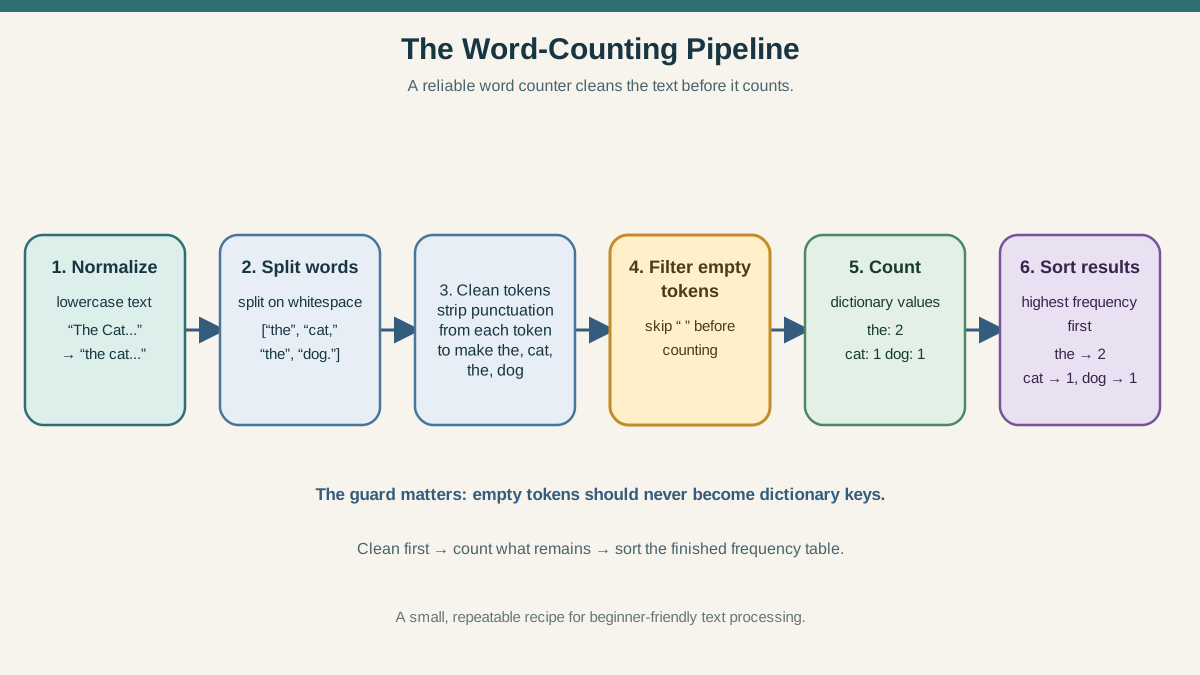
Before we move to files, let's consolidate everything into one dependable version. This is the recipe you'll reuse: lowercase the text, split it, clean each word, skip anything that becomes empty, and count what remains.
text = "The cat, and the dog... and the bird!"
text = text.lower()

words = text.split()

counts = {}
for word in words:
    word = word.strip(".,!?;:\"'()[]{}")
    if word == "":
        continue
    if word in counts:
        counts[word] = counts[word] + 1
    else:
        counts[word] = 1

for word, count in sorted(counts.items(), key=lambda item: item[1], reverse=True):
    print(f"{word}: {count}")
and: 2
the: 2
cat: 1
dog: 1
bird: 1
Two details in this version matter. First, the if word == "": continue line skips anything that becomes empty after stripping—we'll see why that's necessary in a moment. Second, notice that "dog" and "bird" each got counted once even though "dog..." had periods attached and "bird!" had an exclamation mark. The cleanup handled both.
Keep this version handy. It's the one we'll build on for the file example.
Counting Words in a Text File
So far, we've worked with text stored directly in a variable. But the more realistic scenario is reading text from a file. Maybe you have a document, a transcript, or a downloaded article you want to analyze.
The good news: the counting logic doesn't change. We just need to read the file's contents into a string first.
Let's start with a small test file so you can verify the output. Create a file called sample.txt with this content:
Python is fun. Python is practical, and Python is powerful!
Now save this script as word_counter.py:
with open("sample.txt", "r") as file:
    text = file.read()

text = text.lower()

words = text.split()

counts = {}
for word in words:
    word = word.strip(".,!?;:\"'()[]{}")
    if word == "":
        continue
    if word in counts:
        counts[word] = counts[word] + 1
    else:
        counts[word] = 1

for word, count in sorted(counts.items(), key=lambda item: item[1], reverse=True):
    print(f"{word}: {count}")
Run it from the same folder where both files live:
python word_counter.py
python: 3
is: 3
fun: 1
practical: 1
and: 1
powerful: 1
The with open() block reads the entire file and automatically closes it when we're done. Everything after that is identical to the recipe we built above—same cleaning, same empty-token guard, same counting loop, same sorted output.
If you haven't worked with files in Python yet, this is your bridge: reading a file is just one extra line that turns the file's contents into a string. Once you have that string, every technique from this article applies unchanged.
Common Mistake: Counting Empty or Punctuation-Only Tokens
Here's a trap that catches beginners: what happens when stripping punctuation leaves nothing behind?
Consider text with an ellipsis or a standalone dash. After splitting, one "word" might be "..."—just punctuation characters. When we strip those characters away, nothing remains. And empty strings get counted like everything else.
text = "Hello... is it me you're looking for?"
text = text.lower()

words = text.split()

counts = {}
for word in words:
    word = word.strip(".,!?;:\"'()[]{}")
    if word in counts:
        counts[word] = counts[word] + 1
    else:
        counts[word] = 1

print(counts)
{'hello': 1, '': 1, 'is': 1, 'it': 1, "you're": 1, 'me': 1, 'looking': 1, 'for': 1}
There it is: an empty string with a count of one. That empty key pollutes your results and makes no sense as a "word."
The fix is a simple check. Skip any word that's empty after cleaning:
for word in words:
    word = word.strip(".,!?;:\"'()[]{}")
    if word == "":
        continue
    if word in counts:
        counts[word] = counts[word] + 1
    else:
        counts[word] = 1
The continue statement tells Python to skip the rest of the loop body and move to the next word. This guard is already built into the complete recipe above, so the version you copy from the file section won't produce empty keys.
Tip: When your counts look wrong, print the intermediate result. Add
print(words)right after the split to see exactly what Python thinks your words are. Most counting bugs become obvious the moment you inspect the word list. This habit—checking intermediate output—will save you hours of confusion across every Python project you build.
Knowledge check
Check your understanding
Answer this question before you continue.
A Quicker Built-In Option: collections.Counter
The manual dictionary loop teaches you the mechanism. But once you understand it, Python offers a shortcut.
The collections module includes a Counter class designed exactly for this job. Give it a list, and it counts everything automatically.
from collections import Counter

text = "the cat and the dog and the bird and the cat"
text = text.lower()

words = text.split()
cleaned_words = []
for word in words:
    word = word.strip(".,!?;:\"'()[]{}")
    if word != "":
        cleaned_words.append(word)

counts = Counter(cleaned_words)
print(counts)
Counter({'the': 3, 'and': 2, 'cat': 2, 'dog': 1, 'bird': 1})
The loop on lines 6–9 does the cleaning and filtering, building a new list of valid words. Then Counter handles all the counting.
Counter also gives you most_common(), which returns the results sorted from most to least frequent:
print(counts.most_common())
[('the', 3), ('and', 2), ('cat', 2), ('dog', 1), ('bird', 1)]
So which should you use?
| Approach | Use when | Tradeoff |
|---|---|---|
| Manual dictionary loop | You're learning, or you need custom logic inside the counting step | More code, but full control |
collections.Counter | You want a quick, readable solution | Less control, but much shorter |
My rule: build the manual version at least once so you understand what's happening under the hood. After that, reach for Counter when you want clean, fast code. Both approaches are valid—the difference is whether you need to see the gears turning.
Your Next Step
Take the file-based version of the word counter and run it on your own text. A paragraph you wrote, a downloaded article, a chat transcript—anything with enough words to produce interesting results. Look at the top words. Do they match what you expected?
If the counts look wrong, add a print(words) line and inspect what Python actually extracted. That debugging habit will serve you far beyond this project.
From here, the natural next steps are learning more about file handling and building a small data project that combines these skills. You now have a working tool that turns messy text into clean, ordered information—which is the foundation of a lot of real-world Python work.
Knowledge check
Final check
Finish the article by checking the ideas you just learned.
References
Want a more structured Python path?
Use the Python Starter Pack to turn scattered tutorials into a focused practice path.
Python for Artificial Intelligence Starter Pack
Build a Python foundation you can actually use. The Python for AI Starter Pack brings together a guided path through setup, core programming concepts, data structures, files, JSON, APIs, debugging, and practical projects—so you can move quickly from running your first program to understanding and building useful software.
- 264-page illustrated PDF
- 12 guided Python chapters
- Visual concept diagrams
- Self-assessment quizzes
- Bonus deep-dive sections
- Files, JSON, APIs, debugging & projects
- Foundation for data, automation & AI
Coming soon


