
Sorting and Filtering Data in Python
You have a list of numbers that needs to be in order. Or a dictionary of products where you only want the ones under a certain price. Every real Python…

Key topics
You have a list of numbers that needs to be in order. Or a dictionary of products where you only want the ones under a certain price. Every real Python project reaches this moment: the data is there, but it is not in the shape you need.
Two built-in skills solve most of this. Sorting rearranges what you have into a meaningful order. Filtering keeps only the items that match a condition and drops the rest. Both are built into Python, so you do not need any extra libraries or setup.
Here is how fast these tools work:
scores = [88, 42, 95, 61, 73]

# Sorting: lowest to highest
print(sorted(scores))

# Filtering: keep only passing scores
passing = [score for score in scores if score >= 60]
print(passing)
Output:
[42, 61, 73, 88, 95]
[61, 73, 88, 95]
That is the whole idea. The rest of this tutorial shows you when to use each tool, how they behave with dictionaries, and the mistakes that trip up nearly every beginner.
Why Sorting and Filtering Matter
Think about the last time you looked at a messy list and wished it were organized. Maybe it was a to-do list where the urgent tasks were buried at the bottom. Or a list of expenses where you wanted to see only the ones above a certain amount.
Sorting and filtering are how you take raw data and turn it into something you can actually act on. Sorting puts items in a sequence that makes sense, like highest priority first or cheapest to most expensive. Filtering narrows the data down to only what matters, like pulling out every expense over $50.
These two operations show up everywhere in real code. Reports sort results before printing them. Dashboards filter data before displaying it. Data cleanup scripts sort and filter before saving anything to a file.
The best part? Python gives you these tools for free. No imports, no setup, no extra packages.
Sorting a List with sorted()
The sorted() function is the safest place to start because it does not change your original data. It takes any list and returns a brand new sorted list.
numbers = [5, 2, 9, 1, 7]
sorted_numbers = sorted(numbers)

print(sorted_numbers)
print(numbers)
Output:
[1, 2, 5, 7, 9]
[5, 2, 9, 1, 7]
Notice what happened. sorted_numbers is in ascending order, but numbers still holds its original order. That is the key behavior: sorted() gives you a new list and leaves the old one alone.
You can sort strings the same way:
names = ["Zara", "mike", "Anna", "bob"]
print(sorted(names))
Output:
['Anna', 'Zara', 'bob', 'mike']
One thing to notice: Python sorts strings using their character codes, so uppercase letters come before lowercase ones. If you want a true alphabetical sort regardless of case, you can pass key=str.lower:
names = ["Zara", "mike", "Anna", "bob"]
print(sorted(names, key=str.lower))
Output:
['Anna', 'bob', 'mike', 'Zara']
To sort from highest to lowest, add reverse=True:
numbers = [5, 2, 9, 1, 7]
print(sorted(numbers, reverse=True))
Output:
[9, 7, 5, 2, 1]
My rule for beginners: when you are not sure which sorting tool to use, reach for sorted(). It is harder to break because your original data stays intact.
Knowledge check
Check your understanding
Answer this question before you continue.
Sorting in Place with .sort()
Lists also have a method called .sort(). It does the same ordering work, but with one critical difference: it changes the original list directly and returns nothing.
numbers = [5, 2, 9, 1, 7]
numbers.sort()

print(numbers)
Output:
[1, 2, 5, 7, 9]
The list itself is now sorted. The original order is gone.
Common mistake: assigning the result of .sort()
Here is the mistake I see constantly. Beginners write something like this:
numbers = [5, 2, 9, 1, 7]
sorted_numbers = numbers.sort()

print(sorted_numbers)
Output:
None
Why? Because .sort() changes the list in place and returns None. You just assigned None to your variable. The sorted list exists, but it is stored in numbers, not in sorted_numbers.
The fix is simple: either call .sort() without assigning the result, or use sorted() when you want a new list.
sorted() | .sort() | |
|---|---|---|
| Changes the original list? | No | Yes |
| Returns | A new sorted list | None |
| Works on | Any iterable (lists, tuples, dictionaries) | Lists only |
| Use this when | You want to keep the original data | You no longer need the original order |
| Beginner mistake | Forgetting to assign the result | Assigning the result and getting None |
A good instinct: use .sort() when the list is temporary and you just need it ordered for the next step. Use sorted() when you might need the original order later.
Knowledge check
Check your understanding
Answer this question before you continue.
Sorting Dictionaries by Key or Value
Dictionaries store key-value pairs. When you call sorted() on a dictionary, it sorts the keys:
prices = {"apple": 0.50, "banana": 0.25, "cherry": 1.25}
print(sorted(prices))
Output:
['apple', 'banana', 'cherry']
That gives you a sorted list of keys, not a sorted dictionary. To sort by value, you need to tell Python what to compare. The key parameter lets you pass a function that extracts the comparison value from each item.
Before we sort by price, let us look at what .items() gives us. It turns each key-value pair into a tuple, with the key first and the value second:
prices = {"apple": 0.50, "banana": 0.25, "cherry": 1.25}
print(list(prices.items()))
Output:
[('apple', 0.50), ('banana', 0.25), ('cherry', 1.25)]
Each pair is a tuple, and the price sits at index 1. That is why the sorting line uses item[1]:
prices = {"apple": 0.50, "banana": 0.25, "cherry": 1.25}
sorted_by_price = sorted(prices.items(), key=lambda item: item[1])

print(sorted_by_price)
Output:
[('banana', 0.25), ('apple', 0.50), ('cherry', 1.25)]
Let me unpack that sorting line because it looks dense at first.
prices.items()returns each key-value pair as a tuple, like("apple", 0.50).key=lambda item: item[1]tells Python, "Sort these tuples by their second element," which is the price.- The result is a sorted list of tuples.
If you want the result back as a dictionary, you can wrap it:
prices = {"apple": 0.50, "banana": 0.25, "cherry": 1.25}
sorted_by_price = dict(sorted(prices.items(), key=lambda item: item[1]))

print(sorted_by_price)
Output:
{'banana': 0.25, 'apple': 0.50, 'cherry': 1.25}
This pattern works for any realistic ranking task: products by price, students by score, employees by years of experience. The key function just needs to point at the value you care about.
Knowledge check
Check your understanding
Answer this question before you continue.
Filtering Lists with List Comprehensions
Filtering means keeping only the items that meet a condition. The most readable way to do this in Python is a list comprehension — a compact syntax that builds a new list in one line.
Here is the pattern:
[item for item in original_list if condition]
Read it like this: "Build a list containing each item from the original list, but only if the condition is true."
A concrete example:
expenses = [15, 80, 42, 120, 8, 65]
big_expenses = [amount for amount in expenses if amount > 50]

print(big_expenses)
Output:
[80, 120, 65]
The original expenses list is untouched. You built a new list containing only the amounts over $50.
If you have not seen list comprehensions before, they can look like magic. They are not. Here is the same logic written as a regular for loop:
expenses = [15, 80, 42, 120, 8, 65]
big_expenses = []

for amount in expenses:
    if amount > 50:
        big_expenses.append(amount)

print(big_expenses)
Same result, five lines instead of one. The list comprehension is just a shorthand for this loop. Once you recognize that, it stops looking mysterious.
You can filter strings too:
words = ["python", "java", "ruby", "go", "rust"]
short_words = [word for word in words if len(word) <= 3]

print(short_words)
Output:
['go']
Filtering always creates a new list. If you want to keep the original intact, that is exactly what you want.
Filtering Dictionaries
Dictionaries have their own version of the comprehension pattern. You can build a filtered dictionary by looping over .items(), which gives you both the key and the value for each entry.
prices = {"apple": 0.50, "banana": 0.25, "cherry": 1.25}
affordable = {item: price for item, price in prices.items() if price < 1.00}

print(affordable)
Output:
{'apple': 0.50, 'banana': 0.25}
The structure mirrors the list version, with two differences. First, you use curly braces {} instead of square brackets [] because you are building a dictionary. Second, you specify both the key and the value before the for.
You can also filter by key instead of value:
prices = {"apple": 0.50, "banana": 0.25, "cherry": 1.25}
a_items = {item: price for item, price in prices.items() if item.startswith("a")}

print(a_items)
Output:
{'apple': 0.50}
If .items() is new to you, here is what it does: it returns each key-value pair as a tuple, which the comprehension unpacks into item and price. That unpacking is what lets you test either side of the pair.
Knowledge check
Check your understanding
Answer this question before you continue.
Common Mistakes and How to Fix Them
These four mistakes account for most of the sorting and filtering bugs I have watched beginners hit. Now you can recognize them before they cost you an hour.
Assigning the result of .sort(). This gives you None because .sort() modifies the list in place and returns nothing. Use sorted() when you want a new list, or call .sort() without assignment.
Forgetting reverse=True. If you want descending order and you do not pass reverse=True, you will get ascending order. The function is not broken. You just forgot to tell it which direction you wanted.
Mixing types in one list. Python cannot compare a number to a string. sorted([3, "apple", 1]) raises a TypeError because Python does not know whether 3 comes before or after "apple". Keep your lists to one type, or use a key function that converts everything to a comparable form.
Expecting a dictionary to stay sorted. Sorting a dictionary with sorted() returns a sorted list of keys, not a sorted dictionary. If you want the sorted result as a dictionary, you need to rebuild it with dict(sorted(...)) as shown earlier.
Practice: Sort and Filter a Real List
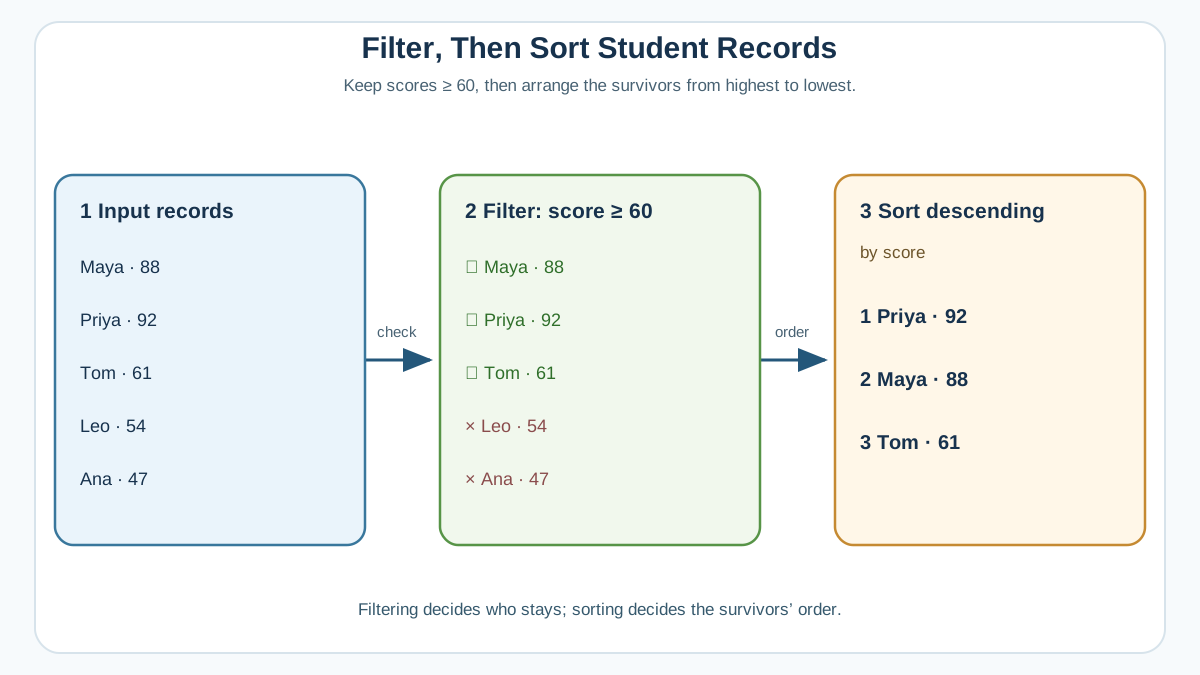
Time to combine both skills. Here is a small dataset of students with their exam scores:
students = [
    {"name": "Maya", "score": 88},
    {"name": "Diego", "score": 54},
    {"name": "Priya", "score": 92},
    {"name": "Tom", "score": 61},
    {"name": "Aisha", "score": 47},
]
Your task: filter for students who passed (score of 60 or higher), then sort the result so the highest score comes first.
Try it yourself before looking at the solution. The tools you need are all in this tutorial: a list comprehension for filtering and sorted() with key and reverse for sorting.
Here is one way to solve it:
students = [
    {"name": "Maya", "score": 88},
    {"name": "Diego", "score": 54},
    {"name": "Priya", "score": 92},
    {"name": "Tom", "score": 61},
    {"name": "Aisha", "score": 47},
]

passing = [student for student in students if student["score"] >= 60]
ranked = sorted(passing, key=lambda student: student["score"], reverse=True)

for student in ranked:
    print(f"{student['name']}: {student['score']}")
Output:
Priya: 92
Maya: 88
Tom: 61
If your output matches, you just combined filtering and sorting on a realistic dataset. That is the core skill you will use again and again as you move into reading data from files and building small data projects.
The natural next step is to take this skill and point it at real data. Try reading a list of records from a text file, then sort and filter it the same way. That is where these tools start paying for themselves.
Knowledge check
Final check
Finish the article by checking the ideas you just learned.
References
Want a more structured Python path?
Use the Python Starter Pack to turn scattered tutorials into a focused practice path.
Python for Artificial Intelligence Starter Pack
Build a Python foundation you can actually use. The Python for AI Starter Pack brings together a guided path through setup, core programming concepts, data structures, files, JSON, APIs, debugging, and practical projects—so you can move quickly from running your first program to understanding and building useful software.
- 264-page illustrated PDF
- 12 guided Python chapters
- Visual concept diagrams
- Self-assessment quizzes
- Bonus deep-dive sections
- Files, JSON, APIs, debugging & projects
- Foundation for data, automation & AI
Coming soon


