
Lambda Functions for Beginners: Anonymous Functions in Python
You've learned to write functions with def, giving each one a name and a job. Then you meet lambdas and wonder: should I be rewriting everything? The short…

Key topics
You've learned to write functions with def, giving each one a name and a job. Then you meet lambdas and wonder: should I be rewriting everything? The short answer is no. The longer answer is the point of this article: lambda functions are a tool for a specific moment, not a replacement for everything you already know.
What Is a Lambda Function?
A lambda function is a small, anonymous function created with the lambda keyword instead of def. When we say "anonymous," we mean it literally: the function doesn't have a name. You create it, use it, and move on.
Here's the core syntax:
lambda arguments: expression
The lambda keyword is followed by its arguments, then a colon, then a single expression. That expression's result is returned automatically.
Let's see one in action right away:
print((lambda x: x * 2)(5))
10
Notice what happened. We created a lambda that takes one argument x and returns x * 2. We didn't give it a name. We wrapped it in parentheses and called it immediately with 5.
If you've already learned how to define functions with def, you've seen this pattern before. The lambda above is equivalent to this:
def double(x):
    return x * 2
Same result. Different shape. But notice the difference in how we used them. The def version has a name because it's meant to be reused. The lambda was created, used once, and gone.
Knowledge check
Check your understanding
Answer this question before you continue.
Lambda vs. Regular Functions: What's Different?
The differences between lambda and def functions come down to what each one can do. Lambdas are deliberately limited, and those limits are what make them useful.
| Feature | Lambda Function | Regular Function |
|---|---|---|
| Syntax | lambda x: x * 2 | def double(x): return x * 2 |
| Name | Anonymous unless assigned | Always has a name |
| Body | Single expression only | Multiple statements, loops, conditionals |
| Return | Expression result returned automatically | Needs explicit return |
| Docstrings | Not allowed | Supported |
| Reuse | Best for one-time use | Built for reuse |
The biggest constraint is the single expression. You cannot put multiple statements, a loop, or an assignment inside a lambda. If you need more than one line of logic, you need def.
Lambdas can take multiple arguments, though:
add = lambda x, y: x + y
print(add(3, 4))
7
One thing to keep in mind: lambdas can't use default values or type hints the way regular functions can. They're meant to be small and quick, not fully featured.
Knowledge check
Check your understanding
Answer this question before you continue.
Where Lambdas Actually Shine
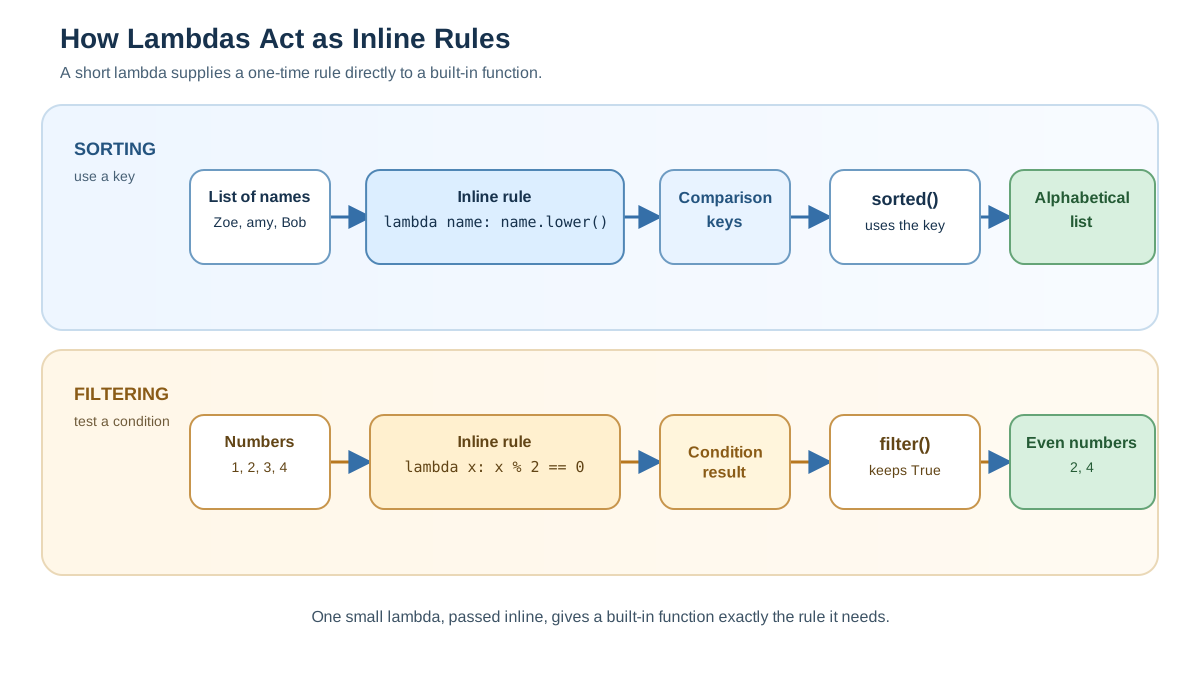
The real power of lambdas appears when you pass a function as an argument to another function. Python lets you do this, and lambdas give you a clean way to create that tiny function on the spot.
Think of it this way: some built-in functions in Python accept a "key" or "condition" function that tells them how to behave. Instead of defining a named function somewhere else in your code, you can drop a lambda right where it's needed.
Sorting with a Custom Key
The sorted() function is a perfect example. Say you have a list of names and you want to sort them alphabetically, ignoring case:
names = ["alice", "Bob", "carol", "David"]
sorted_names = sorted(names, key=lambda name: name.lower())
print(sorted_names)
['alice', 'Bob', 'carol', 'David']
Without the key, Python would sort using the exact strings, which puts uppercase letters before lowercase ones. The lambda lambda name: name.lower() tells sorted() to compare each name by its lowercase version instead.
Knowledge check
Check your understanding
Answer this question before you continue.
Filtering a List
The filter() function keeps only the items that pass a condition. The lambda provides that condition:
numbers = [1, 2, 3, 4, 5, 6, 7, 8]
even_numbers = list(filter(lambda x: x % 2 == 0, numbers))
print(even_numbers)
[2, 4, 6, 8]
The lambda lambda x: x % 2 == 0 returns True for even numbers and False for odd ones. filter() keeps only the ones that return True.
In both examples, the lambda is short, used in exactly one place, and would be awkward to define separately with def. That's the sweet spot.
Knowledge check
Check your understanding
Answer this question before you continue.
A Realistic Example: Sorting Records
Let's make this concrete with a task you might actually face: sorting a list of records by a field.
orders = [
    {"item": "notebook", "price": 4.50},
    {"item": "pen", "price": 1.25},
    {"item": "folder", "price": 2.00},
]

cheapest_first = sorted(orders, key=lambda order: order["price"])
print(cheapest_first)
[{'item': 'pen', 'price': 1.25}, {'item': 'folder', 'price': 2.0}, {'item': 'notebook', 'price': 4.5}]
Here's what's happening: sorted() calls the lambda once for each dictionary in the list. The lambda pulls out the "price" value, and sorted() uses those values to decide the order. The lambda is doing one small job in one place—exactly what it's designed for.
This pattern shows up constantly in data cleanup and reporting work. When you have a list of records and need to sort, filter, or transform them, a lambda is often the cleanest way to express the rule.
When to Skip the Lambda
Lambdas are convenient, but they're not always the right choice. Here's the decision rule I use:
Use a lambda when the logic is a single short expression used in one place. Use def when it grows beyond that.
Watch for these warning signs:
- The logic needs more than one expression. If you're trying to squeeze multiple steps into a lambda, stop. Write a
deffunction. - You're naming a lambda to reuse it. If you find yourself writing
double = lambda x: x * 2and callingdoublein several places, adeffunction is clearer. Many Python style guides discourage assigning lambdas to names for this reason. - The logic is getting hard to read. Lambdas compress logic into one line, but compression isn't the same as clarity. When a reader has to squint to understand what your lambda does, it's time for
def.
A good beginner instinct is to default to def and reach for lambda only when the function is genuinely tiny and used once. You'll write more readable code, and you won't have to refactor later.
Common Beginner Mistakes
Everyone trips over lambdas at first. Here are the mistakes I see most often, so you can skip them.
Trying to put multiple statements inside a lambda. This will not work:
# This will cause a SyntaxError
bad_lambda = lambda x: x + 1; x * 2
A lambda body is one expression, period. If you need multiple steps, use def.
Forgetting that no return is needed. The expression's result is returned automatically. Writing return inside a lambda is a syntax error.
Overusing lambdas. Just because you can write something as a lambda doesn't mean you should. If a def function would be easier to read, use it.
Confusing syntax with calling. Defining a lambda and calling it are different steps. The definition uses lambda x: x * 2. Calling it uses parentheses: (lambda x: x * 2)(5). Mixing those up is a common source of confusion when you're starting out.
The Rule to Remember
Here's the whole article in one sentence: use a lambda when the logic is a single short expression used in one place, and reach for def when it grows.
Lambdas aren't a more advanced way to write functions. They're a more compact way to write tiny functions. The skill isn't in using lambdas everywhere—it's in knowing when they earn their place and when a plain def function is the better tool.
Now that you understand lambdas, the natural next step is learning how to organize your code into modules. That's where your functions—lambda and otherwise—start becoming reusable pieces of larger programs.
Knowledge check
Final check
Finish the article by checking the ideas you just learned.
References
Want a more structured Python path?
Use the Python Starter Pack to turn scattered tutorials into a focused practice path.
Python for Artificial Intelligence Starter Pack
Build a Python foundation you can actually use. The Python for AI Starter Pack brings together a guided path through setup, core programming concepts, data structures, files, JSON, APIs, debugging, and practical projects—so you can move quickly from running your first program to understanding and building useful software.
- 264-page illustrated PDF
- 12 guided Python chapters
- Visual concept diagrams
- Self-assessment quizzes
- Bonus deep-dive sections
- Files, JSON, APIs, debugging & projects
- Foundation for data, automation & AI
Coming soon


