
Python asyncio Basics: Use async and await for I/O
Your script fetches three URLs. Each one takes a second. The whole thing takes three seconds, and for almost all of that time your CPU is doing nothing but…

Key topics
Your script fetches three URLs. Each one takes a second. The whole thing takes three seconds, and for almost all of that time your CPU is doing nothing but waiting.
That is the problem asyncio exists to solve. Not speed in the sense of more computation per second — reclaimed waiting. When your program is blocked on a network call, a disk read, or a subprocess, asyncio lets it go do something else instead of sitting there. This article shows you the mechanism with one small script you can run twice and time yourself.
Why Waiting Is the Real Cost
Before any syntax, get the diagnosis right. Work falls into two rough categories:
- I/O-bound work spends most of its time waiting on something outside the CPU: a network response, a file read, a database query, a subprocess.
- CPU-bound work keeps a core busy from start to finish: crunching numbers, parsing a huge file, resizing images.
Asyncio is built for the first category. If you have three tasks that each wait one second on a network call, running them one after another costs about three seconds of mostly nothing. The CPU is not slow. It is unemployed, and your program has no way to hand it other work.
That is the entire pitch. And the boundary matters just as much: asyncio does not make CPU-heavy loops faster, and it does not create parallel cores. If your bottleneck is arithmetic, asyncio buys you nothing. Keep that rule in your head, because it explains most of the confusion beginners run into later.
Knowledge check
Check your understanding
Answer this question before you continue.
Your First async and await Example
Let's start with the smallest thing that shows the mechanism. Save this as first_async.py:
import asyncio

async def say_after(delay, message):
    await asyncio.sleep(delay)
    print(message)

async def main():
    print("start")
    await say_after(1, "one second later")
    print("end")

asyncio.run(main())
Run it:
python first_async.py
Expected output:
start
one second later
end
Three things are happening here, and each one matters.
async def defines a coroutine function. Calling it does not run the body — it returns a coroutine object, a suspended piece of work that has not started yet. That is the first surprise most people hit: if you write say_after(1, "hi") without await, nothing prints. Python may even warn you that the coroutine was never awaited.
await is what actually runs that coroutine object and pauses the current flow until it finishes. When you await say_after(...), the body executes, hits await asyncio.sleep(delay), and hands control back to the event loop. This is the line that makes everything else possible. Compare it to time.sleep(delay), which blocks the entire program — no other task can run while it waits. await asyncio.sleep() yields; time.sleep() holds the whole thread hostage.
asyncio.run(main()) is the entry point. It creates an event loop, runs your coroutine on it, and closes the loop when the coroutine finishes. You call it once, at the top level of your program.
Common mistake: Using
time.sleep()inside a coroutine. It looks harmless, but it blocks the event loop and silently kills all concurrency. If you are inside anasync def, reach forawait asyncio.sleep().
Knowledge check
Check your understanding
Answer this question before you continue.
Sequential vs Concurrent: Run It Twice
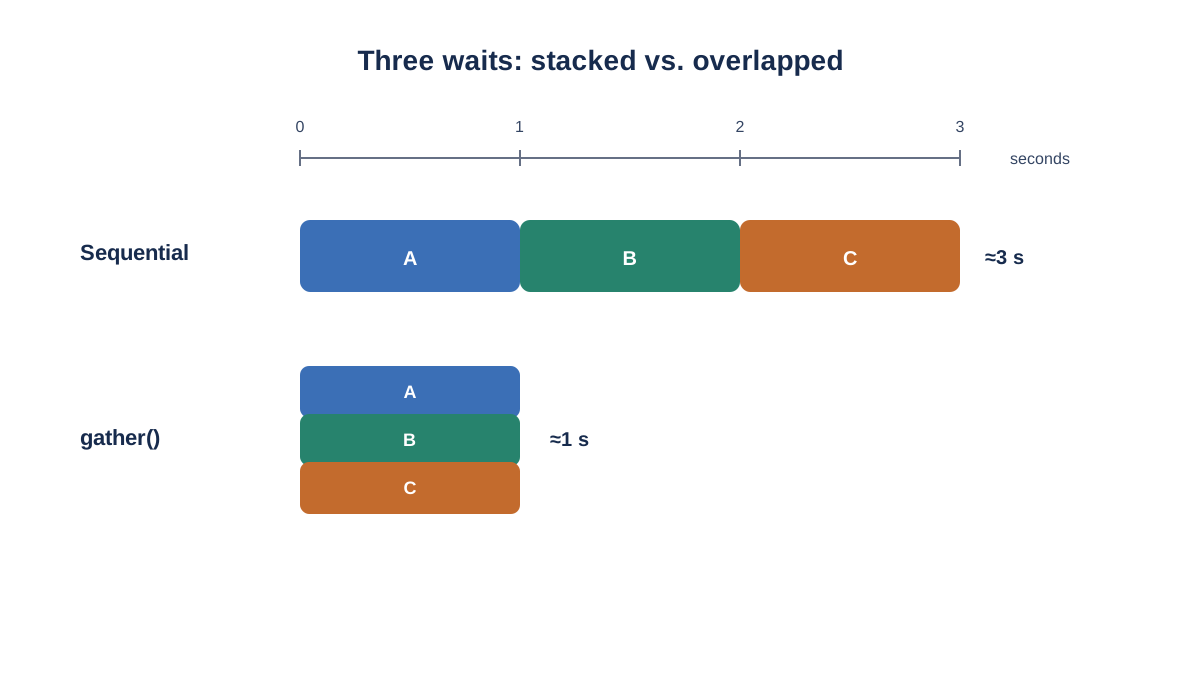
One coroutine waiting is not interesting. The payoff shows up when you have several. Let's write the same three tasks two ways and time them.
Version A — sequential, one await after another:
import asyncio
import time

async def fetch(name, delay):
    await asyncio.sleep(delay)
    print(f"finished {name}")

async def main():
    start = time.perf_counter()
    await fetch("A", 1)
    await fetch("B", 1)
    await fetch("C", 1)
    print(f"total: {time.perf_counter() - start:.2f}s")

asyncio.run(main())
Expected output:
finished A
finished B
finished C
total: 3.00s
Version B — the same coroutines wrapped in asyncio.gather():
import asyncio
import time

async def fetch(name, delay):
    await asyncio.sleep(delay)
    print(f"finished {name}")

async def main():
    start = time.perf_counter()
    await asyncio.gather(
        fetch("A", 1),
        fetch("B", 1),
        fetch("C", 1),
    )
    print(f"total: {time.perf_counter() - start:.2f}s")

asyncio.run(main())
Expected output:
finished A
finished B
finished C
total: 1.00s
Same work. Same one thread. Same one core. Three seconds became one, because all three waits overlapped instead of stacking.
The difference between the two versions is worth naming precisely. In Version A, each await fetch(...) runs one coroutine to completion before the next line executes. In Version B, asyncio.gather() receives three coroutine objects, schedules them as tasks on the event loop, and lets them make progress concurrently. await alone does not create concurrency — it just waits for one thing. gather() is what arranges multiple awaitables to run side by side.
Notice that the printed order may not match the order you called them in. That is not a bug — it is the whole point. The event loop is a scheduler, and it switches between tasks only at await points. This is cooperative concurrency: tasks give up control voluntarily. Nothing preempts them. If a task never awaits, it runs to completion and starves everything else.
That is also why the mental model is "concurrency without parallelism." One core, one thread, many overlapping waits.
Note: The
asyncio.sleep()calls in these examples simulate I/O waiting. They stand in for a real network request, disk read, or database query. The timing behavior is the same, but the actual I/O is not happening. To make this real, you would replace the sleep with anawaiton an operation from an async-capable client — for example, an async HTTP library or an async database driver. A plain synchronous library cannot simply be awaited.
Knowledge check
Check your understanding
Answer this question before you continue.
What the Event Loop Is Actually Doing
Here is the model I want you to keep, because it lets you predict behavior instead of memorizing syntax.
The event loop maintains two sets: tasks that are ready to run, and tasks parked on pending I/O. When a coroutine hits await, it registers what it is waiting for and returns control to the loop. The loop picks the next runnable task. When the awaited operation completes, the parked task is rescheduled and resumes right where it left off.
That "resumes where it left off" is the part a regular function cannot do. A normal function runs to completion and returns. A coroutine can be suspended and resumed, which is what makes overlapping waits possible in a single thread.
The critical consequence: a coroutine that never awaits blocks the loop entirely. The loop cannot interrupt running code. It can only choose what to run next when the current task yields. This is why one stray time.sleep() or a tight CPU loop inside a coroutine freezes every other task in your program.
Knowledge check
Check your understanding
Answer this question before you continue.
When to Use asyncio and When to Skip It
Reach for asyncio when many tasks spend most of their time waiting on network, sockets, or async-capable libraries. Skip it when the work is CPU-bound, or when your libraries are synchronous with no async equivalent — await only works on awaitable objects, and a plain synchronous database driver cannot simply be awaited.
| Approach | Good for | Avoid when | Cost |
|---|---|---|---|
| Sequential | Simple scripts, few tasks, easy debugging | Many slow I/O calls | Total time is the sum of every wait |
| Threading | Blocking I/O with synchronous libraries | Shared mutable state gets tricky | Race conditions, GIL limits CPU work |
| Multiprocessing | CPU-bound work across cores | Tasks are mostly waiting | Process startup, memory, IPC overhead |
| asyncio | Many concurrent I/O waits in one thread | CPU-bound work, sync-only libraries | Requires async-aware libraries and discipline |
The honest limitation: async support depends on the library. If you want async database queries, you need a driver that supports async and await. This is also why asyncio shows up everywhere in real codebases — it is the foundation for async web frameworks and network clients you will meet as you go.
Common Mistakes That Break the Illusion
These are the failures that make beginners conclude asyncio is broken or useless. It usually is not.
time.sleep()inside a coroutine. Blocks the loop, kills concurrency. Useawait asyncio.sleep().- Forgetting
await. The coroutine object is created and never runs. Python may warn you about it. - Confusing a coroutine object with a scheduled task. Calling an async function creates a coroutine object. It does not start running until you
awaitit or hand it to something likeasyncio.gather()orasyncio.create_task(). - Calling
asyncio.run()twice in one program, or nesting it inside a running loop. It is a top-level entry point, not a reusable helper. - Assuming output order equals call order. Concurrent tasks interleave.
- Expecting a speedup on CPU-bound work. You will not get one, and that is by design.
- Treating every
awaitas a safe checkpoint. Shared state can still be read and written across a suspension point. Cooperative concurrency reduces data races; it does not eliminate them.
Practice: Make the Wait Visible
Write a script with three coroutines that each await a different sleep duration — say 1, 2, and 3 seconds. Run them sequentially, then with asyncio.gather(). The sequential total should be about 6 seconds; the gathered total should be close to 3.
Print a timestamp at the start and end of each coroutine so you can watch the interleaving. Then extend it: replace one sleep with a real network call using an async-capable client, and notice that the pattern is identical.
For now, memorize four things: async def, await, asyncio.run(), and asyncio.gather(). Look up tasks, queues, locks, and timeouts when you actually need them.
The next practical step is to take an existing script that loops over slow calls — API requests, file downloads, anything that waits — and convert that loop into a gather() call. That single change is the same pattern behind the async web frameworks and network clients you will run into later.
Knowledge check
Final check
Finish the article by checking the ideas you just learned.
References
Want a more structured Python path?
Use the Python Starter Pack to turn scattered tutorials into a focused practice path.
Python for Artificial Intelligence Starter Pack
Build a Python foundation you can actually use. The Python for AI Starter Pack brings together a guided path through setup, core programming concepts, data structures, files, JSON, APIs, debugging, and practical projects—so you can move quickly from running your first program to understanding and building useful software.
- 264-page illustrated PDF
- 12 guided Python chapters
- Visual concept diagrams
- Self-assessment quizzes
- Bonus deep-dive sections
- Files, JSON, APIs, debugging & projects
- Foundation for data, automation & AI
Coming soon


