
Python Constants and Naming Conventions
Good names are the cheapest debugging tool you own. A variable called a tells you nothing when a script breaks; a variable called average_score tells you…

Good names are the cheapest debugging tool you own. A variable called a tells you nothing when a script breaks; a variable called average_score tells you exactly where to look. The catch is that a name only helps if it matches what the value actually does. That is the real lesson behind Python naming conventions: the name on the page should do the explaining before you ever read a comment.
What Makes a Value a Constant?
A constant is a value you intend to keep fixed by design: the value of pi, a maximum number of users, a default timeout. Some languages lock constants so they cannot change. Python does not. A constant in Python is still an ordinary variable, and nothing stops you from reassigning it.
So how do you signal intent? By convention, you write constants in all uppercase letters with underscores between words:
PI = 3.14159
MAX_USERS = 100
DEFAULT_TIMEOUT = 30
That uppercase style is a message to every reader: this value is meant to stay fixed. Python won't enforce it, but the convention is unmistakable. PEP 8, the official Python style guide, recommends exactly this pattern for module-level constants.
Note: These are still ordinary variables. Python will happily let you write
MAX_USERS = 5later in the code. The uppercase name is a promise you and your team keep, not a rule the interpreter enforces.
Knowledge check
Check your understanding
Answer this question before you continue.
The Decision Frame: Does the Value Change?
The key question is not "is this value important?" It's "should this value change while the program runs?"
A value fixed by the program's design—the tax rate, the maximum retry count, the path to a config file—is a good constant candidate. A value that changes as the program runs is a variable, even if it's important:
MAX_USERS = 100      # fixed by design: a constant
current_users = 37   # changes as people log in: a variable
current_users is just as important as MAX_USERS, but it gets a lowercase name because it's meant to move. Mixing the two up is a common beginner trap: labeling every important value a constant, or treating a constant as if it were a normal variable.
Now watch all three roles work together in one calculation:
PI = 3.14159        # constant: fixed by math
radius = 5          # variable: changes with the circle
area = PI * radius * radius
print(area)
78.53975
The code reads like a sentence. PI is a constant because its value is fixed by design. radius is a variable because it changes with the circle you're measuring. area is the result. Each name fits its role, so you can see what the calculation does without a comment.
Knowledge check
Check your understanding
Answer this question before you continue.
A Naming Decision Guide
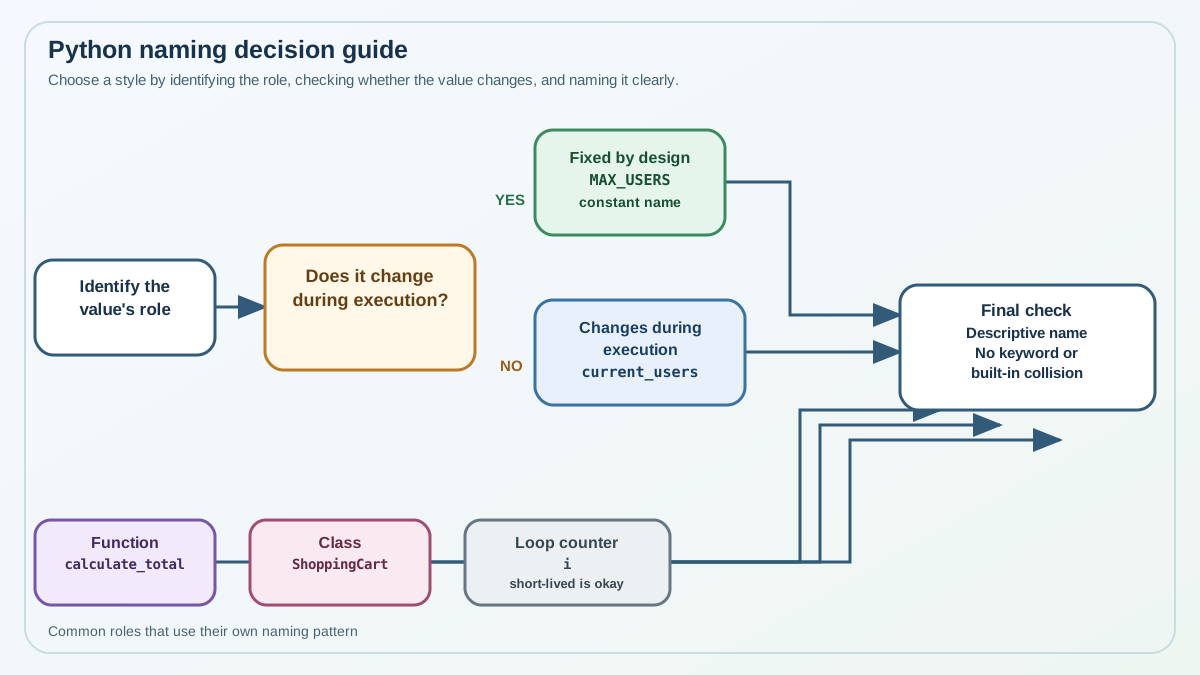
When you meet a new value, run it through one short process: identify the role, ask whether it changes, choose the style, then check for collisions.
Identify the role. Is this a fixed setting, a changing measurement, a function, or a throwaway loop counter? The role decides the style:
- Constants: all uppercase with underscores.
MAX_USERS,DEFAULT_TIMEOUT. - Variables and functions: lowercase with underscores (snake_case).
user_name,total_score,calculate_total. - Classes: each word capitalized with no underscores (CapWords), like
ShoppingCartorUserProfile. This article focuses on constants, variables, and functions, but knowing the class style keeps you from assuming every name is snake_case. - Temporary loop variables: short names are fine.
i,x, ortempwork inside a short loop, but not for data that matters.
Ask whether it changes. If the value is meant to stay fixed by design, uppercase it and treat it as a constant. If it moves as the program runs, lowercase it and let the name say what it does.
Choose a descriptive, not wordy, name. average_score beats a or score1, but average_score_for_all_completed_quizzes is too much. A name that forces you to stop and think is a name doing your debugging for you—in the wrong direction.
Check for collisions. Python draws a line between rules it enforces and conventions it merely recommends, and beginners often blur the two. That boundary is worth one careful look, because it produces the most confusing failure a beginner can hit.
Knowledge check
Check your understanding
Answer this question before you continue.
Enforced Rules vs. Conventions
Enforced rules: You cannot use Python keywords as variable names. for, if, while, and def are reserved by the language, and trying to use one raises a syntax error:
for = 5
  File "<stdin>", line 1
    for = 5
        ^
SyntaxError: invalid syntax
Conventions: Names like list and dict are not keywords. They're built-in names, and Python will let you assign to them. That runs without an error—until you need the real built-in and it's gone:
list = [1, 2, 3]
print(list("hello"))
Traceback (most recent call last):
  File "<stdin>", line 1, in <module>
TypeError: 'list' object is not callable
You just shadowed the built-in list with your own variable, so list("hello") no longer builds a list from a string. The repair is simple: rename your variable to something descriptive like items, and the built-in comes back.
items = [1, 2, 3]
print(list("hello"))
['h', 'e', 'l', 'l', 'o']
That is the practical rule: avoid shadowing built-ins even though Python allows it, because a descriptive name prevents a confusing failure you would otherwise have to debug.
Knowledge check
Check your understanding
Answer this question before you continue.
Make Naming a Habit
Naming conventions and clear constants aren't style for its own sake. They're a practical way to write code you can actually debug, share, and reuse. The decision rule is compact: if a value is meant to stay fixed by design, name it in uppercase and treat it as a constant; if it moves, name it in lowercase and let the name say what it does. Uppercase communicates intent—it never enforces it.
Next step: Take a small script you've already written and refactor it in one pass. Turn every fixed setting into an uppercase constant, rename any vague values into descriptive snake_case names, and replace any variable that shadows a built-in. Before you run it, read each name aloud and ask whether it tells you what the value does. After you step away for a while, come back and see how much faster you can follow your own code.
Knowledge check
Final check
Finish the article by checking the ideas you just learned.
References
Want a more structured Python path?
Use the Python Starter Pack to turn scattered tutorials into a focused practice path.
Python for Artificial Intelligence Starter Pack
Build a Python foundation you can actually use. The Python for AI Starter Pack brings together a guided path through setup, core programming concepts, data structures, files, JSON, APIs, debugging, and practical projects—so you can move quickly from running your first program to understanding and building useful software.
- 264-page illustrated PDF
- 12 guided Python chapters
- Visual concept diagrams
- Self-assessment quizzes
- Bonus deep-dive sections
- Files, JSON, APIs, debugging & projects
- Foundation for data, automation & AI
Coming soon


