
Python Context Managers: Use the with Statement to Manage Resources
Your script reads a file, does some work, and closes the file on the last line. Then an error shows up halfway through. The close() line never runs. The…

Key topics
Your script reads a file, does some work, and closes the file on the last line. Then an error shows up halfway through. The close() line never runs. The file handle stays open, and your program keeps going as if nothing happened — until it doesn't.
That is the real problem this article solves. Not "how do I remember to close files," but "how do I make cleanup impossible to skip."
You already know how to open, read, and write files with open() and close(). This article is about what happens between those two calls, and why Python gives you a better tool for the job.
Why close() Is Not Enough
Here is the pattern most beginners write first:
f = open("notes.txt")
data = f.read()
f.close()
This works when nothing goes wrong. The moment something does, the last line becomes optional.
f = open("notes.txt")
data = f.read()
result = 10 / 0   # something breaks here
f.close()         # this line never runs
The ZeroDivisionError stops execution before close() is reached. The file object still exists in memory, still holds an open handle to the operating system, and Python will not close it for you until the object is garbage collected — which may be much later, or never, if the program keeps running.
One leaked handle is invisible. A thousand is not. Every process has a limited number of file descriptors, and once you exhaust them, open() starts failing with an error like OSError: [Errno 24] Too many open files. A long-running script that opens files in a loop can hit this in seconds.
The manual fix is try / finally:
f = open("notes.txt")
try:
    data = f.read()
    result = 10 / 0
finally:
    f.close()
The finally block runs whether the try block succeeds, fails, or returns early. This is correct. It is also boilerplate you would have to write around every single resource — every file, every connection, every lock. Multiply that by a real script and the cleanup code starts to drown the actual work.
The goal is not to remember cleanup. The goal is to make cleanup automatic.
Your First with Statement
Here is the same file read, rewritten with the with statement:
with open("notes.txt") as f:
    data = f.read()
    print(data)
Save this as read_notes.py, create a small notes.txt next to it, and run it:
python read_notes.py
First line of notes.
Second line of notes.
Notice what is missing: there is no close() call anywhere. The file is still closed when the block ends. Python did it for you.
Two things are worth understanding here.
First, the as f part. The name after as receives whatever the context manager hands back. For open(), that is the file object — the same object you would have assigned with f = open(...). You use it exactly the same way inside the block.
Second, the indentation. Everything indented under the with line is the managed region. When execution leaves that region — by finishing normally, by raising an exception, by return, by break, or by continue — the cleanup runs.
That is the whole idea. The with statement does not just open the file. It guarantees the file gets closed.
Knowledge check
Check your understanding
Answer this question before you continue.
What Actually Happens Behind the with
There is no magic here, and that is the point. A context manager is just an object that defines two methods:
__enter__— runs when the block starts. Its return value is bound to the name afteras.__exit__— runs when the block ends, no matter how it ends.
When Python sees with something as x:, it does roughly this:
- Call
something.__enter__()and bind the result tox. - Run the block.
- Call
something.__exit__(...)on the way out.
The with statement is a cleaner spelling of try / finally. It is not a different behavior — it is the same guarantee with less ceremony.
The __exit__ method receives three arguments describing any exception that happened inside the block: the exception type, the exception value, and the traceback. If the block finished cleanly, all three are None. That is how a context manager knows whether it is exiting normally or cleaning up after a failure.
You do not need to write those methods yet. The next sections show what they do in practice, and later you will write your own.
Cleanup When Something Breaks
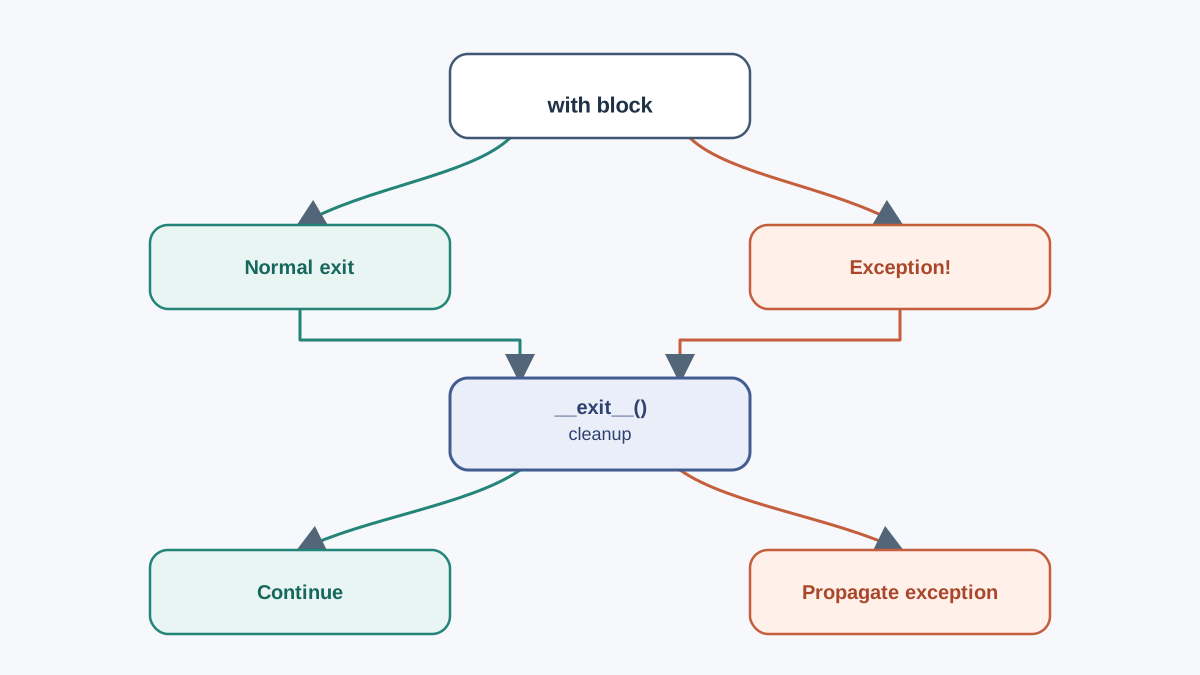
This is the claim worth proving. Let's break the block on purpose, but catch the error outside the with so we can observe what happened to the file:
try:
    with open("notes.txt") as f:
        data = f.read()
        f.this_method_does_not_exist()
        print("This line never runs")
except AttributeError as e:
    print("Caught:", e)

print("File closed:", f.closed)
python break_it.py
Caught: 'TextIOWrapper' object has no attribute 'this_method_does_not_exist'
File closed: True
The exception still propagated out of the with block — the except outside caught it. But look at the last line: File closed: True. The file was closed even though the block blew up. The __exit__ method ran on the way out, before the exception reached our except.
Note:
f.closedis a real attribute on file objects. It isTrueafter the file is closed andFalsewhile it is open. It is a handy way to verify cleanup in your own experiments.
The rule to remember: __exit__ runs on the way out regardless of success, exception, return, break, or continue.
There is one nuance worth knowing now, even though you will rarely use it as a beginner. If __exit__ returns a truthy value, Python treats the exception as handled and swallows it — execution continues after the with block as if nothing happened. That is occasionally useful in library code, but it is almost never what you want in your own scripts. Leave the return value alone and the exception propagates normally.
Knowledge check
Check your understanding
Answer this question before you continue.
The Mistake That Bites Beginners
Three mistakes show up again and again. All three are easy to fix once you can name them.
Mistake 1: Opening outside the with
f = open("notes.txt")       # opened here
with f:                     # managed here
    data = f.read()
This looks like it uses a context manager, but the file was already opened before the with line. If anything fails between open() and with, the handle leaks. The fix is to move the open() inside the with:
with open("notes.txt") as f:
    data = f.read()
The rule: the with statement should wrap the acquisition, not just the usage.
Knowledge check
Check your understanding
Answer this question before you continue.
Mistake 2: Using the file after the block
with open("notes.txt") as f:
    data = f.read()

print(f.read())   # ValueError: I/O operation on closed file
The file is closed the moment the block ends. Reading from it afterward raises ValueError: I/O operation on closed file. If you need the contents later, store them in a variable inside the block — which the example above already does with data.
Mistake 3: Catching the exception inside the block
with open("notes.txt") as f:
    try:
        data = f.read()
    except Exception as e:
        print("Something went wrong:", e)
This is not wrong, but it changes what you see. The exception is caught before it reaches __exit__, so __exit__ receives None for all three arguments and treats the exit as clean. Cleanup still happens — the file still closes — but if you were relying on __exit__ to log failures, it will not see them. For beginners, the simpler habit is to let exceptions propagate out of the with block and handle them outside.
Common mistake: Assuming the file object is still usable after the
withblock. It is not. If you need the data, read it inside the block and keep the result.
Managing More Than One Resource
Real scripts often need two files at once — read one, write another. You can open both in a single with statement, separated by a comma:
with open("input.txt") as infile, open("output.txt", "w") as outfile:
    for line in infile:
        outfile.write(line.upper())
python copy_upper.py
(no output — output.txt is written)
Both files are managed. If the loop raises an exception halfway through, both are closed. If you want to see the result, check output.txt — every line from input.txt will be there in uppercase.
Nested with blocks are equivalent and sometimes easier to read when there are many resources:
with open("input.txt") as infile:
    with open("output.txt", "w") as outfile:
        for line in infile:
            outfile.write(line.upper())
Python 3.10 and later also allow parenthesized grouping, which is handy when the resource list gets long:
with (
    open("input.txt") as infile,
    open("output.txt", "w") as outfile,
    open("log.txt", "a") as logfile,
):
    ...
If you are on an older Python version, use the comma form or nesting instead.
Knowledge check
Check your understanding
Answer this question before you continue.
Where Else You Will See This Pattern
The with statement is not a file-only trick. Any time a library offers with support, it is telling you: I know how to release this resource, and I will do it for you.
A few places you will meet it:
- Thread locks.
with lock:acquires the lock and releases it when the block ends. No manualrelease()that can be skipped if an exception fires. - Database connections and transactions. A connection context manager commits on success and rolls back on failure, then closes the connection.
- Temporary files and directories. The standard library offers context managers that clean up temporary files automatically when the block exits.
The shape to look for is always the same: acquire something scarce, use it, release it. If a library exposes a with interface, it is handling the release for you. That is your signal to use it instead of managing the resource by hand.
Writing Your Own Context Manager
You can build your own context manager with a small class. Here is the simplest useful version — one that prints when it enters and exits, so you can watch the call order:
class Tracer:
    def __enter__(self):
        print("Entering")
        return self

    def __exit__(self, exc_type, exc_value, traceback):
        print("Exiting")

with Tracer():
    print("Inside the block")
python tracer.py
Entering
Inside the block
Exiting
The order is exactly what the mechanism predicts: __enter__ runs first, the block runs, __exit__ runs last. The return self in __enter__ is what makes as useful — if you wrote with Tracer() as t:, then t would be the Tracer instance.
For simple setup-and-teardown, the contextlib module offers a shorter form using a decorator. The key detail is wrapping the yield in try / finally so the teardown still runs when the block raises:
from contextlib import contextmanager

@contextmanager
def tracer():
    print("Entering")
    try:
        yield
    finally:
        print("Exiting")

with tracer():
    print("Inside the block")
Entering
Inside the block
Exiting
The yield marks the point where the block runs. Everything before it is setup; everything after it is cleanup. Without the try / finally, an exception inside the block would skip the cleanup code entirely — which defeats the whole purpose of a context manager. The finally guarantees the teardown runs no matter how the block ends.
Which one should you reach for? Use the decorator when the setup and teardown are simple and you do not need to return a rich object. Use a class when you need to keep state, return something specific from __enter__, or inspect the exception details in __exit__.
What to Memorize and What to Look Up
You do not need to memorize the full context manager protocol. You need a small set of habits and a clear sense of what to look up later.
Memorize:
with open(...) as f:for every file operation. No exceptions.__exit__always runs, no matter how the block ends.- The acquire-use-release shape, so you recognize when a library is offering you a context manager.
Look up when you need it:
- The exact
__exit__signature and the exception-swallowing rule, when you write a custom one. contextlibhelpers beyond@contextmanager—closing,suppress,ExitStack— when a specific need appears.
The decision rule is simple: if a resource needs releasing, reach for with before reaching for try / finally. The with statement is the shorter, safer spelling of the same guarantee.
Practice: Make Your Own Script Safe
Take a script you have already written — one that opens a file, reads or writes it, and closes it manually. Rewrite it with with. The behavior should not change; the cleanup should just stop being your responsibility.
Then try these three tasks:
- Break it on purpose. Add a line inside the
withblock that raises an error, such as1 / 0. Run the script. Confirm the traceback appears and the file still closes. Checkf.closedafter the block if you want proof. - Open two files. Write a small script that reads one file and writes an uppercased copy to another, using a single
withstatement with twoopen()calls. - Write a tiny context manager. Use
@contextmanagerto build one that prints"Starting"before the block and"Done"after. Use it around aprint()call and confirm the order in the output.
Each task is small enough to finish in a few minutes, and each one exercises a different part of the mechanism: cleanup on failure, multiple resources, and authoring your own.
Once this pattern feels natural, the next place you will see it is CSV and JSON files. Both are opened with open(), both benefit from with, and both are worth learning next as you build up your file-handling toolkit.
Knowledge check
Final check
Finish the article by checking the ideas you just learned.
References
Want a more structured Python path?
Use the Python Starter Pack to turn scattered tutorials into a focused practice path.
Python for Artificial Intelligence Starter Pack
Build a Python foundation you can actually use. The Python for AI Starter Pack brings together a guided path through setup, core programming concepts, data structures, files, JSON, APIs, debugging, and practical projects—so you can move quickly from running your first program to understanding and building useful software.
- 264-page illustrated PDF
- 12 guided Python chapters
- Visual concept diagrams
- Self-assessment quizzes
- Bonus deep-dive sections
- Files, JSON, APIs, debugging & projects
- Foundation for data, automation & AI
Coming soon


