
Working with Dates and Times in Python
Here is the failure that teaches this lesson faster than any definition. You store a date as a string, then try to subtract it from today:

Key topics
A date is not text. It is a structured object wearing a text costume.
Here is the failure that teaches this lesson faster than any definition. You store a date as a string, then try to subtract it from today:
today = "2024-03-20"
birthday = "2024-03-15"
print(today - birthday)
TypeError: unsupported operand type(s) for -: 'str' and 'str'
Python refuses. And it is right to refuse. To Python, "2024-03-15" is not a date. It is a sequence of characters — the same kind of value as "hello". You cannot subtract one word from another, and you cannot subtract one date-string from another.
You already know strings and numbers from earlier basics. Dates are a third kind of value: they look like text, but they behave like a number. You can compare them, order them, and do arithmetic on them. The datetime module exists to give dates that structure.
By the end of this tutorial, you will create dates and times, parse them from strings, format them back, measure durations, compare moments, and know when time zones matter.
Why Dates Break as Plain Strings
A string date has no parts. Python cannot tell you the month of "2024-03-15" without you slicing characters and converting them yourself. Worse, it cannot tell you whether one date comes before another.
Try comparing two date strings:
print("2024-03-15" < "2024-03-20")
print("10/03/2024" < "03/10/2024")
True
False
The first line works by accident: ISO-style dates sort correctly as text because the year comes first. The second line is a trap. Is "10/03/2024" October 3rd or March 10th? You know your own convention. Python does not. It compares character by character and gives you an answer that means nothing.
The datetime module fixes this by giving dates real structure. Four classes do most of the work:
date— a calendar date: year, month, day.time— a time of day: hour, minute, second, microsecond.datetime— both together, a specific moment.timedelta— a duration, the difference between two moments.
They live in the datetime module, so you import them. The mental model to hold onto: a datetime object stores year, month, day, hour, minute, second, and microsecond as separate fields you can read, compare, and do math with. Text is only ever its costume.
Your First Runnable datetime Example
Let's get real output on screen. Create a file called dates.py:
from datetime import date, datetime

print(date.today())
print(datetime.now())
Run it:
python dates.py
2024-03-15
2024-03-15 14:30:45.123456
Your values will differ — they reflect the moment you ran the script. Notice the shape: date.today() gives you just the day, while datetime.now() gives you the day plus the time down to the microsecond.
Now read the parts. Each field is an attribute you can pull out:
from datetime import datetime

now = datetime.now()
print(now.year)
print(now.month)
print(now.day)
print(now.hour)
print(now.weekday())
2024
3
15
14
4
weekday() returns a number where 0 is Monday and 6 is Sunday. That off-by-one trips up beginners constantly, so file it away now.
You can also build a specific moment on purpose by passing the fields in order:
from datetime import datetime

new_years_eve = datetime(2024, 12, 31, 23, 59, 59)
print(new_years_eve)
2024-12-31 23:59:59
Note: The module is named
datetime, and one of its classes is also nameddatetime. That is why the common import line isfrom datetime import datetime— you are pulling the class out of the module so you can use it directly.
date, time, and datetime: Which One Do You Need?
The most common beginner confusion is picking the wrong class. The decision rule is simple: match the class to the meaning you actually have.
| Class | What it holds | Use it when | Beginner mistake |
|---|---|---|---|
date | Year, month, day | A birthday, a due date, a daily report | Using it for anything you will compare to a timestamp |
time | Hour, minute, second, microsecond | A daily alarm at 09:00, a store opening time | Using it when the calendar day matters too |
datetime | Date and time | A log entry, an API timestamp, an event | Using it when only the day matters |
timedelta | A duration | "30 minutes from now", "3 days between" | Confusing it with a point in time |
A time value is useful on its own when the calendar date is irrelevant. You build it the same way you build a datetime, just with clock fields only:
from datetime import time

opening = time(9, 0, 0)
closing = time(17, 30, 0)

print(opening)
print(closing)
print(opening < closing)
09:00:00
17:30:00
True
Notice there is no date anywhere in that output. A time answers "what time of day?" and nothing else. If you ever need to know which day that opening belongs to, you have picked the wrong class — reach for datetime instead.
A datetime can be split back into its parts when you need them:
from datetime import datetime

moment = datetime(2024, 3, 15, 14, 30, 45)
print(moment.date())
print(moment.time())
2024-03-15
14:30:45
When not to use date: if you will ever compare the value against a timestamp or convert it across time zones, use a datetime. A date has no time-of-day meaning, so it cannot answer "which came first?" when two events happen on the same day.
Parsing a Date String into a Real Date
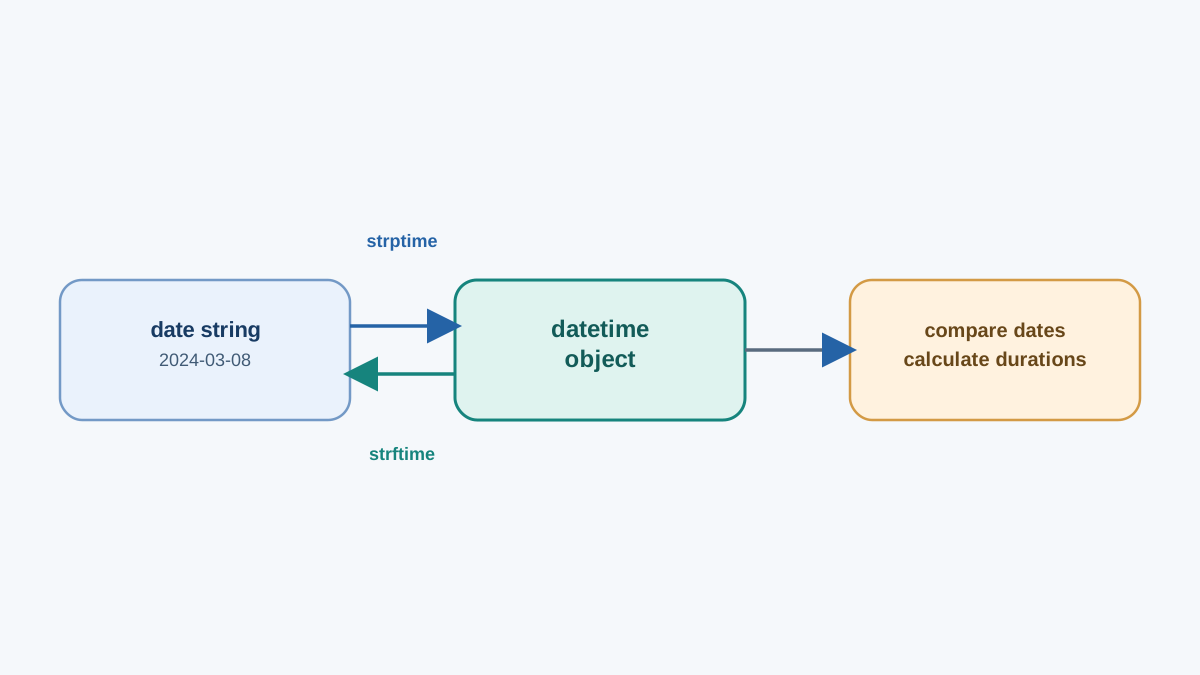
This is the single most common task you will face: you received a date as text — from a file, a form, or an API — and you need to work with it. The bridge from text to object is strptime.
strptime(string, format) takes the text and a format string, and returns a datetime. The format must match the input character for character. The format codes you need right now:
| Code | Meaning | Example |
|---|---|---|
%Y | Four-digit year | 2024 |
%m | Two-digit month | 03 |
%d | Two-digit day | 15 |
%H | Hour (24-hour) | 14 |
%M | Minute | 30 |
%S | Second | 45 |
%B | Full month name | March |
%A | Full weekday name | Friday |
Parse an ISO-style date:
from datetime import datetime

parsed = datetime.strptime("2024-03-15", "%Y-%m-%d")
print(parsed)
print(type(parsed))
2024-03-15 00:00:00
<class 'datetime.datetime'>
Parse a written date with a month name:
from datetime import datetime

parsed = datetime.strptime("25 December, 2022", "%d %B, %Y")
print(parsed)
2022-12-25 00:00:00
Notice the output is a real datetime object, not a string. That is the whole point — you can now compare it, do arithmetic on it, and format it however you like.
Common mistake: a mismatched format raises
ValueError: time data '...' does not match format '...'. When you see it, do not guess. Print the raw string and the format side by side, then fix one character at a time. The error is telling you exactly which position disagrees.
Knowledge check
Check your understanding
Answer this question before you continue.
Formatting a Date Back into a String
strftime is the reverse direction: it turns an object into text you control. Same object, many costumes:
from datetime import datetime

moment = datetime(2024, 3, 15, 14, 30, 45)
print(moment.strftime("%Y-%m-%d"))
print(moment.strftime("%d/%m/%Y"))
print(moment.strftime("%B %d, %Y"))
print(moment.strftime("%A, %B %d, %Y"))
2024-03-15
15/03/2024
March 15, 2024
Friday, March 15, 2024
The direction rule to memorize: strptime = string to object, strftime = object to string. One letter flips the direction.
When you need a machine-friendly, sortable string, use isoformat():
from datetime import datetime

moment = datetime(2024, 3, 15, 14, 30, 45)
print(moment.isoformat())
2024-03-15T14:30:45
ISO format sorts correctly as plain text, which makes it ideal for filenames. A file named report_2024-03-15.csv will sort in chronological order in any file browser — a small habit that saves real time when you have hundreds of dated files.
Knowledge check
Check your understanding
Answer this question before you continue.
Calculating Durations with timedelta
This is the payoff. Subtracting two datetime objects gives you a timedelta — a duration:
from datetime import datetime

start = datetime(2024, 3, 15, 9, 0, 0)
end = datetime(2024, 3, 15, 17, 30, 0)
duration = end - start

print(duration)
print(duration.total_seconds())
8:30:00
30600.0
You can also move a moment forward or backward by adding or subtracting a timedelta. Build the duration you mean instead of doing manual math:
from datetime import datetime, timedelta

meeting = datetime(2024, 3, 15, 15, 0, 0)
reminder = meeting - timedelta(minutes=30)
print(reminder)
2024-03-15 14:30:00
timedelta accepts weeks, days, hours, minutes, seconds, and more. This is where the object model earns its keep: measuring how long a script step took, or computing a due date from today, becomes one line instead of a pile of arithmetic.
Knowledge check
Check your understanding
Answer this question before you continue.
Comparing Dates and Times
Because dates are objects, comparison operators work directly on them. Python compares them chronologically:
from datetime import datetime

deadline = datetime(2024, 3, 20, 17, 0, 0)
now = datetime(2024, 3, 15, 14, 30, 0)

print(now < deadline)
print(now > deadline)
print(now == deadline)
True
False
False
This is the reason the object model matters. "Has the deadline passed?" is one comparison, not a string-parsing exercise.
Warning: comparing a naive
datetime(no time zone) to an aware one (with a time zone) raisesTypeError. That boundary is exactly where the next section begins. Also, do not compare adateobject to adatetimeobject and expect a meaningful result — convert first with.date().
Naive vs Aware: When Time Zones Matter
A naive datetime carries no time zone information. It is ambiguous — 14:30 in which part of the world? An aware datetime carries an offset and can be converted and compared safely across regions.
from datetime import datetime, timezone

print(datetime.now())
print(datetime.now(timezone.utc))
2024-03-15 14:30:45.123456
2024-03-15 18:30:45.123456+00:00
The first is naive. The second is aware — note the +00:00 offset.
Use aware values when the moment crosses machines, servers, users, or regions: logs, APIs, scheduled jobs, anything stored for later. Use naive values when the time is local and self-contained — a reminder for "9 AM tomorrow" on your own laptop.
That is the boundary for today. When you need named time zones like America/New_York, the zoneinfo module handles it. That is the next step, not today's lesson.
Knowledge check
Check your understanding
Answer this question before you continue.
Practice: Build a Small Date Utility
Time to combine everything. Write a script that reads two date strings, parses both, prints the days between them, and prints the end date in a friendly format.
from datetime import datetime

start_string = "2024-03-01"
end_string = "2024-03-15"

start = datetime.strptime(start_string, "%Y-%m-%d")
end = datetime.strptime(end_string, "%Y-%m-%d")

days_between = end - start
print(f"Days between: {days_between.days}")
print(end.strftime("%A, %B %d, %Y"))
Days between: 14
Friday, March 15, 2024
For the parse step, use %Y-%m-%d. For the friendly output, %A, %B %d, %Y gives you the weekday, month name, day, and year.
A smaller drill to lock in the arithmetic: print today's date plus 30 days as an ISO string.
from datetime import datetime, timedelta

future = datetime.now() + timedelta(days=30)
print(future.isoformat())
If you want a real challenge, extend the first script to print a warning when the end date comes before the start date. That single check is the kind of guardrail that separates a script you trust from one you have to babysit.
What to Memorize and What to Look Up
Do not try to hold the whole module in your head. Hold the decisions, look up the details.
Memorize: the four class names, the import line, the strptime vs strftime direction rule, and that timedelta handles durations.
Look up: the full format-code table, time zone names, and edge cases like daylight saving transitions.
My rule when a format string fights back: print the raw string and the format side by side before changing any code. Nine times out of ten, the mismatch is visible the moment you stop guessing and start comparing.
Here is your next action. Take a CSV or log file you already have, parse its date column with strptime, and sort the rows chronologically. That one exercise turns today's syntax into a habit — and once local dates feel routine, timezone-aware handling is the natural next skill to add.
Knowledge check
Final check
Finish the article by checking the ideas you just learned.
References
Want a more structured Python path?
Use the Python Starter Pack to turn scattered tutorials into a focused practice path.
Python for Artificial Intelligence Starter Pack
Build a Python foundation you can actually use. The Python for AI Starter Pack brings together a guided path through setup, core programming concepts, data structures, files, JSON, APIs, debugging, and practical projects—so you can move quickly from running your first program to understanding and building useful software.
- 264-page illustrated PDF
- 12 guided Python chapters
- Visual concept diagrams
- Self-assessment quizzes
- Bonus deep-dive sections
- Files, JSON, APIs, debugging & projects
- Foundation for data, automation & AI
Coming soon


