
Python Decorators: Understand and Write a Simple Function Wrapper
You copy a snippet from a tutorial. It works. Then you notice a strange line sitting above the function you actually care about:

Key topics
You copy a snippet from a tutorial. It works. Then you notice a strange line sitting above the function you actually care about:
@timer
def clean_data(rows):
    ...
You delete the @timer line because you do not know what it does. The code still runs, but the timing output disappears. You just removed behavior you wanted, and you cannot explain why.
Here is the fix: that @ line is not magic. It is an assignment. Once you see the assignment, you can read any decorator, and you can write your own.
What the @ Line Actually Does
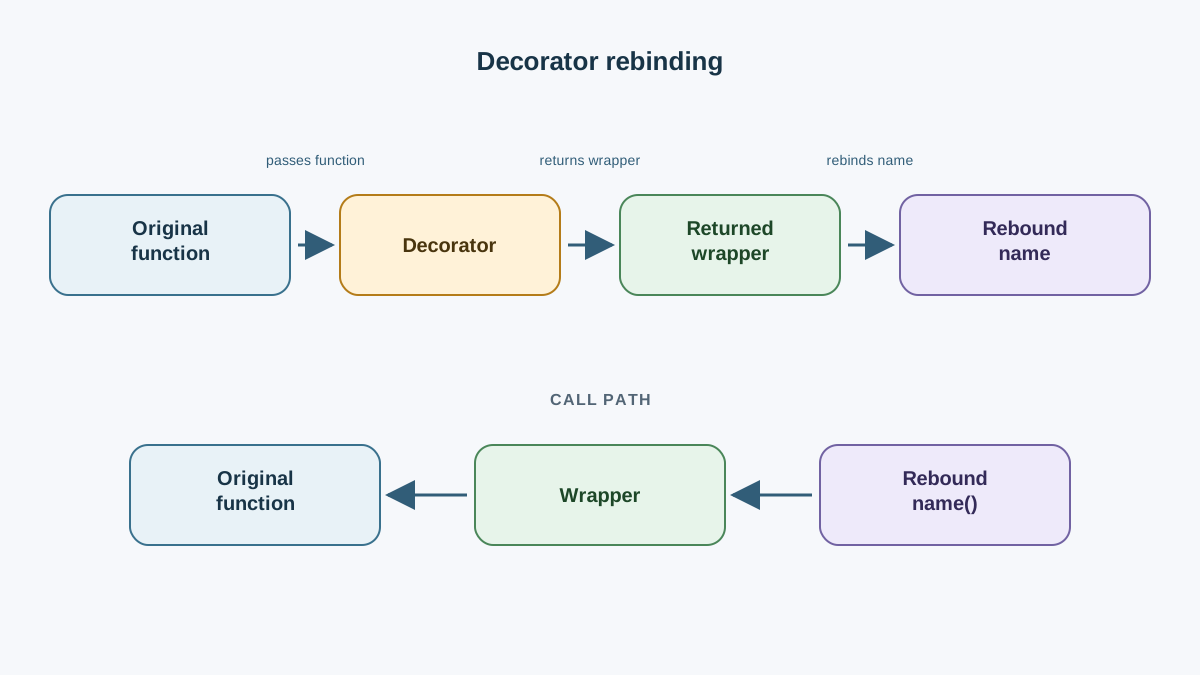
A decorator is a function that takes a function and returns a replacement function. That is the whole idea. Everything else is syntax and convention.
You already know how to define functions and return values. This article adds one layer: returning a function instead of a number or a string. That is possible because functions in Python are objects. You can pass them around, store them in variables, and return them from other functions.
So when you write this:
@decorator
def greet():
    print("Hello")
Python reads it as this:
def greet():
    print("Hello")

greet = decorator(greet)
The @decorator line runs decorator(greet), takes whatever comes back, and rebinds the name greet to that result. The original function object still exists, but the name greet now points at the replacement.
That rebinding is the mechanism. The @ symbol is just shorthand for it.
Note: The name is rebound after the function definition runs. By the time
decorator(greet)is called,greetis a normal function object, ready to be passed as an argument.
Knowledge check
Check your understanding
Answer this question before you continue.
Build a Tiny Wrapper in 10 Lines
Let's build the smallest useful decorator. Save this as log_demo.py:
def log_call(func):
    def wrapper():
        print("Before the call")
        func()
        print("After the call")
    return wrapper


@log_call
def say_hello():
    print("Hello from inside the function")


say_hello()
Run it:
python log_demo.py
Expected output:
Before the call
Hello from inside the function
After the call
Read the code carefully. log_call takes func. Inside it, wrapper is defined but not called. The function returns wrapper itself. Then the @log_call line rebinds say_hello to that returned wrapper.
When you call say_hello(), you are actually calling wrapper(). Inside wrapper, func() calls the original function.
The names func and wrapper are conventions, not keywords. You could call them original and inner. Pick names that make the code readable and stay consistent.
Tip: If you ever get confused by the
@syntax, delete it and write the explicit form:say_hello = log_call(say_hello). The behavior is identical, and the mechanism becomes visible.
Knowledge check
Check your understanding
Answer this question before you continue.
Why the Wrapper Needs *args and **kwargs
The wrapper above works only for functions that take no arguments. The moment you decorate def add(a, b), it breaks.
Try it:
def log_call(func):
    def wrapper():
        print("Before the call")
        func()
        print("After the call")
    return wrapper


@log_call
def add(a, b):
    return a + b


print(add(2, 3))
You get a traceback:
TypeError: wrapper() takes 0 positional arguments but 2 were given
The error is honest. wrapper accepts zero arguments, but add(2, 3) passes two. The wrapper is the function being called, so it must accept whatever the caller sends.
The fix is to forward any arguments through:
def log_call(func):
    def wrapper(*args, **kwargs):
        print("Before the call")
        result = func(*args, **kwargs)
        print("After the call")
        return result
    return wrapper


@log_call
def add(a, b):
    return a + b


print(add(2, 3))
Expected output:
Before the call
After the call
5
Two things changed. First, *args, **kwargs lets wrapper accept any signature. Second, return result preserves the original return value.
Common mistake: Forgetting
returninside the wrapper. Without it, the decorated function silently returnsNone. No error, no traceback, just a wrong result that shows up three functions later. If a decorated function suddenly returnsNone, check the wrapper first.
Knowledge check
Check your understanding
Answer this question before you continue.
A Practical Wrapper: Timing a Function
Now let's build something you would actually keep in a project. Timing a slow step is a real use case: you want to know how long a data cleanup or a file parse takes, without editing the function body.
Save this as timing_demo.py:
import time
import functools


def timer(func):
    @functools.wraps(func)
    def wrapper(*args, **kwargs):
        start = time.perf_counter()
        result = func(*args, **kwargs)
        elapsed = time.perf_counter() - start
        print(f"{func.__name__} took {elapsed:.4f} seconds")
        return result
    return wrapper


@timer
def slow_sum(n):
    total = 0
    for i in range(n):
        total += i
    return total


print(slow_sum(1_000_000))
Run it:
python timing_demo.py
Expected output (the timing value will vary):
slow_sum took 0.0312 seconds
499999500000
The decorator wraps slow_sum with a stopwatch. The function body is untouched. If you later want to time a different function, you add @timer above it and move on.
The functools.wraps(func) line is worth understanding. Without it, the wrapper replaces the original function's identity. Try this:
def timer(func):
    def wrapper(*args, **kwargs):
        return func(*args, **kwargs)
    return wrapper


@timer
def my_func():
    """Does something useful."""
    pass


print(my_func.__name__)
print(my_func.__doc__)
Expected output:
wrapper
None
The name and docstring are gone. They now belong to wrapper. That breaks debugging tools, help output, and anything that inspects function metadata.
Add @functools.wraps(func) above the inner wrapper, and the output becomes:
my_func
Does something useful.
functools.wraps copies the original function's metadata onto the wrapper. It is a one-line fix that prevents a class of confusing bugs. Use it in every decorator you write.
Knowledge check
Check your understanding
Answer this question before you continue.
Stacking Decorators and the Order Trap
You can apply more than one decorator to the same function:
@log_call
@timer
def process():
    ...
The order matters. Decorators apply bottom-up: the one closest to def runs first.
Here is the mapping:
| Written order | Execution order | Equivalent assignment |
|---|---|---|
@log_call then @timer | timer wraps first, then log_call wraps the result | process = log_call(timer(process)) |
@timer then @log_call | log_call wraps first, then timer wraps the result | process = timer(log_call(process)) |
Read the equivalent assignment from the inside out. The innermost call happens first. That is the decorator closest to def.
If you swap the order, the output changes. log_call prints before and after the call. timer measures the call. If log_call is on top, its "Before" and "After" prints are outside the timer, so they are not measured. If timer is on top, the log prints are inside the timed region.
Tip: When you are unsure about order, write the explicit assignment form.
process = log_call(timer(process))makes the nesting visible.
When a Plain Function Is the Better Choice
Decorators are not free. They add a layer between the caller and the function body. That layer is worth it when the same before/after behavior must apply to many functions. It is a cost when the behavior is used once.
Use a decorator when:
- The same wrapper logic applies to several functions (logging, timing, retrying, caching).
- The call site should stay clean and the wrapper is genuinely reusable.
- The behavior is orthogonal to the function's job, not part of it.
Skip the decorator when:
- The behavior is used once. A plain call inside the function is easier to read.
- The wrapper hides control flow that the reader needs to see.
- You are still learning the mechanism. Write the explicit
func = decorator(func)form first, then convert to@once it feels obvious.
There is also a debugging cost. When a decorated function raises an exception, the traceback points into wrapper, not the function you wrote. functools.wraps helps with metadata, but the stack frame is still the wrapper's. For a small project this is fine. For a function you are actively debugging, temporarily remove the decorator and test the raw function.
Warning: Do not decorate everything you touch. A decorator that is used once is usually a function call wearing a costume. Reach for it when the pattern repeats.
Practice: Write Your Own Wrapper
Here is a focused drill. Write a @count_calls decorator that prints how many times a function has been called.
Starter code:
import functools


def count_calls(func):
    # Your code here
    pass


@count_calls
def greet(name):
    print(f"Hello, {name}")


greet("Ana")
greet("Bo")
greet("Cy")
Expected behavior:
greet has been called 1 times
Hello, Ana
greet has been called 2 times
Hello, Bo
greet has been called 3 times
Hello, Cy
Hint: store the counter as an attribute on the wrapper function, or use a list or dictionary in the enclosing scope. The counter must survive between calls, so it cannot be a local variable inside wrapper.
Once it works, add @functools.wraps(func) above wrapper and confirm that greet.__name__ still returns "greet".
Where to Go Next
Read @name as func = name(func). That single line of translation covers almost every decorator you will meet.
Reach for a decorator when the same wrapper behavior must apply across several functions and the call site should stay clean. Otherwise, keep the plain function. A wrapper that is used once is usually just a function call in disguise.
Your next step: build a small decorators.py module with timer, log_call, and count_calls. Import it into a script and apply each one to a different function. That module becomes a reusable asset you can drop into any project, and writing it forces you to internalize the mechanism instead of copying snippets you do not understand.
Knowledge check
Final check
Finish the article by checking the ideas you just learned.
References
Want a more structured Python path?
Use the Python Starter Pack to turn scattered tutorials into a focused practice path.
Python for Artificial Intelligence Starter Pack
Build a Python foundation you can actually use. The Python for AI Starter Pack brings together a guided path through setup, core programming concepts, data structures, files, JSON, APIs, debugging, and practical projects—so you can move quickly from running your first program to understanding and building useful software.
- 264-page illustrated PDF
- 12 guided Python chapters
- Visual concept diagrams
- Self-assessment quizzes
- Bonus deep-dive sections
- Files, JSON, APIs, debugging & projects
- Foundation for data, automation & AI
Coming soon


