
Scope and Lifetime of Variables in Python
You write a function. It works perfectly. The variable inside it prints exactly what you expected. Then you try to use that same variable outside the…

Key topics
You write a function. It works perfectly. The variable inside it prints exactly what you expected. Then you try to use that same variable outside the function, and Python throws a NameError at you like you never created it.
This is not a bug in your code. It is Python's variable scope doing exactly what it is designed to do.
Scope answers one question: where can this name be seen? Lifetime answers another: how long does this value exist? Together, they decide which variables your code can read, which ones it can change, and which ones vanish when a function finishes.
Why Your Variable Disappeared
Look at this tiny function:
def greet():
    message = "Hello there!"
    print(message)

greet()
Hello there!
That works. Now try to print message after the function call:
def greet():
    message = "Hello there!"
    print(message)

greet()
print(message)
Hello there!
NameError: name 'message' is not defined
The first print works because it lives inside the function, right next to where message was created. The second print fails because it lives outside the function, where message does not exist.
Here is the mental model that makes this predictable: every function call creates a fresh workspace. Variables you create inside that workspace belong to it. When the function returns, that workspace closes and its names are no longer reachable.
Scope is the visibility rule. Lifetime is the duration rule. A local variable is visible only inside its function, and its name lives only as long as that function runs.
One nuance matters even at this stage: the name disappears, but the value can survive. If your function returns a value, that object keeps living in the caller's workspace. The local name was just the handle you used while the function ran.
Knowledge check
Check your understanding
Answer this question before you continue.
Local Variables: Yours Alone
A local variable is any variable you create inside a function body. It is visible only within that function.
def calculate_discount(price):
    discount = price * 0.1
    return discount

print(calculate_discount(100))
10.0
The variable discount exists while calculate_discount runs. Once the function returns its value, the name discount is gone. If you try to reference it later, Python will not recognize the name.
Each call also gets its own workspace. If you call calculate_discount twice, the two calls do not share their discount variables. Each call creates a fresh one, uses it, and discards it.
This is a feature, not a limitation. Local variables keep functions self-contained. You can write a function without worrying that its internal variables will collide with variables elsewhere in your program.
Global Variables: Visible Everywhere
A global variable is one you create outside any function, at the top level of your file. It lives for the entire run of your program and can be read from anywhere.
site_name = "LearnPyFast"

def show_site():
    print(site_name)

show_site()
print(site_name)
LearnPyFast
LearnPyFast
Notice that show_site reads site_name without any special keyword. Reading a global variable from inside a function is always allowed.
The trap appears when you try to change it.
visits = 0

def record_visit():
    visits = visits + 1

record_visit()
print(visits)
UnboundLocalError: cannot access local variable 'visits' where it is not associated with a value
Here is what happened: because you assigned to visits inside the function, Python decided that visits is a local variable for the entire function. The function then tried to read visits before giving it a value, which is why you get an error.
If you genuinely need to modify a global variable from inside a function, you must declare your intention with the global keyword:
visits = 0

def record_visit():
    global visits
    visits = visits + 1

record_visit()
record_visit()
print(visits)
2
The global line tells Python: "When I say visits in this function, I mean the global one, not a new local one."
Knowledge check
Check your understanding
Answer this question before you continue.
The Same Name, Two Variables
What happens when a local variable and a global variable share a name?
player = "global player"

def show_player():
    player = "local player"
    print(player)

show_player()
print(player)
local player
global player
Inside the function, the local player shadows the global one. Python sees a local variable with that name and uses it. Outside the function, the global player keeps its original value, untouched.
These are two separate variables that happen to share a name. The function never touched the global one.
My rule for beginners: give them different names. Relying on globals inside functions makes code harder to follow, because you can no longer tell which player you are looking at. If a function needs a value, pass it in as an argument. If it needs to produce a value, return it.
Knowledge check
Check your understanding
Answer this question before you continue.
Nonlocal: Nested Functions
Sometimes you define a function inside another function. Python calls the outer one the enclosing function, and variables from it live in the enclosing scope.
An inner function can read an outer function's variable without any keyword:
def outer():
    count = 1

    def inner():
        print(count)

    inner()

outer()
1
But if the inner function tries to assign to count, Python creates a new local variable inside inner instead of changing the outer one. That is the same rule you saw with globals, just one level down.
To modify the outer function's variable, use the nonlocal keyword:
def outer():
    count = 1

    def inner():
        nonlocal count
        count = count + 1

    inner()
    print(count)

outer()
2
Nested functions are less common in beginner code, but you will recognize them when you see them. The pattern matters because it is the same mechanism as global, applied to the enclosing function instead of the module level.
Knowledge check
Check your understanding
Answer this question before you continue.
The Lookup Order: Local, Enclosing, Global, Built-in
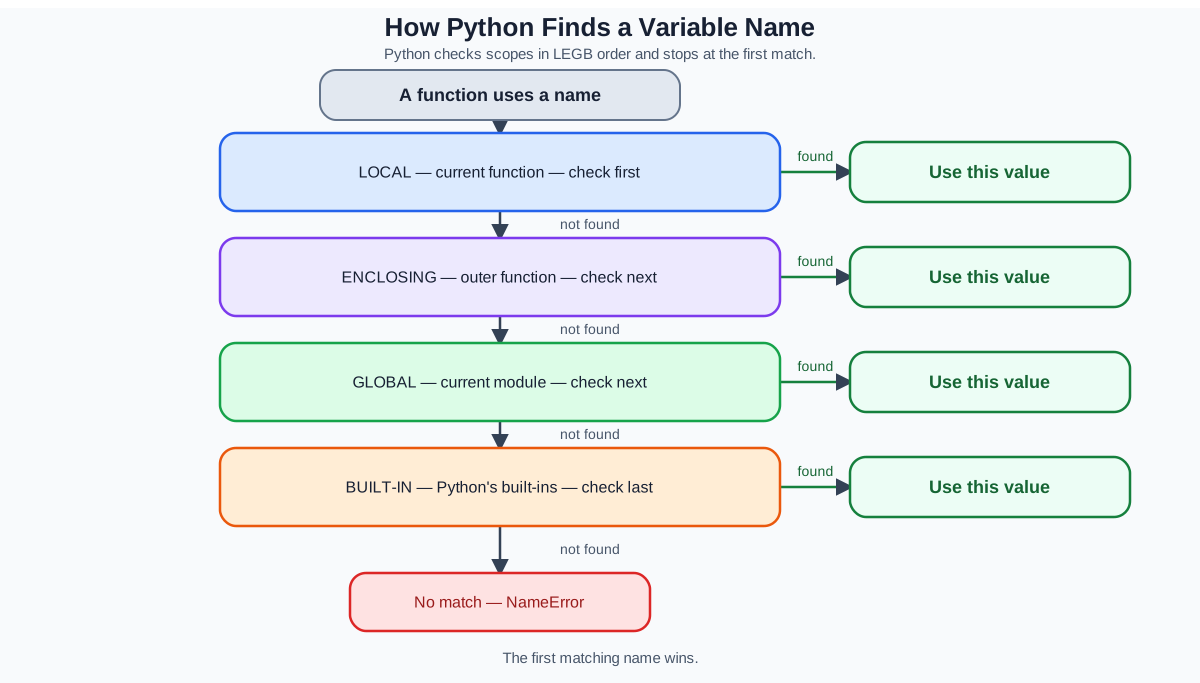
When Python sees a name, it does not guess which variable you mean. It checks scopes in a fixed order until it finds a match:
- Local — inside the current function
- Enclosing — any outer functions that contain the current one
- Global — the top level of your file
- Built-in — Python's built-in names like
printandlen
This order is easy to remember as LEGB.
value = "global"

def outer():
    value = "enclosing"

    def inner():
        value = "local"
        print(value)

    inner()

outer()
local
Python found value in the local scope first and stopped looking. Remove the local assignment, and it would find the enclosing one. Remove that, and it would find the global one.
This is the rule that predicts which variable your code actually sees. When you are confused about why a value looks wrong, walk the LEGB order and ask which scope Python stopped at.
Common Mistakes and How to Recover
Three errors show up constantly when beginners first wrestle with scope.
The UnboundLocalError. You assign to a name inside a function, then try to read it before the assignment runs. Python treats the name as local for the whole function, so the read fails.
def broken():
    print(total)
    total = 5
The fix: assign the variable before you read it, or use global if you meant the global one.
The NameError from a local variable. You create a variable inside a function and try to use it outside. The variable no longer exists. The fix: return the value from the function and capture it.
The silent bug. You assign to a name inside a function, expecting to update a global, but Python quietly creates a local copy instead. The global never changes, and nothing tells you. The fix: check whether you meant to read or modify, and use global only when modification is truly what you want.
When a variable misbehaves, ask two questions. Which scope does it live in? Did I mean to read it or change it? Most scope bugs answer themselves once you ask both.
Where Scope Shows Up in Real Code
Scope is not an abstract rule for passing quizzes. It shapes how real programs are organized.
Configuration values and constants often live at the global level, because many functions need to read them. Working data inside functions stays local, because it is temporary and belongs to that specific operation.
tax_rate = 0.08

def calculate_total(price):
    tax = price * tax_rate
    return price + tax
Here tax_rate is global because many functions might need to read it. tax is local because it is an intermediate value that only matters during the calculation.
Notice the design judgment hiding in this example: calculate_total reads tax_rate but does not change it. That keeps the global dependency visible and safe. The moment a function starts modifying a global, you lose that safety. Prefer passing values in and returning results out whenever you can.
This separation is what keeps functions reusable. A function that depends only on its arguments and its own local variables can be moved, tested, and debugged in isolation. A function that secretly depends on global state is harder to reason about, because you can no longer tell what it needs just by looking at its inputs.
The same global-scope idea powers modules and imports. When you import a module, its top-level names become available through that module's namespace. That is the next natural step after you feel comfortable with scope inside a single file.
Your Next Experiment
Run this small experiment to make the mechanism visible. The first function is supposed to fail, so do not treat the error as a surprise.
counter = 0

def actually_increment():
    global counter
    counter = counter + 1

actually_increment()
print(counter)
1
Now see what happens without the global keyword:
counter = 0

def try_to_increment():
    counter = counter + 1

try_to_increment()
print(counter)
UnboundLocalError: cannot access local variable 'counter' where it is not associated with a value
The second function fails because it tries to modify a global without permission. The first works because global declares the intent. Run both versions yourself, predict each outcome before you execute, and compare the error messages.
Once you can predict which function succeeds and which one errors, you understand the core of Python variable scope.
From here, the natural next step is learning how to pass values into functions and get results back out. Arguments and return values are the clean way to move data across scope boundaries, and they will let you write functions that do not need global at all.
Knowledge check
Final check
Finish the article by checking the ideas you just learned.
References
Want a more structured Python path?
Use the Python Starter Pack to turn scattered tutorials into a focused practice path.
Python for Artificial Intelligence Starter Pack
Build a Python foundation you can actually use. The Python for AI Starter Pack brings together a guided path through setup, core programming concepts, data structures, files, JSON, APIs, debugging, and practical projects—so you can move quickly from running your first program to understanding and building useful software.
- 264-page illustrated PDF
- 12 guided Python chapters
- Visual concept diagrams
- Self-assessment quizzes
- Bonus deep-dive sections
- Files, JSON, APIs, debugging & projects
- Foundation for data, automation & AI
Coming soon


