
Python Lists vs Dictionaries: Which Should You Use?
You have a handful of related values and a small script to write. Should they go in a list or a dictionary? Both can hold a group of items, so the…

You have a handful of related values and a small script to write. Should they go in a list or a dictionary? Both can hold a group of items, so the confusion is fair. But "which container is better?" is the wrong question. The real question is: how do you want to look your data up?
A list answers "what is at position N?" A dictionary answers "what goes with this label?" Once you see that difference, choosing between them becomes almost automatic.
The Real Question Isn't Which Is Better
Lists and dictionaries both store collections of values. That shared job is why beginners reach for either one without a clear reason. But they organize data in fundamentally different ways, and that difference decides which one fits your task.
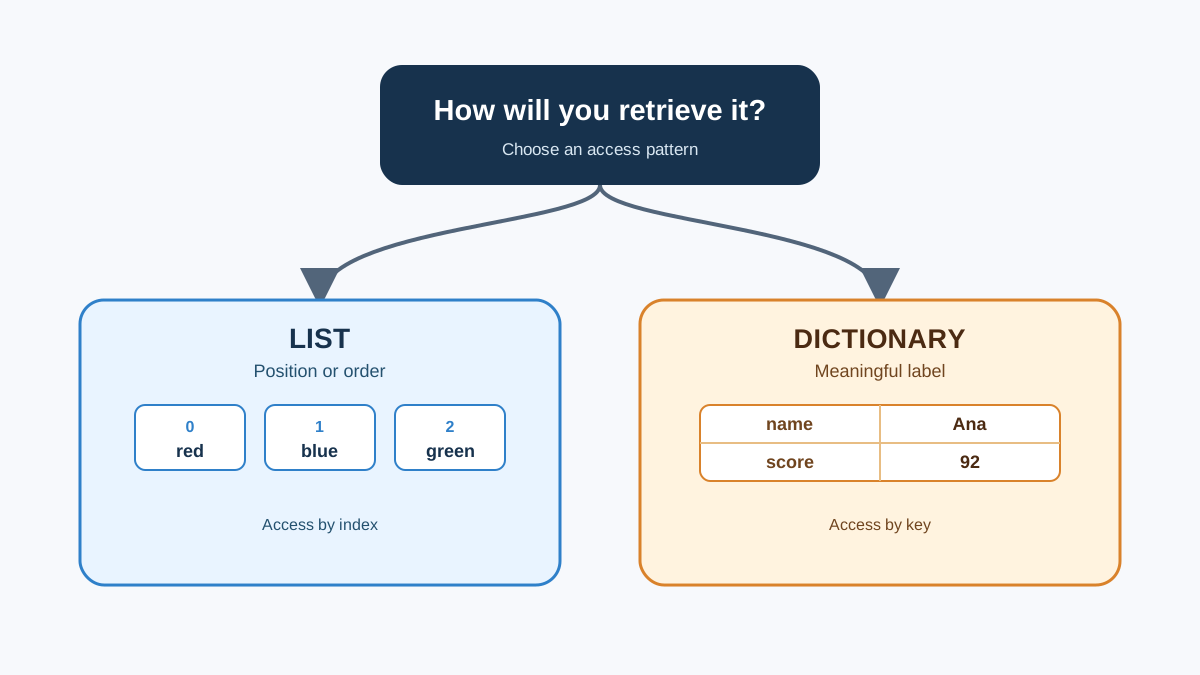
Think of a list as an ordered sequence. You reach items by their position, called an index. The first item is at index 0, the second at index 1, and so on.
A dictionary works differently. It maps unique labels, called keys, to values. You reach data by meaning, not by position. Instead of asking "what is the third item?", you ask "what is the score for this student's name?"
Here is the difference in miniature:
# A list of names, accessed by position
names = ["Maya", "Leo", "Zara"]
print(names[0])

# A dictionary mapping names to scores, accessed by key
scores = {"Maya": 92, "Leo": 85, "Zara": 88}
print(scores["Maya"])
Output:
Maya
92
Both store related data. But the list hands you the first name, while the dictionary hands you Maya's score directly. That is the entire decision in one glance.
What a List Is Good At
A list keeps items in the order you add them. That order is the point. You can reach any item by its index, and you can store duplicate values without a problem.
Lists shine when order or repetition matters. A queue of tasks, a history of steps, a sequence of events — these are natural lists because their meaning comes from their position and their order.
tasks = ["write report", "email client", "review code"]
print(tasks[0])
print(tasks[-1])
Output:
write report
email client
Notice what the list gives you: the first task and the last task, purely by position. You did not need to know anything about the tasks themselves. You just needed to know where they sat in line.
Here, the important point is the pattern: lists are for ordered collections where position carries meaning.
Knowledge check
Check your understanding
Answer this question before you continue.
What a Dictionary Is Good At
A dictionary pairs each unique key with a value. The key is a label that means something to you — a username, an ID, a product code. The value can be anything, including another list.
Keys must be unique and must be an immutable type, which means they cannot change after creation. Strings, numbers, and tuples work as keys. Lists do not, because lists can be modified. Values, on the other hand, have no such restriction.
product_prices = {"laptop": 1200, "mouse": 25, "keyboard": 80}
print(product_prices["laptop"])
Output:
1200
The dictionary answers a question the list cannot answer directly: "What does this label point to?" You do not scan through positions. You hand Python the key, and Python hands you the value.
What matters for this comparison is the retrieval pattern: dictionaries are for labeled data where you look things up by meaning.
Knowledge check
Check your understanding
Answer this question before you continue.
Lists vs Dictionaries: Side by Side
When the two structures sit next to each other, the differences become easy to scan:
| List | Dictionary | |
|---|---|---|
| How you access items | By index position (0, 1, 2...) | By a unique key (a name, ID, or label) |
| Does order matter? | Yes, order is preserved and meaningful | Order is preserved, but you usually do not care about it |
| Can values repeat? | Yes, duplicates are allowed | Keys cannot repeat; values can |
| What can the key be? | Only integers (the index) | Any immutable type: strings, numbers, tuples |
| Typical use | A sequence of steps, tasks, or events | A mapping, like a name to a score or a code to a price |
Both structures are mutable, meaning you can add, change, and remove items after creation. So mutability is not the deciding factor. The deciding factor is how you retrieve data.
Here is a rule of thumb that catches most beginner mistakes: if you find yourself repeatedly searching a list to match a value with its label, you probably wanted a dictionary.
A Small Example: Choosing the Right Structure
Let us put the rule to work. Suppose you are storing student scores for a small class. You need to look up one student's score by name.
Here is the same data stored both ways, including the direct dictionary lookup:
# As a list of scores
scores_list = [92, 85, 88]

# As a dictionary mapping names to scores
scores_dict = {"Maya": 92, "Leo": 85, "Zara": 88}
print(scores_dict["Leo"])
Now ask yourself: what does the task actually need?
If you need to look up a score by a student's name, the list version forces you to remember that Maya is index 0, Leo is index 1, and Zara is index 2. That works until you add a student, remove one, or simply forget the order. The dictionary version gives you the answer directly, as the lookup in the example above shows.
Output:
85
If you only needed the scores in order — say, to print them from highest to lowest — a list would work fine. But the moment your lookup is "give me the score for this specific person," the dictionary is the natural fit.
Knowledge check
Check your understanding
Answer this question before you continue.
Why Updating Makes the Dictionary Shine
The difference becomes even clearer when data changes. Imagine a new student joins the class, or a score needs correcting. With a dictionary, each label and its value travel together:
scores = {"Maya": 92, "Leo": 85, "Zara": 88}

# A new student arrives
scores["Ivy"] = 90

# Leo retakes the test
scores["Leo"] = 91

print(scores)
Output:
{'Maya': 92, 'Leo': 91, 'Zara': 88, 'Ivy': 90}
One structure holds every name-to-score relationship. You update one entry, and the connection stays intact.
Now try the same changes with parallel lists:
names = ["Maya", "Leo", "Zara"]
scores = [92, 85, 88]

# A new student arrives
names.append("Ivy")
scores.append(90)

# Leo retakes the test
# Find Leo's position, then update the matching score
leo_index = names.index("Leo")
scores[leo_index] = 91

print(names)
print(scores)
Output:
['Maya', 'Leo', 'Zara', 'Ivy']
[92, 91, 88, 90]
It works, but you had to keep two lists in sync. Add a student and you must update both lists. Remove one and you must remember to remove both entries. Miss one update, and names and scores fall out of alignment — Maya might suddenly appear to have Leo's score.
That is the practical cost of using lists for labeled data. Every change becomes a coordinated edit across multiple containers. The dictionary keeps each label bound to its value, so one update is all you need.
Knowledge check
Check your understanding
Answer this question before you continue.
Common Beginner Mistake: Searching a List by Value
The most frequent mistake beginners make is storing labeled data in a list and then writing a loop to find one item. It is a normal instinct, and the fix is a quick mental check, not a deep concept.
Here is the awkward pattern. You have a list of names and a list of scores, and you want Maya's score:
names = ["Maya", "Leo", "Zara"]
scores = [92, 85, 88]

for i in range(len(names)):
    if names[i] == "Maya":
        print(scores[i])
Output:
92
That works, but look at what you had to write. You looped through every name, checked each one, and then used the matching position to pull the score from a second list. It is easy to make a mistake, and it is hard to read.
Now the dictionary version:
scores = {"Maya": 92, "Leo": 85, "Zara": 88}
print(scores["Maya"])
Output:
92
One line. No loop. No index tracking. The dictionary version is shorter, easier to read, and does not require you to write a search loop at all.
Reaching for a list first is a normal beginner instinct because lists feel simpler. But when your data has labels, the dictionary is the tool that matches the way you actually think about the data.
Note: This rule applies when you need to retrieve a value by a stable label, over and over. If you just need to check whether an item exists in a sequence, or scan through items once in order, a list is still the right tool. The problem is not searching a list. The problem is using a list to do a dictionary's job.
When to Use a List, When to Use a Dictionary
Here is the durable rule you can apply immediately:
Use a list when order matters, when you need position-based access, or when duplicates are meaningful. A to-do sequence, a log of events, a history of page visits — these are lists because their position in line is part of their meaning.
Use a dictionary when each value belongs to a unique label and you will look it up by that label. A username pointing to a profile, a product code pointing to a price, a student name pointing to a score — these are dictionaries because you retrieve by meaning, not by position.
Use a list when you will mostly add to the end and iterate through everything in order. Lists are built for that workflow.
Use a dictionary when you will frequently fetch one specific value by name. The dictionary gives you that value directly, without a search loop.
The whole comparison collapses into one question: when you retrieve data, do you know its position or its label?
If you know the position, use a list. If you know the label, use a dictionary.
Your Next Step
Pick a small piece of data you already work with. Maybe it is a list of names, a set of scores, or a collection of product prices. Store it in the other structure — if it was a list, make it a dictionary, and vice versa. Then decide which version reads more naturally for the lookup you actually need.
You will probably find that one version feels forced and the other feels obvious. That feeling is your decision rule in action.
Once you have chosen your structure, the natural next step is learning how to sort and filter the data inside it. That is exactly what the sorting and filtering article covers, and it works with both lists and dictionaries.
Knowledge check
Final check
Finish the article by checking the ideas you just learned.
References
Want a more structured Python path?
Use the Python Starter Pack to turn scattered tutorials into a focused practice path.
Python for Artificial Intelligence Starter Pack
Build a Python foundation you can actually use. The Python for AI Starter Pack brings together a guided path through setup, core programming concepts, data structures, files, JSON, APIs, debugging, and practical projects—so you can move quickly from running your first program to understanding and building useful software.
- 264-page illustrated PDF
- 12 guided Python chapters
- Visual concept diagrams
- Self-assessment quizzes
- Bonus deep-dive sections
- Files, JSON, APIs, debugging & projects
- Foundation for data, automation & AI
Coming soon


