
Python Operators Explained: Arithmetic, Assignment, and More
An operator is how you tell Python to act on a value: add it, compare it, store it, or test whether it belongs somewhere. Most beginner bugs are not syntax…

Key topics
An operator is how you tell Python to act on a value: add it, compare it, store it, or test whether it belongs somewhere. Most beginner bugs are not syntax errors—they are operators doing something different from what you assumed. Learn what each one actually does, and the code stops surprising you.
Why Operators Matter
Operators are the verbs of your program. Numbers and variables are the nouns; operators are what make them move, combine, and decide. Every script you write—from a calculator to a login check—is mostly operators doing their job.
If how Python stores values or handles basic arithmetic is still unfamiliar, review those fundamentals first.
What Are Operators and Operands?
An operator is a symbol that tells Python to perform an action on one or more values. The values the operator acts on are called operands.
result = 3 + 2
Here, + is the operator, and 3 and 2 are the operands. Python evaluates the expression and stores the outcome in result.
A Map of the Operator Families
Before the details, here is the mental model I want you to keep. Each operator family answers one question about your data:
| Family | Question it answers | Example |
|---|---|---|
| Arithmetic | How do I calculate a value? | 7 // 2 |
| Assignment | How do I store or update a value? | count += 1 |
| Comparison | How do two values relate? | age >= 18 |
| Logical | How do I combine conditions? | age >= 18 and has_id |
| Membership | Does a value belong in a collection? | 'banana' in fruits |
| Identity | Do two names point to the same object? | a is b |
| Bitwise | How do I work with the bits of an integer? | flags | 1 |
This article covers the major operator families beginners reach for every day. Python has a few more specialized operators—like sequence repetition, conditional expressions, and the assignment expression :=—that you will meet later. Do not worry about them now. When you hit a line of code you do not understand, ask which question it answers. That single habit turns a wall of symbols into a small set of recognizable jobs.
Arithmetic Operators: Doing Math
Arithmetic operators perform mathematical operations. Here is the full arithmetic set:
| Operator | Name | Example | Result |
|---|---|---|---|
+ | Addition | 2 + 3 | 5 |
- | Subtraction | 5 - 2 | 3 |
* | Multiplication | 4 * 2 | 8 |
/ | Division | 7 / 2 | 3.5 |
// | Floor division | 7 // 2 | 3 |
% | Modulo | 7 % 2 | 1 |
** | Exponentiation | 2 ** 3 | 8 |
Run them and watch the output:
print(2 + 3)
print(5 - 2)
print(4 * 2)
print(7 / 2)
print(7 // 2)
print(7 % 2)
print(2 ** 3)
5
3
8
3.5
3
1
8
Three of these trip up beginners more than the rest:
/always returns a float, even when the result is a whole number.4 / 2gives2.0, not2.//returns the floor of the division—the result rounded down to the nearest whole number.%returns the remainder, which makes it perfect for checking even and odd numbers.
Common mistake
Do not reach for / when you want a whole number. 7 / 2 gives 3.5; 7 // 2 gives 3. And if you want the remainder, use %, not //.
Also, do not think of // as "just dropping the decimal." Floor division rounds down toward negative infinity, not toward zero. That difference only shows up with negative numbers:
print(-7 // 2)
-4
-7 / 2 is -3.5, and flooring it rounds down to -4, not up to -3. For positive numbers the two ideas agree, which is why the shortcut feels right until a negative sneaks in.
Knowledge check
Check your understanding
Answer this question before you continue.
Assignment Operators: Storing and Updating Values
Assignment operators put values into variables. The basic one is =:
score = 10
print(score)
10
Compound assignment operators perform an operation and assign the result back to the variable, saving you from repeating the variable name:
+=adds to the variable-=subtracts*=multiplies/=divides//=floor divides%=keeps the remainder**=raises to a power
count = 5
count += 3  # Same as: count = count + 3
print(count)
8
Common mistake
= assigns a value; == compares two values. Writing if x = 5: raises an error because Python expects a comparison there. Use if x == 5: to check equality. This is the single most common operator slip, so keep it in mind as you move into comparisons.
Knowledge check
Check your understanding
Answer this question before you continue.
Comparison Operators: Checking Values
Comparison operators test how two values relate and always return True or False.
| Operator | Meaning | Example | Result |
|---|---|---|---|
== | Equal to | 5 == 5 | True |
!= | Not equal to | 5 != 3 | True |
< | Less than | 3 < 5 | True |
> | Greater than | 5 > 3 | True |
<= | Less than or equal to | 3 <= 3 | True |
>= | Greater than or equal to | 5 >= 6 | False |
a = 7
b = 5
print(a == b)
print(a != b)
print(a > b)
print(a < b)
print(a >= b)
print(a <= b)
False
True
True
False
True
False
Logical Operators: Combining Conditions
Logical operators combine comparisons into a single condition:
andisTrueonly when both sides areTrueorisTruewhen at least one side isTruenotflips aTruetoFalseand vice versa
age = 20
has_id = True

print(age >= 18 and has_id)
print(age < 18 or has_id)
print(not has_id)
True
True
False
You will use these constantly inside if statements to check several things at once, like whether a user is old enough and has the required permission.
Knowledge check
Check your understanding
Answer this question before you continue.
Membership and Identity Operators
Two more operator families handle collections and object identity.
Membership Operators
in and not in test whether a value appears inside a collection such as a list, string, or dictionary.
fruits = ['apple', 'banana', 'cherry']
print('banana' in fruits)
print('orange' not in fruits)
True
True
Identity Operators
is and is not check whether two variables point to the exact same object in memory—not whether they hold equal values.
a = [1, 2, 3]
b = a
c = [1, 2, 3]

print(a is b)
print(a is c)
True
False
a is b is True because b points to the same list as a. a is c is False because c is a separate list that merely looks identical.
Knowledge check
Check your understanding
Answer this question before you continue.
Common mistake
Use == to compare values and is only when you genuinely care whether two names refer to the same object. Beginners often use is for value checks and get surprising results.
Bitwise Operators: Working with Bits
Bitwise operators act on the individual bits of an integer. They are the least common family in everyday beginner code, so you can safely skim this section and return when you need bit-level work.
| Operator | Name | Example | Result |
|---|---|---|---|
& | Bitwise AND | 5 & 3 | 1 |
| | Bitwise OR | 5 | 3 | 7 |
^ | Bitwise XOR | 5 ^ 3 | 6 |
~ | Bitwise NOT | ~5 | -6 |
<< | Left shift | 1 << 3 | 8 |
>> | Right shift | 8 >> 2 | 2 |
A quick example shows the idea. 5 in binary is 101, and 3 is 011. The & operator compares each bit and keeps a 1 only where both numbers have one:
print(5 & 3)
print(5 | 3)
print(1 << 3)
1
7
8
You will meet bitwise operators when you work with low-level data, file permissions, or compact flags. For most beginner programs, arithmetic and comparison operators do the job. The point of knowing the family exists is that a line like flags & 1 stops looking like a typo.
Reading Mixed Expressions: Precedence and Parentheses
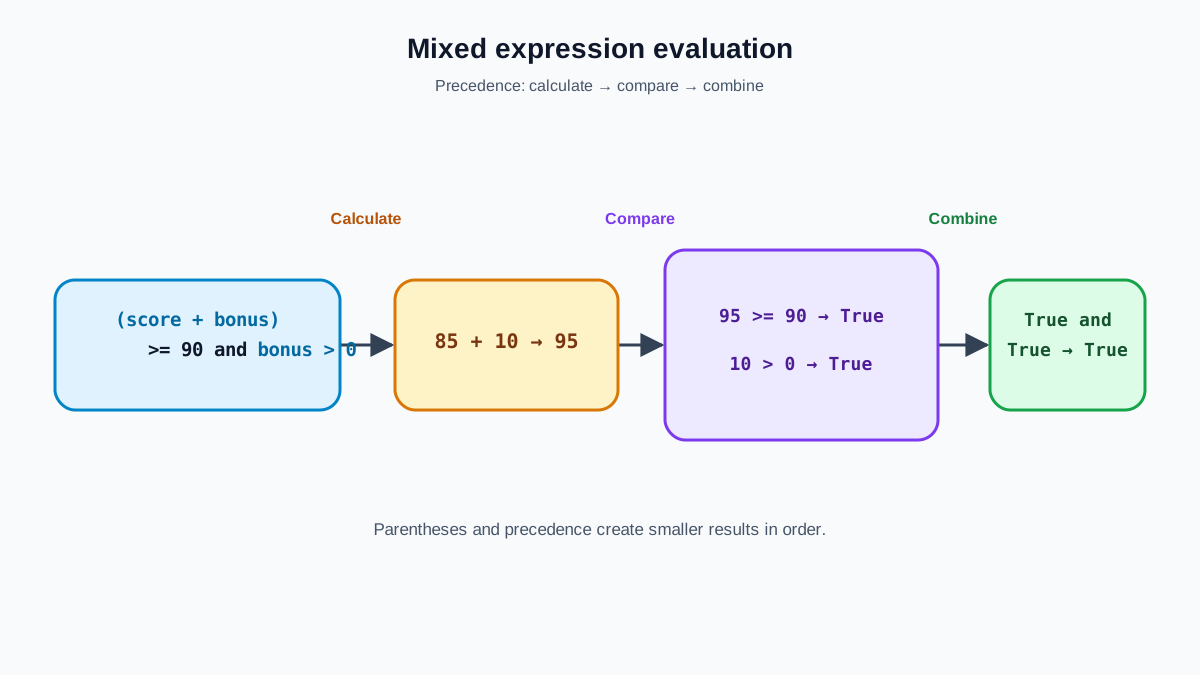
Once you combine several operator families in one line, order matters. Python does not simply read left to right. It follows a fixed precedence, and the ordering that matters most for beginners runs roughly like this:
- Parentheses
( ) - Exponentiation
** - Multiplication, division, floor division, modulo
* / // % - Addition and subtraction
+ - - Comparison operators
< <= > >= == != notandor
So multiplication happens before addition, and comparison happens before and. The safe move is to make your intent explicit with parentheses instead of relying on memory:
score = 85
bonus = 10
passed = (score + bonus) >= 90 and bonus > 0
print(passed)
True
The parentheses make it obvious that score + bonus is computed first, then compared, then combined with bonus > 0. When you read a confusing expression, add parentheses to force the grouping you mean. That is not a crutch—it is how you keep the code readable for the next person (including future you).
Common Beginner Mistakes with Operators
Beyond the = versus == slip you already saw, two mistakes cause most operator-related errors:
- Using
/when you meant//. One returns a float, the other a whole number. - Mixing incompatible types. Some operators refuse to combine certain types.
print("Score: " + 5)
This raises an error:
TypeError: can only concatenate str (not "int") to str
Convert the number to a string first:
print("Score: " + str(5))
Score: 5
Tip
When you see a TypeError or a message about "unsupported operand type(s)", the operator is fine—the types are not. Check what you are combining and convert one side if needed.
One Script That Uses Them All
Here is a small, runnable program that puts the operator map to work. It checks whether a player qualifies for a bonus round:
score = 85
level = 3
unlocked = ['level_2', 'level_3']

score += 10  # assignment + arithmetic
qualified = score >= 90 and level >= 3  # comparison + logical
has_bonus = 'level_3' in unlocked  # membership

print(qualified)
print(has_bonus)
True
True
Read it through the map: assignment updates the score, arithmetic computes, comparison and logical decide, membership checks the collection. Each operator answers one question, and together they produce a real decision.
What to Practice Next
The fastest way to learn python operators is to run them and watch the output change. Try these small drills:
- Write a script that takes two numbers and prints their sum, difference, product, and quotient.
- Use
%to report whether a number is even or odd. - Combine
andandorin anifstatement that checks multiple conditions at once.
Then make the operator model process changing data instead of fixed values. Take the bonus-round script and replace the hard-coded score with a value the user types in:
score = int(input("Enter your score: "))
level = 3
unlocked = ['level_2', 'level_3']

score += 10
qualified = score >= 90 and level >= 3
has_bonus = 'level_3' in unlocked

print(qualified)
print(has_bonus)
Run it a few times with different scores and watch the comparisons respond. When you can predict every line of output for a new input, you have turned the operator map from a list into a working mental model. From there, the natural next step is learning how to branch your code with if statements so those comparisons decide what your program does.
Knowledge check
Final check
Finish the article by checking the ideas you just learned.
References
Want a more structured Python path?
Use the Python Starter Pack to turn scattered tutorials into a focused practice path.
Python for Artificial Intelligence Starter Pack
Build a Python foundation you can actually use. The Python for AI Starter Pack brings together a guided path through setup, core programming concepts, data structures, files, JSON, APIs, debugging, and practical projects—so you can move quickly from running your first program to understanding and building useful software.
- 264-page illustrated PDF
- 12 guided Python chapters
- Visual concept diagrams
- Self-assessment quizzes
- Bonus deep-dive sections
- Files, JSON, APIs, debugging & projects
- Foundation for data, automation & AI
Coming soon


