
Using Built-in Python Functions: A Beginner's Guide
Python ships with a toolbox of ready-made functions. You call them, they do the job, and you move on. No imports. No setup. Just a name, some parentheses,…

Python ships with a toolbox of ready-made functions. You call them, they do the job, and you move on. No imports. No setup. Just a name, some parentheses, and the right input.
These are Python's built-in functions, and they're one of the fastest ways to write less code and make fewer mistakes.
What Are Built-in Functions?
A function is a named action you can call. You give it an input, and it returns a result. Python already provides many of these actions for you, so you don't have to write them yourself.
Built-in functions are available the moment you run a Python program. You've been using them since your first script. Remember print()? That's a built-in function. So is type(), which tells you what kind of value you're working with: print(type(42)) returns <class 'int'>.
Think of it like a workshop. When you write your own functions, you're building custom tools. Built-in functions are the tools already hanging on the wall, ready for the everyday jobs nearly every program needs.
Knowledge check
Check your understanding
Answer this question before you continue.
Why Built-ins Save You Time
Here's the practical payoff: built-in functions turn several lines of hand-written code into a single call.
Imagine you have a list of test scores and you want to find the highest one. Without built-ins, you'd write a loop and track the highest value yourself. Put that next to the built-in version and the difference is obvious:
scores = [72, 85, 91, 68, 88]

# Manual version
highest = scores[0]
for score in scores:
    if score > highest:
        highest = score
print(highest)

# Built-in version
print(max(scores))
91
91
Same result, one line instead of four. Fewer lines mean fewer places for bugs to hide. And when someone else reads your code, they don't have to trace through your custom loop. They see max() and know immediately what it does.
How Built-ins Think About Input
Before you start grabbing functions by name, there's one pattern worth understanding: some built-ins take a single value, while others take a collection of values.
Compare these two calls:
print(max(4, 9, 2))
print(max([4, 9, 2]))
9
9
Same result. The first version receives three separate numbers. The second receives one list, and Python looks inside it to find the largest item.
This distinction matters because it predicts how other functions behave. len() looks inside a collection to count its items. sum() looks inside to add them up. sorted() looks inside to order them. When you see a function that works with a list, ask yourself: is it consuming the whole collection, or just one value?
Knowledge check
Check your understanding
Answer this question before you continue.
The Everyday Built-ins You'll Use Most
There are dozens of built-in functions, and you don't need to learn them all at once. Here are the ones beginners actually reach for, organized by the decisions you'll make in real code.
Inspecting values
Before you can work with a value, you often need to know what it is or how big it is. For example, type("hello") returns <class 'str'>, while len("hello") returns 5.
type() tells you what kind of value you're holding. len() tells you how many items are inside a collection like a string or a list.
Converting values
Sometimes a value is the right idea but the wrong type. Conversion functions fix that:
print(int("42"))
print(float("3.5"))
print(str(123))
print(bool(0))
42
3.5
123
False
These matter because data doesn't always arrive in the shape you need. Text from a user, a number from a file, a value from a calculation — conversion functions reshape them so you can use them.
Knowledge check
Check your understanding
Answer this question before you continue.
Summarizing collections
When you have a list of numbers, these functions give you quick answers:
scores = [72, 85, 91, 68, 88]
print(max(scores))
print(min(scores))
print(sum(scores))
91
68
404
Ordering and generating collections
These functions create or rearrange collections:
print(sorted([3, 1, 2]))
print(list("abc"))
print(list(range(3)))
[1, 2, 3]
['a', 'b', 'c']
[0, 1, 2]
sorted() returns a new ordered list without changing the original. list() converts other values into a list. range() generates a sequence of numbers, which makes it perfect for loops.
enumerate() is another gem: it gives you both the item and its position in a list as you loop through it. That saves you from managing a counter variable by hand.
Rounding numbers
For small numeric cleanup, abs(-7) returns 7, while round(3.14159, 2) returns 3.14.
abs() gives you a number's distance from zero. round() controls how many decimal places you keep.
How to Find the Right Built-in When You Forget
Here's a relief: you are not expected to memorize all the built-in functions. Even experienced developers look them up constantly. I've been writing Python for years, and I still check the documentation when I need something unusual.
What you should do instead is build a lookup habit. Python gives you two helpers right inside your session. Run dir(__builtins__) to see the built-in names available, then use something like help(round) when you want documentation for a specific function.
help(round) opens the built-in documentation for round() right in your terminal.
The official Python documentation also lists every built-in function with examples. Bookmark it. That's your reference manual.
My rule of thumb: recognize the everyday group above, because they'll show up in nearly every program you write. Look up the rest when a task needs them. The durable skill isn't memorization — it's knowing that a tool probably exists and knowing how to find it.
A Common Beginner Mistake: Shadowing Built-ins
Here's a trap almost every beginner falls into at some point. You name a variable list because you're making a list. Then later, you try to use the built-in list() function to convert something, and Python throws an error:
list = [1, 2, 3]
print(list("abc"))
TypeError: 'list' object is not callable
What happened? When you assigned list = [1, 2, 3], you overwrote the built-in list name for the rest of your program. From that point on, list refers to your variable, not the function. This is called shadowing.
Python resolves names from the inside out. Your variable lives closer to your code than the built-in does, so your name wins.
The fix is simple: use descriptive variable names. Instead of list, call it scores or items or names. And if you've already made the mistake in a session, rename the variable or restart your session to get the built-in back.
Knowledge check
Check your understanding
Answer this question before you continue.
Built-ins vs. Imported Functions
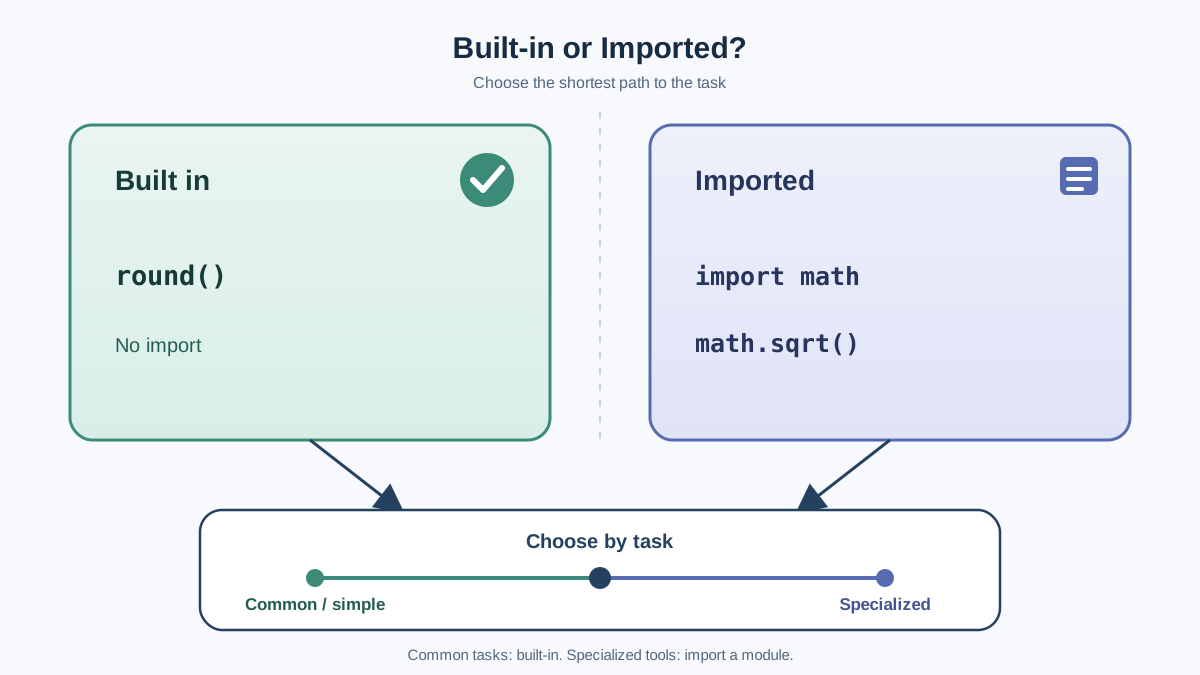
So if built-ins are so great, do you ever need anything else?
Yes. Built-in functions cover common, simple tasks. But Python has a huge standard library of modules for specialized work, and those functions require an import first.
Here's the contrast. round() is built in and always available, while a square root comes from the math module:
print(round(2.675, 2))  # Built in

import math
print(math.sqrt(16))    # Imported from the standard library
The decision rule is simple: if the task is common and simple, Python probably has a built-in for it. If it's specialized — square roots, random numbers, dates, file paths — you'll import a module. The importing system is its own topic, and you'll get the full tour soon.
Where Built-ins Show Up in Real Code
Built-ins aren't just textbook exercises. They're the building blocks under almost every real Python script.
Cleaning up sales data? max(), min(), and sum() give you instant summaries, and round() keeps your numbers presentable:
sales = [12.50, 45.99, 8.75, 32.00]
print(f"Best sale: ${max(sales):.2f}")
print(f"Total: ${sum(sales):.2f}")
Best sale: $45.99
Total: $99.24
Building a simple report from a list? enumerate() gives you numbered rows without managing a counter variable by hand.
None of these scenarios require a framework or a fancy library. They're everyday tasks, and built-ins handle them directly.
Your Next Step
Open a Python session right now. Grab a list of your own data — temperatures, prices, scores, anything — and deliberately use five built-ins from the everyday group: max(), min(), sum(), round(), and len(). See what each one does with your data. Then try sorted() and enumerate() on the same list.
The goal isn't to memorize every built-in. It's to build the instinct that Python probably has a tool for the job before you write a loop by hand.
Once you've got built-ins comfortable, the natural next step is learning how to import the specialized tools that live in Python's modules — that's where square roots, random numbers, and a hundred other capabilities come from.
Knowledge check
Final check
Finish the article by checking the ideas you just learned.
References
Want a more structured Python path?
Use the Python Starter Pack to turn scattered tutorials into a focused practice path.
Python for Artificial Intelligence Starter Pack
Build a Python foundation you can actually use. The Python for AI Starter Pack brings together a guided path through setup, core programming concepts, data structures, files, JSON, APIs, debugging, and practical projects—so you can move quickly from running your first program to understanding and building useful software.
- 264-page illustrated PDF
- 12 guided Python chapters
- Visual concept diagrams
- Self-assessment quizzes
- Bonus deep-dive sections
- Files, JSON, APIs, debugging & projects
- Foundation for data, automation & AI
Coming soon


