
What is Python?
Python is a programming language, but that answer only starts the story. What makes Python worth learning first is that it shortens the loop from idea to…

Key topics
Python is a programming language, but that answer only starts the story. What makes Python worth learning first is that it shortens the loop from idea to working result: you think of something, write it as an instruction, run it, look at the output, and change it. Python keeps that loop short enough to watch with your own eyes, and that is the real reason beginners learn faster with it.
Where the Name Comes From
Python was not named after the snake. Guido van Rossum, its creator, named it after Monty Python's Flying Circus, the British comedy show. He wanted a name that was fun and memorable, not another technical acronym.
That detail matters for one reason: programming languages are made by people with taste, constraints, and cultural references. They are not handed down as neutral technical objects. Python's design choices—clarity, simplicity, readability—were deliberate decisions, and you can feel them the moment you write your first line.
Knowledge check
Check your understanding
Answer this question before you continue.
What Python Actually Is
A programming language is a way to write instructions a computer can follow. Think of it as a recipe: each line is a step, and the computer works through them in order.
What makes Python different is that its code reads close to plain English. You do not need to memorize cryptic symbols or advanced math to get started. Python was designed for readability, which makes it approachable for a beginner and still powerful enough for professionals building complex systems.
So when someone asks what is Python, the practical answer is: a simple yet powerful language for telling computers what to do, designed so that anyone can start without a technical background.
One boundary is worth setting early. Python is the language; the programs and libraries built with it provide the specific instructions and capabilities. Python itself does not magically understand a task you describe in conversation. It follows precise instructions you write, and it runs them the same way every time.
Your First Proof: Hello, World!
Let's make that concrete. Here is the classic first program in Python:
print("Hello, World!")
Hello, World!
That is one line, and you have told the computer to display a message. Break it down:
print()is the instruction.- The quoted text is the value being shown.
- The output is evidence that the computer followed the instruction.
- Change the text, run it again, and you have performed your first experiment.
That last step is the one beginners skip, and it is the one that matters. Change the message to your own name, run it again, and watch the output change. You just completed the whole loop: idea → instruction → output → observation → revision.
Common mistake
Common mistake: Forgetting the parentheses or quotation marks causes an error. Writing
print "Hello, World!"without parentheses will not work in modern Python.
Knowledge check
Check your understanding
Answer this question before you continue.
The Zen of Python: Design Taste in Action
You might wonder what makes Python code feel so readable. It is not just a feature list. Python carries a design philosophy, and there is a tiny built-in easter egg that reveals it.
If you have access to a Python interpreter—on your computer or in an online editor—try running this:
import this
You will see the "Zen of Python," a short set of guiding principles for writing Python code. Here is a taste of the output:
Beautiful is better than ugly.
Explicit is better than implicit.
Simple is better than complex.
Readability counts.
You do not need to memorize these lines. They are a glimpse of the design taste behind Python: clarity, explicitness, simplicity, and readability. And readability is not a vague marketing adjective. It has an operational consequence. Clearer code shortens the path from a surprising result to a useful correction. When you can read your own code a week later and still understand what it does, mistakes are cheaper to spot, changes are safer to make, and debugging hurts less.
Knowledge check
Check your understanding
Answer this question before you continue.
Watch the Loop Work: A Tiny Experiment
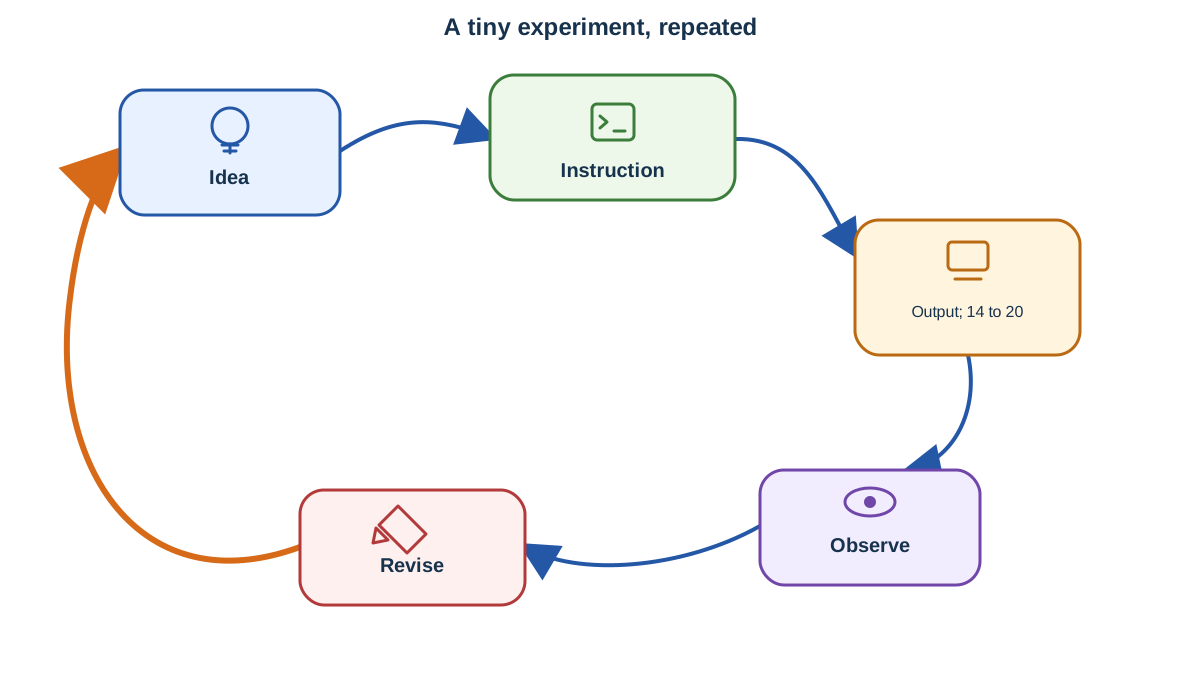
Here is where the loop stops being a slogan and becomes a habit. Many beginners treat code as something to copy and recognize: they type the example, see the output, and move on. That is the weak model. Python becomes useful when you change an instruction, inspect the output, and revise from evidence.
Try this small calculation:
print(2 + 3 * 4)
14
If you expected 20, the output just taught you something: multiplication runs before addition. That surprising result is not a failure. It is evidence about how the computer follows instructions. Change the line to print((2 + 3) * 4), run it again, and watch the output become 20. You just used the loop to correct a mental model.
My rule: As a beginner, focus on tiny scripts that do one thing. Run them, read the output, and change something to see what happens. Do not worry about building big projects or memorizing every feature. The loop—idea, instruction, output, observation, revision—is your main tool.
What Can You Do With Python? Beginner-Scale Examples
Python is not for one kind of project. Here are practical, beginner-sized ways to use it, in the order I would try them:
- Check a calculation: Write a line to add, multiply, or process numbers and see the result instantly. This is the safest first task because the output is immediate and self-contained.
- Transform some text: Format a name, clean up a string, or rearrange a sentence. Again, the output is right in front of you.
- Clean up a list: Remove duplicates, sort items, or filter out unwanted entries.
- Rename files: Automate repetitive file-renaming tasks in a folder.
- Automate a boring step: Script a task you do often, such as formatting text or extracting data from a file.
My advice is to pick the smallest repeated task you already understand—something you do by hand and wish you did not have to. Start with a calculation or text transformation, because you get immediate visible output and can compare it against what you expect. Move to files and data only after you are comfortable comparing expected and actual output. When the result matches your expectation, you have proof the loop works. When it does not, you have a clear signal to revise.
What If You Get Stuck?
Every beginner runs into errors. That is normal. Python's error messages are usually clear, and a large community is ready to help. If you hit a roadblock, read the message carefully, identify the failing line, and use the evidence to test one fix at a time.
My advice: Treat every error as evidence. Read the message, look at what changed, and use it to revise your code. Debugging is not failure. It is the fastest way to learn what the computer actually did.
Your Next Step: Run the Loop Yourself
Ready to try Python? Here is your first experiment:
- Open a Python interpreter or online editor.
- Type
print("Hello, World!")and run it. Observe the output. - Change the text inside the quotes to your own message. Run it again. Did the output change as you expected?
- If you see an error, read the message and revise your code. That is the loop in action: idea → instruction → output → observation → revision.
Once you have tried this, choose your next step based on what you want:
- If you want to keep experimenting quickly without setup, stick with an online editor for now.
- When you are ready to run Python on your own computer, install a current Python 3 release on Windows, Mac, or Linux.
- Explore the different ways to run code, including scripts and interactive mode.
That choice follows directly from the loop model: try the smallest experiment first, then decide whether you want a permanent setup or a quick way to keep running code. Every new script is another turn of the loop, and each turn makes the next one faster.
Knowledge check
Final check
Finish the article by checking the ideas you just learned.
References
Want a more structured Python path?
Use the Python Starter Pack to turn scattered tutorials into a focused practice path.
Python Starter Pack
A compact LearnPyFast PDF pack covering what Python is, installation, your first program, running Python code, and Python versions.
- 5 curated chapters
- Enhanced PDF edition with bundle-only learning guidance
- Offline-friendly format for focused review
- Source article links for future online updates
Coming soon


