
Python Mini Project Practice: Build a Text-Based To-Do List
You have learned Python pieces: input(), lists, functions, if statements, and file handling. Now it's time to stop practicing them one at a time and start…

You have learned Python pieces: input(), lists, functions, if statements, and file handling. Now it's time to stop practicing them one at a time and start combining them into something that actually runs and does useful work.
That gap—between isolated lessons and a working program—is where most beginners stall. This guided project closes it. You'll build a text-based to-do list that can add tasks, show them, mark them complete, and save them so they survive a restart.
By the end, you'll have a real program you can run, break, fix, and extend. That's the whole point of python mini project practice: not memorizing syntax, but proving you can make it work together.
Why Build a To-Do List to Practice Python
A to-do list is small enough to hold in your head and useful enough to feel like a real tool. It is the classic python beginner practice project for a reason.
Here is what this project pulls together:
input()to read what the user types- Lists to store tasks
- Functions to organize each action
ifstatements to run the right action- File I/O to save tasks between runs
Each of those concepts made sense on its own. Now they need to cooperate. That cooperation is what programming actually feels like.
The finished program will do four things:
- Add a task
- View all tasks
- Mark a task complete
- Save tasks to a file so they are still there next time
That's the whole scope. No database, no web interface, no calendar syncing. Just a small command-line tool that works.
I want you to notice something about that scope: it is deliberately boring. That is a feature. When you build a python to do list project for practice, you want the problem simple enough that the challenge comes from wiring the pieces together, not from understanding a complicated domain.
Plan the Program Before Writing Code
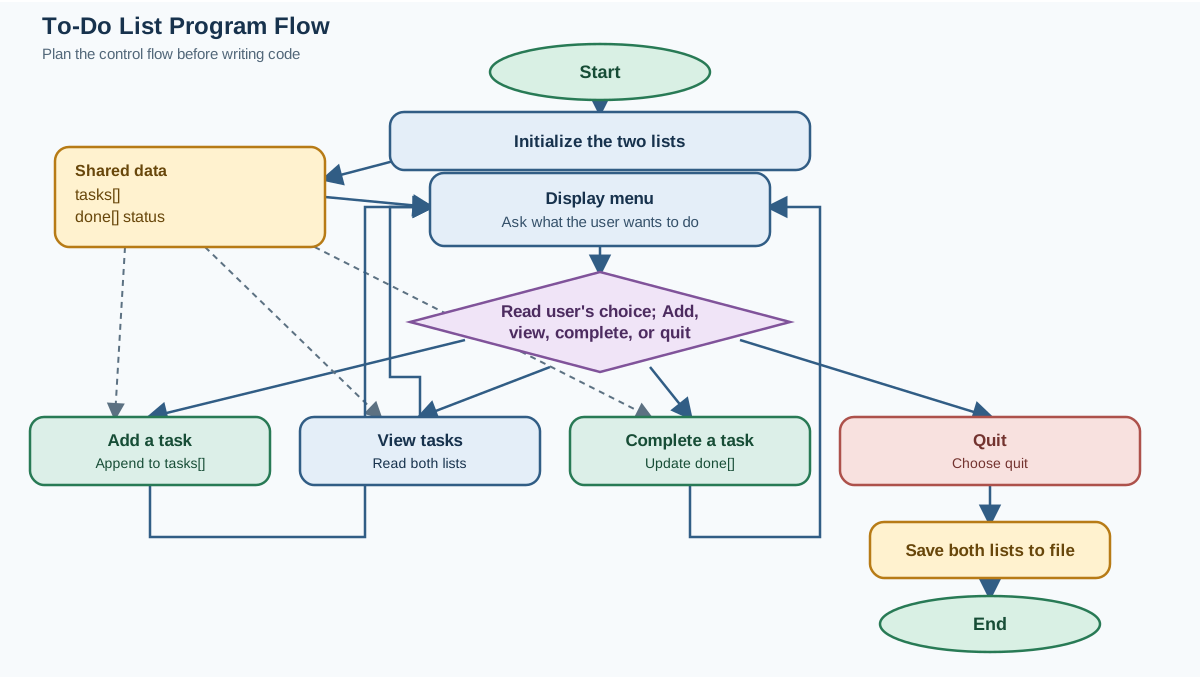
Before you type a single line, sketch what the program should do. This habit will save you more debugging time than any other practice you can build.
Think of the program as a loop that keeps asking the user what to do next:
- Show a menu
- Read the user's choice
- Run the matching action
- Repeat until the user chooses to quit
The data is simple. You need one list to hold task descriptions. You need a second list to track which tasks are done, using True or False values that stay in step with the task list.
Why two lists instead of something fancier? Because two parallel lists are easy for a beginner to understand and debug. You can check them side by side. When you are ready for dictionaries, you can refactor. For now, keep the mental model light.
Here is the whole plan in one sketch:
tasks = ["buy groceries", "pay rent"]
done = [False, False]

Loop:
  Show menu
  Read choice
  If choice is "add": ask for task, append to both lists
  If choice is "view": print each task with a number and status
  If choice is "complete": ask which number, mark it done
  If choice is "quit": save to file, break the loop
That is the entire design. You can hold it in your head, which means you can debug it when something breaks.
The habit here matters more than this specific project. When you plan first, you know what each piece of the program is supposed to do before you write it. When a test fails, you can ask "which part of the plan is wrong?" instead of staring at a wall of code.
Knowledge check
Check your understanding
Answer this question before you continue.
Starter Code and Your First Run
Let's get something running immediately. Here is a minimal skeleton with the menu loop and a quit option already working.
Create a file called todo.py and save this in it:
tasks = []
done = []

while True:
    print("\n--- To-Do List ---")
    print("1. Add a task")
    print("2. View tasks")
    print("3. Mark a task complete")
    print("4. Quit")

    choice = input("Choose an option: ")

    if choice == "4":
        print("Goodbye!")
        break
Now run it from your terminal:
python todo.py
You will see the menu, and when you type 4 and press Enter, the program should exit cleanly:
--- To-Do List ---
1. Add a task
2. View tasks
3. Mark a task complete
4. Quit
Choose an option: 4
Goodbye!
Notice what just happened. You have a running program with a loop, a menu, and a clean exit. That is your foundation. Every feature you add from here is one small piece bolted onto this skeleton.
Your first task: run it, choose quit, and confirm the loop exits. If that works, you are ready to add features.
Add a Task with input() and a List
Now make option 1 actually do something. When the user picks "Add a task", the program should ask what the task is and store it.
Your task: Write the code that collects a task from the user and appends it to the tasks list.
Hint: You need input() to ask the question, and you need to store the result in a variable. Then use list.append() to add that variable to tasks. You also need to append a matching False to the done list, because new tasks are not complete yet.
Try it yourself before reading the solution. Getting stuck and thinking through it is part of the practice.
Here is one working solution:
tasks = []
done = []

while True:
    print("\n--- To-Do List ---")
    print("1. Add a task")
    print("2. View tasks")
    print("3. Mark a task complete")
    print("4. Quit")

    choice = input("Choose an option: ")

    if choice == "1":
        new_task = input("Enter the task: ")
        tasks.append(new_task)
        done.append(False)
        print("Task added!")

    elif choice == "4":
        print("Goodbye!")
        break
The key line is new_task = input("Enter the task: "). The most common beginner mistake here is calling input() and forgetting to store the result. If you write input("Enter the task: ") without assigning it to a variable, the user's answer vanishes into the void.
Run the program, add a task, and you should see:
--- To-Do List ---
1. Add a task
2. View tasks
3. Mark a task complete
4. Quit
Choose an option: 1
Enter the task: buy groceries
Task added!
The task is now sitting in the tasks list, waiting. You cannot see it yet because you have not written the view action. That is next.
Knowledge check
Check your understanding
Answer this question before you continue.
View Tasks and Mark One Complete
A to-do list you cannot read is useless. Let's fix that.
First, let's isolate the one new mechanism you need: enumerate(). It lets you loop through a list while also getting each item's position:
tasks = ["buy groceries", "pay rent"]

for index, task in enumerate(tasks):
    print(index, task)
Output:
0 buy groceries
1 pay rent
Notice that index starts at 0, matching how Python lists work. When you show tasks to a user, you will want to display numbers starting at 1, so you will print index + 1.
Your task: Write the view action so it prints each task with a number. Then write the complete action so the user can pick a task by number and mark it done.
Hint: Use enumerate() in a loop to get both the index and the task. For the complete action, remember that input() always returns a string, so you need int() to convert the user's choice to a number. Check that the number is valid before using it as an index.
Here is a solution:
tasks = []
done = []

while True:
    print("\n--- To-Do List ---")
    print("1. Add a task")
    print("2. View tasks")
    print("3. Mark a task complete")
    print("4. Quit")

    choice = input("Choose an option: ")

    if choice == "1":
        new_task = input("Enter the task: ")
        tasks.append(new_task)
        done.append(False)
        print("Task added!")

    elif choice == "2":
        for index, task in enumerate(tasks):
            status = "Done" if done[index] else "Not done"
            print(f"{index + 1}. {task} [{status}]")

    elif choice == "3":
        task_number = int(input("Enter the task number: "))
        if 1 <= task_number <= len(tasks):
            tasks_index = task_number - 1
            done[tasks_index] = True
            print("Task marked complete!")
        else:
            print("That number is not valid.")

    elif choice == "4":
        print("Goodbye!")
        break
Let's walk through the two new pieces.
The view action uses enumerate(tasks), which gives you each item's position and value as you loop. The user sees numbers starting at 1, so you print index + 1. The status comes from checking the matching spot in the done list.
The complete action has two traps. First, input() returns a string, so comparing it directly to a number would fail. You convert with int(). Second, the user sees tasks numbered from 1, but Python lists start at 0. So task number 1 is actually at index 0. The line tasks_index = task_number - 1 handles that shift.
The if 1 <= task_number <= len(tasks) check is your safety net. It stops the program from crashing if the user types 99 or -3.
Run it, add a couple of tasks, view them, and mark one complete:
--- To-Do List ---
1. Add a task
2. View tasks
3. Mark a task complete
4. Quit
Choose an option: 2
1. buy groceries [Not done]
2. pay rent [Not done]
Then mark task 1 complete and view again:
1. buy groceries [Done]
2. pay rent [Not done]
The two lists are staying in step. Task 1 in tasks matches position 1 in done. That parallel structure is the whole trick.
Knowledge check
Check your understanding
Answer this question before you continue.
Save Tasks So They Survive a Restart
Right now, everything you add disappears when the program closes. That makes the to-do list a toy. Adding file storage makes it a tool.
But here is the detail most beginners miss: you need to save the whole state of the program, not just the task text. If you only save the task descriptions, then a task you marked complete will come back as "Not done" after a restart. The completion status is part of the data too.
Your task: Save both the task text and its completion status to a file when the program quits, and load both back when the program starts.
Hint: A simple format is one line per task, with the task text and its status separated by a tab character (\t). When saving, write each task as task + "\t" + status. When loading, split each line on the tab to recover both pieces.
Here is a full solution:
tasks = []
done = []

try:
    with open("tasks.txt", "r") as file:
        for line in file:
            parts = line.strip().split("\t")
            tasks.append(parts[0])
            done.append(parts[1] == "True")
except FileNotFoundError:
    pass

while True:
    print("\n--- To-Do List ---")
    print("1. Add a task")
    print("2. View tasks")
    print("3. Mark a task complete")
    print("4. Quit")

    choice = input("Choose an option: ")

    if choice == "1":
        new_task = input("Enter the task: ")
        tasks.append(new_task)
        done.append(False)
        print("Task added!")

    elif choice == "2":
        for index, task in enumerate(tasks):
            status = "Done" if done[index] else "Not done"
            print(f"{index + 1}. {task} [{status}]")

    elif choice == "3":
        task_number = int(input("Enter the task number: "))
        if 1 <= task_number <= len(tasks):
            tasks_index = task_number - 1
            done[tasks_index] = True
            print("Task marked complete!")
        else:
            print("That number is not valid.")

    elif choice == "4":
        with open("tasks.txt", "w") as file:
            for index, task in enumerate(tasks):
                file.write(task + "\t" + str(done[index]) + "\n")
        print("Tasks saved. Goodbye!")
        break
Let's look at what changed.
The loading code at the top uses a try/except block. On the very first run, tasks.txt does not exist yet, and trying to open a missing file for reading raises a FileNotFoundError. The except catches that and simply moves on with empty lists. That is the standard beginner mistake with file loading: forgetting that the file might not be there on the first run.
Each line in the file now holds two pieces of data separated by a tab. When loading, line.strip().split("\t") splits that line into a list like ["buy groceries", "False"]. The first piece is the task text. The second piece is a string, so you compare it to "True" to get back a real boolean value.
The saving code writes each task followed by a tab, the status, and a newline. When you open tasks.txt in a text editor, it looks like this:
buy groceries	False
pay rent	True
That format is easy to read and easy to debug. If something goes wrong, you can open the file and see exactly what your program stored.
Why a plain text file? Because it is enough. You can open it in any text editor, read it, and understand exactly what your program stored. For this project, that simplicity is a strength.
Test it carefully: add a task, mark it complete, quit, run the program again, and view tasks. Your task should still be there, and it should still show as done.
Knowledge check
Check your understanding
Answer this question before you continue.
Refactor the Program into Functions
Your program works. Now let's make it easier to read and extend by organizing it into functions. This is where you actually practice the functions skill from your earlier lessons.
Right now, all the behavior lives inside one long while loop. That works, but it gets harder to follow as you add features. Functions let you name each action and isolate its logic.
Your task: Move each action into its own function. The menu loop should become short and readable, with each branch calling a function.
Hint: Think about what each function needs and what it should return. add_task() needs to modify both lists. view_tasks() only needs to read them. complete_task() needs the user's chosen number. save_tasks() needs both lists to write to the file.
Here is the refactored solution:
def add_task(tasks, done):
    new_task = input("Enter the task: ")
    tasks.append(new_task)
    done.append(False)
    print("Task added!")

def view_tasks(tasks, done):
    for index, task in enumerate(tasks):
        status = "Done" if done[index] else "Not done"
        print(f"{index + 1}. {task} [{status}]")

def complete_task(tasks, done):
    task_number = int(input("Enter the task number: "))
    if 1 <= task_number <= len(tasks):
        tasks_index = task_number - 1
        done[tasks_index] = True
        print("Task marked complete!")
    else:
        print("That number is not valid.")

def save_tasks(tasks, done):
    with open("tasks.txt", "w") as file:
        for index, task in enumerate(tasks):
            file.write(task + "\t" + str(done[index]) + "\n")

def load_tasks():
    tasks = []
    done = []
    try:
        with open("tasks.txt", "r") as file:
            for line in file:
                parts = line.strip().split("\t")
                tasks.append(parts[0])
                done.append(parts[1] == "True")
    except FileNotFoundError:
        pass
    return tasks, done

tasks, done = load_tasks()

while True:
    print("\n--- To-Do List ---")
    print("1. Add a task")
    print("2. View tasks")
    print("3. Mark a task complete")
    print("4. Quit")

    choice = input("Choose an option: ")

    if choice == "1":
        add_task(tasks, done)

    elif choice == "2":
        view_tasks(tasks, done)

    elif choice == "3":
        complete_task(tasks, done)

    elif choice == "4":
        save_tasks(tasks, done)
        print("Goodbye!")
        break
Look at what the main loop became. Each branch is now one clean function call. If you want to know what option 3 does, you read complete_task(). You do not have to scan through the whole program.
Notice how each function declares what it needs in its parameters. add_task() needs both lists because it changes them. view_tasks() only needs to read them. save_tasks() needs both lists to write the file. load_tasks() creates the lists from scratch and returns them both.
That last function shows an important pattern: when a function creates new data, it returns that data to the caller. The line tasks, done = load_tasks() captures both returned lists.
Run the refactored program and test every option. It should behave exactly like the version before, but now the code is organized into named pieces you can understand and extend.
Common Mistakes and How to Recover
Every beginner hits these. Here is what they look like and how to fix them.
The program crashes when you type a number for the complete action. The symptom is a ValueError. The cause is that input() returns a string, and you cannot use a string as a list index. The fix is int() around the input call. If the user types something that is not a number, the program will still crash—handling that gracefully is a good future exercise, but converting to an integer is the first step.
You quit the program and your tasks are gone. You forgot to save, or the save code never ran. Check that your quit branch actually opens the file and writes before breaking the loop. The save only happens when the user chooses quit, not when the program ends any other way.
The program crashes on startup with FileNotFoundError. This happens on the first run, before any save file exists. The fix is the try/except block shown above. Expect this error the first time you add file loading. It is normal.
Tasks display with the wrong numbers. The user sees task 1, but Python indexes from 0. If marking task 1 changes the wrong task, you forgot the - 1 offset. Remember: display numbers start at 1, list indexes start at 0.
Completed tasks come back as "Not done" after a restart. You saved only the task text, not the status. The fix is the tab-separated format that stores both pieces of data. Saving the task list is not the same as saving the whole state of the program.
Make It Yours: Three Small Extensions
The program works. Now make it yours. Each extension changes one requirement, which keeps the challenge manageable.
Extension one: delete a task. Add a menu option that removes a task entirely instead of just marking it complete. This practices list.pop() or list.remove() and forces you to keep both lists in sync when you remove an item.
Extension two: show only incomplete tasks. Change the view action so it only prints tasks where done is False. This practices filtering with a condition inside a loop. You will need enumerate() again, but you will skip items that are already done.
Extension three: add a due date. Store a due date alongside each task. This will push you toward a dictionary or a third parallel list. If you feel ready for dictionaries, this is the perfect moment to try one.
Pick one extension and run it before moving on. The point is not to build the perfect to-do app. The point is to keep practicing the loop of planning, coding, running, and fixing.
You Just Built a Real Program
Stop for a second and look at what you proved. You combined input(), lists, functions, conditionals, loops, and file storage into one working program that does something genuinely useful. That is not a vocabulary exercise. That is building.
The next natural step is a slightly larger command-line project, or a file-handling cookbook that shows you more patterns for reading and writing data. Either one will build on the same foundation you just practiced.
Here is your concrete next action: run your to-do list one more time, add three real tasks you actually need to do this week, mark one complete, and save them. Quit, restart, and confirm everything survived. Then pick one extension and build it.
Knowledge check
Final check
Finish the article by checking the ideas you just learned.
References
Want a more structured Python path?
Use the Python Starter Pack to turn scattered tutorials into a focused practice path.
Python for Artificial Intelligence Starter Pack
Build a Python foundation you can actually use. The Python for AI Starter Pack brings together a guided path through setup, core programming concepts, data structures, files, JSON, APIs, debugging, and practical projects—so you can move quickly from running your first program to understanding and building useful software.
- 264-page illustrated PDF
- 12 guided Python chapters
- Visual concept diagrams
- Self-assessment quizzes
- Bonus deep-dive sections
- Files, JSON, APIs, debugging & projects
- Foundation for data, automation & AI
Coming soon


